
In Game Stream Chat
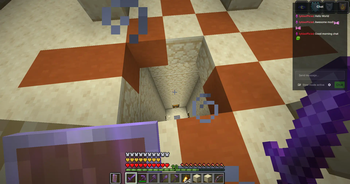
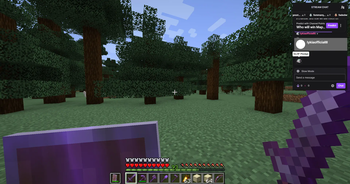
View your live stream chat directly in Minecraft!
Screenshots

About this Mod




In-Game Stream Chat
In-Game Stream Chat is a client-side Fabric mod for Minecraft. It allows you to see the chats from live streams on platforms like Twitch/Kick/YouTube on your in-game screen. You can send messages to the chat, ban people, delete messages, and customize additional stream chat settings right from the screen.
You can view chats without requiring any authorization or membership login.
What's Changed:
v1.3.0:
- The dependency requirement has been removed. You no longer need to install an extra mod.
- An issue detected in rendering has been fixed.
v1.2.0:
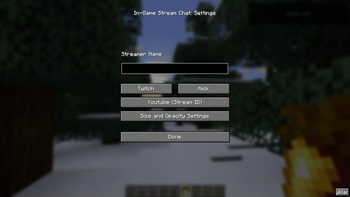
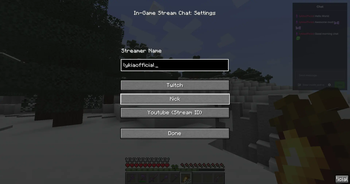
- The config screen has been updated and now includes a new button.
- Size and Opacity Settings have been added, allowing the in-game stream chat to be resized, moved to any desired location on the screen, and its opacity adjusted.
- Rendering has been optimized.
For issues and feedback: (Email) [email protected] or (Discord) https://go.lyki.dev/dc
In-Game Chat Overlay

With the overlay, you can view your stream chat on top of the screen.

With a keybind, you can activate your mouse and click or type on anything you want.
Preview (.gif)


From the settings screen, you can easily configure which streamer's chat you want to view and on which platform the stream is hosted. For YouTube, you will need to enter the stream ID found in the URL of the stream instead of the streamer's name.

Multilingual support: Customized messages for 6 different languages. Works seamlessly with your client language. Here are the supported languages:
- Turkish (Türkçe)
- English (US)
- Français (France)
- Español (España)
- Deutsch (German)
- Russian (Русский)
There may be errors in the localizations; please report any issues for corrections.
Built by lyki.dev
In Game Stream Chat is developed by lyki.dev — an independent software studio focused on custom Minecraft mods, plugins, backend systems and reverse-engineering work.
Need a custom system, private mod or server infrastructure?
Available Versions
How to Install In Game Stream Chat on Your Server
Order Server
Order a Minecraft Java server with at least 3 GB RAM (4 GB recommended).
Set fabric Loader
In the panel under "Egg", select the fabric loader and matching Minecraft version (1.21.4).
Install Mod
Open the mod browser in the dashboard and search for "In Game Stream Chat". Click "Install" – done! Alternatively, upload the .jar via SFTP to the /mods folder.
Compatibility
Mod Loaders
Minecraft Versions
1.21.4, 1.21.3, 1.21.2 (+7 more)
Server-side
✗ UnsupportedRecommended RAM
4 GB(min. 3 GB)Frequently Asked Questions
In Game Stream Chat server crashes on startup – what to do?
Most common cause: wrong fabric version or insufficient RAM. Check the server log (latest.log) for "OutOfMemoryError" or "Mixin" errors. With Mado Hosting: ensure at least 3 GB RAM is allocated and the loader matches the mod version (1.21.4). You can switch loaders with one click in the panel.
Is In Game Stream Chat compatible with fabric?
In Game Stream Chat officially supports fabric for Minecraft 1.21.4, 1.21.3, 1.21.2. The Mado dashboard automatically detects incompatible loader combinations.
Server lagging with In Game Stream Chat – how to optimize performance?
Recommended RAM: 4 GB (per 8 players). Use /spark profiler to check if In Game Stream Chat consumes the most tick time. Common fixes: reduce server view-distance to 8-10, install "performant" or "starlight" as supplementary mods on Forge. With Mado Hosting, your server runs on NVMe SSDs with dedicated CPU cores for minimal latency.
Similar Mods




Rent Modded Server
Install In Game Stream Chat with just one click on your server.