
In Your Lane
Adds wacky bowling alley carpet, ETC
Screenshots


About this Mod
Have you ever wanted to build a bowling alley in minecraft but lacked that wacky carpet that looks right out of the 90's?
Do you wish you could have the lanes in that hypothetical bowling alley be actually wood and not some kind of ice?
WELL DO WE (royal we) HAVE THE SOLUTION FOR YOU!
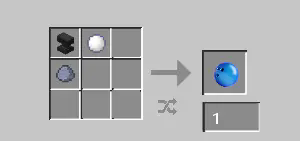
Introducing the IN YOUR LANE mod, which adds the dark carpet blocks, a glow-in-the-dark blockset crafted with amethyst shards and black wool, and can be turned into one of six designs via a stonecutter!
The mod also includes waxed variants of vanilla planks which are slippery! (0.9 value compared to ice's 0.98 and blue ice's 0.989)
The mod does not add stair or slab variants of any of the blocks. I wanted to keep the filesize light.
with the new update we also added a bowling pin that falls over if any entity (including items) collides with it. it also rights itself upon redstone power. it has a hinge, it makes sense shush. (item texture by starrysock)
THE MOD ALSO ADDS A PNG OF A BOWLING BALL! no longer completely useless! now only slightly useless!
ENJOY MOD OKAY BYE.
Side note: I recommend using a mod that allows you to throw items with varying strengths alongside this mod, like Power Drop or Yeet if you have sinytra connector.
[Brought to you by P.E.A.K. Industries (not really)]
Available Versions
How to Install In Your Lane on Your Server
Order Server
Order a Minecraft Java server with at least 3 GB RAM (4 GB recommended).
Set forge Loader
In the panel under "Egg", select the forge loader and matching Minecraft version (1.20.1).
Install Mod
Open the mod browser in the dashboard and search for "In Your Lane". Click "Install" – done! Alternatively, upload the .jar via SFTP to the /mods folder.
Compatibility
Mod Loaders
Minecraft Versions
1.20.1
Server-side
✓ RequiredRecommended RAM
4 GB(min. 3 GB)Frequently Asked Questions
In Your Lane server crashes on startup – what to do?
Most common cause: wrong forge version or insufficient RAM. Check the server log (latest.log) for "OutOfMemoryError" or "Mixin" errors. With Mado Hosting: ensure at least 3 GB RAM is allocated and the loader matches the mod version (1.20.1). You can switch loaders with one click in the panel.
Is In Your Lane compatible with forge?
In Your Lane officially supports forge for Minecraft 1.20.1. The Mado dashboard automatically detects incompatible loader combinations.
Server lagging with In Your Lane – how to optimize performance?
Recommended RAM: 4 GB (per 8 players). Use /spark profiler to check if In Your Lane consumes the most tick time. Common fixes: reduce server view-distance to 8-10, install "performant" or "starlight" as supplementary mods on Forge. With Mado Hosting, your server runs on NVMe SSDs with dedicated CPU cores for minimal latency.
Similar Mods

![[ETF] Entity Texture Features](https://cdn.modrinth.com/data/BVzZfTc1/af683d206d50b05258d865b0d6e4aa2f2cee12f2_96.webp)
![[EMF] Entity Model Features](https://cdn.modrinth.com/data/4I1XuqiY/6e5bbd0d06b1741bfdab6c0cfab6de8fdaf0064c_96.webp)



Rent Modded Server
Install In Your Lane with just one click on your server.