
Industrium Mod
Industrium is the all new mod for revamping your minecraft with a fresh set of items and blocks!
Screenshots

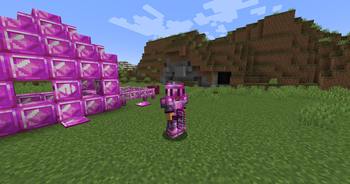

About this Mod
🏭 Industrium
Fabric | Minecraft 1.21.0 – 1.21.1
Industrium is the next-gen industrial mod for Minecraft — a bold evolution inspired by the Create mod, but reimagined for Fabric. Whether you’re into mining, building, automating, or experimenting with a bit of chaos, Industrium gives you the tools to reshape your world.
⚙️ Key Features
🛠️ Tool Revolution
- Hammer: Break entire 3x3 areas at once — mine faster, smarter.
- Chisel: Transform blocks into new forms and decorative styles instantly.
- Tiered Toolsets from brand-new ores with custom stats and progression.
⛏️ Ores & Materials
- Unique new ores to find, mine, and process.
- Used for tools, machines, blocks, and automation systems.
🧱 Modular Blocks
Craft and build with:
- Fences, Doors, Walls, Buttons
- Industrial-style blocks and decorative variants
Designed to support automation and redstone integration.
💧 Fluids & Piping
- Full fluid system support
- Pipes for transporting fluids between containers, machines, and magic devices.
- Future-ready for automation and mod integration.
🎲 Magic Block – The Gamble Cube
- Introduces randomized rewards and risk-taking to mining.
- Drop an item in... and maybe get rare ores — or nothing at all.
- Balances luck, strategy, and surprise.
🌐 Why Choose Industrium?
"If Create gave you motion, Industrium gives you momentum."
- Built natively for Fabric
- Compatible with Minecraft 1.21.0 – 1.21.1
- Lightweight, modular, and designed to work alongside other tech & magic mods
Whether you're digging deep, building big, or automating everything, Industrium is your new go-to for industrial-scale Minecraft.
📥 Installation
- Requires Fabric Loader and Fabric API
- Drop
Industriuminto your/modsfolder - Launch and enjoy!
🧪 Work in Progress
This is an early release with many more features planned, including:
- Machines
- Energy systems
- Advanced automation
- Mod compatibility extensions
Industrium
Build smarter. Mine deeper. Automate everything.
Available Versions
How to Install Industrium Mod on Your Server
Order Server
Order a Minecraft Java server with at least 4 GB RAM (6 GB recommended).
Set fabric Loader
In the panel under "Egg", select the fabric loader and matching Minecraft version (1.21.1).
Install Mod
Open the mod browser in the dashboard and search for "Industrium Mod". Click "Install" – done! Alternatively, upload the .jar via SFTP to the /mods folder.
Compatibility
Mod Loaders
Minecraft Versions
1.21.1, 1.21
Server-side
~ OptionalRecommended RAM
6 GB(min. 4 GB)Frequently Asked Questions
Industrium Mod server crashes on startup – what to do?
Most common cause: wrong fabric version or insufficient RAM. Check the server log (latest.log) for "OutOfMemoryError" or "Mixin" errors. With Mado Hosting: ensure at least 4 GB RAM is allocated and the loader matches the mod version (1.21.1). You can switch loaders with one click in the panel.
Is Industrium Mod compatible with fabric?
Industrium Mod officially supports fabric for Minecraft 1.21.1, 1.21. The Mado dashboard automatically detects incompatible loader combinations.
Server lagging with Industrium Mod – how to optimize performance?
Recommended RAM: 6 GB (per 5 players). Use /spark profiler to check if Industrium Mod consumes the most tick time. Common fixes: reduce server view-distance to 8-10, install "performant" or "starlight" as supplementary mods on Forge. With Mado Hosting, your server runs on NVMe SSDs with dedicated CPU cores for minimal latency.
Similar Mods




Rent Modded Server
Install Industrium Mod with just one click on your server.