
InfoPanel
Customizable HUD for NeoForge 1.21.1 coordinates, FPS, compass, WAILA, light & slime overlays, structures, effect timers.
Screenshots
About this Mod
InfoPanelMod
A feature-rich HUD mod for NeoForge 1.21.1. Inspired by MiniHUD by masady.
🌟 Features
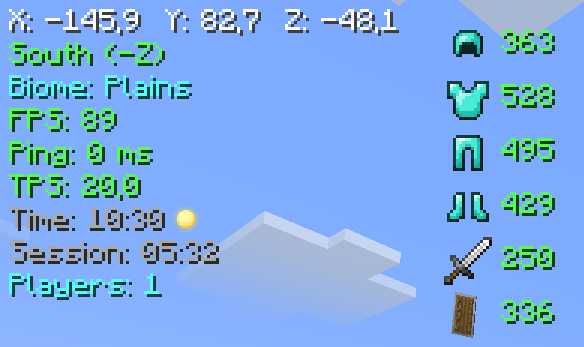
📊 Main Panel
- Coordinates (XYZ)
- Direction (compass)
- Biome
- FPS
- Ping (ms)
- TPS
- In-game time (day/night)
- Session time
- Online players count
🛡️ Item Durability
- Armor (helmet, chestplate, leggings, boots)
- Main hand weapon
- Offhand items
🧭 Compass Bar
An animated bar with 8 directions (N, NE, E, SE, S, SW, W, NW)
🧪 Effect Timers
Shows remaining duration of potion effects on their icons
🔍 WAILA (What Am I Looking At)
- Block / entity name
- Entity health (❤)
💡 Light Overlay (F7)
Highlights blocks where light level ≤ 7 (mobs can spawn)
🟢 Slime Chunks (F9)
Displays chunk boundaries where slimes can spawn
🏗️ Structure Overlay
Shows structure boundaries for:
- Villages
- Pillager Outposts
- Ocean Monuments
- Strongholds
- Desert Temples
- Nether Fortresses
- Bastions
🔧 Compatibility
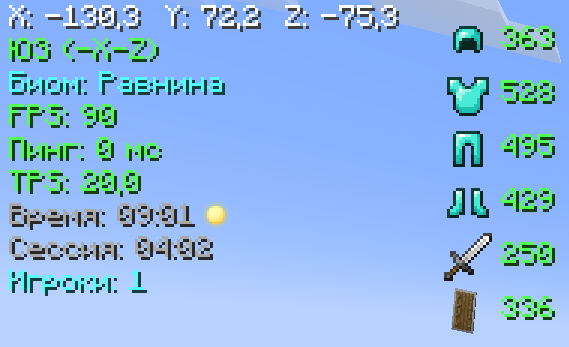
- Terralith — biome name translations (Russian)
⚙️ Configuration (press Y)
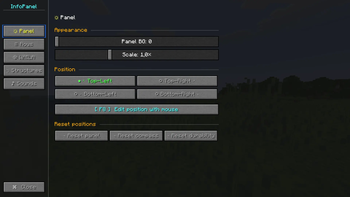
Panel Tab
- Background opacity
- Scale (0.5× – 2.0×)
- Position (4 corners)
- Drag & drop layout editor (F8)
- Reset position
Lines Tab
- Toggle any line on/off
- Custom colors for each line (13 colors)
WAILA Tab
- Background opacity
- Position (4 options)
- Block name color
Structures Tab
- Master toggle for all structures
- Individual toggles for each structure
⌨️ Key Bindings
- H — toggle HUD
- Y — open settings
- F7 — light overlay
- F8 — layout editor (drag & drop)
- F9 — slime chunks
🖱️ Layout Editor (F8)
- Drag main panel, compass bar, and durability bar
- Pulsing borders (blue — panel, yellow — compass, green — durability)
- Shows current coordinates
- Labels below each element
- Esc — save and exit
🎨 Color Palette
White, light gray, gray, red, orange, yellow, green, dark green, cyan, blue, dark blue, pink, purple.
📜 License
MIT License — free to use in any modpack.
Available Versions
How to Install InfoPanel on Your Server
Order Server
Order a Minecraft Java server with at least 3 GB RAM (4 GB recommended).
Set neoforge Loader
In the panel under "Egg", select the neoforge loader and matching Minecraft version (1.21.1).
Install Mod
Open the mod browser in the dashboard and search for "InfoPanel". Click "Install" – done! Alternatively, upload the .jar via SFTP to the /mods folder.
Compatibility
Mod Loaders
Minecraft Versions
1.21.1
Server-side
✓ RequiredRecommended RAM
4 GB(min. 3 GB)Frequently Asked Questions
InfoPanel server crashes on startup – what to do?
Most common cause: wrong neoforge version or insufficient RAM. Check the server log (latest.log) for "OutOfMemoryError" or "Mixin" errors. With Mado Hosting: ensure at least 3 GB RAM is allocated and the loader matches the mod version (1.21.1). You can switch loaders with one click in the panel.
Is InfoPanel compatible with neoforge?
InfoPanel officially supports neoforge for Minecraft 1.21.1. The Mado dashboard automatically detects incompatible loader combinations.
Server lagging with InfoPanel – how to optimize performance?
Recommended RAM: 4 GB (per 8 players). Use /spark profiler to check if InfoPanel consumes the most tick time. Common fixes: reduce server view-distance to 8-10, install "performant" or "starlight" as supplementary mods on Forge. With Mado Hosting, your server runs on NVMe SSDs with dedicated CPU cores for minimal latency.
Similar Mods

![[ETF] Entity Texture Features](https://cdn.modrinth.com/data/BVzZfTc1/af683d206d50b05258d865b0d6e4aa2f2cee12f2_96.webp)
![[EMF] Entity Model Features](https://cdn.modrinth.com/data/4I1XuqiY/6e5bbd0d06b1741bfdab6c0cfab6de8fdaf0064c_96.webp)



Rent Modded Server
Install InfoPanel with just one click on your server.