
Infrastructure Plus
Infrastructure Plus is a mod focused on realistic infrastructure and urban development in Minecraft. It continuously expands the game with new building assets for detailed and authentic environments. (Best use as MTR Addon)
Screenshots

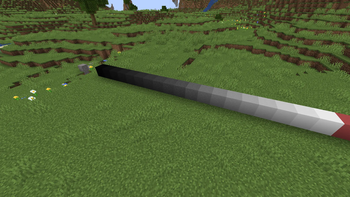
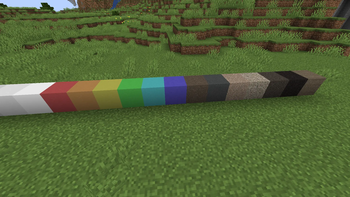
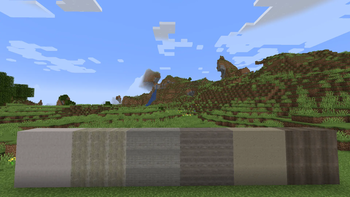
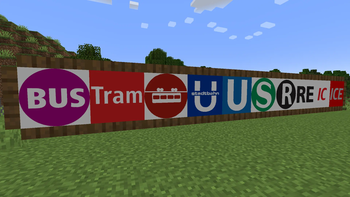
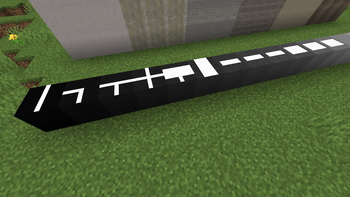
About this Mod
🏗️ Infrastructure Plus 🏗️
Infrastructure Plus is a building-focused Minecraft mod that expands the game with infrastructure assets designed for realistic cities, transportation networks, public spaces, and large-scale urban projects.
Unlike vanilla Minecraft, which offers only a limited selection of blocks suitable for modern infrastructure, Infrastructure Plus provides specialized building assets created specifically for roads, transit systems, tunnels, stations, utilities, and urban environments.
Whether you're building a small town, a modern metropolis, a realistic railway network, a bus system, a tram corridor, or an entire transportation hub, Infrastructure Plus gives you additional tools to bring your projects to life.
🚧 Features 🚧
🛣️ Road Infrastructure
Create realistic roads, streets, and transportation corridors using dedicated infrastructure building assets and road surface variants.
🚇 Tunnel Construction
Build modern and legacy-style tunnel entrances, underground corridors, and transportation tunnels with specialized tunnel components.
🚏 Public Transportation Support
Infrastructure Plus includes transportation-oriented assets that complement bus, tram, metro, subway, and railway projects.
🎨 Builder-Friendly Design
Designed primarily for builders, city projects, transportation enthusiasts, roleplay maps, and server communities that want more realistic urban environments.
🧩 Flexible Integration
Works perfectly as a standalone building mod and alongside transportation and city-building mods.
🚆 Perfect Companion for MTR 🚆
Infrastructure Plus pairs especially well with Minecraft Transit Railway (MTR).
By combining both mods, players can create more immersive stations, rail corridors, transit hubs, urban districts, and transportation networks while maintaining a realistic appearance.
🌍 Why Download Infrastructure Plus? 🌍
Minecraft offers endless creativity, but modern infrastructure has always been one of the more difficult things to build convincingly using vanilla blocks alone.
Infrastructure Plus aims to solve that problem by providing dedicated infrastructure assets designed specifically for realistic construction projects.
Whether you're building:
- 🏙️ Modern Cities
- 🚇 Metro & Subway Networks
- 🚊 Tram Systems
- 🚌 Bus Routes & Terminals
- 🚂 Railway Corridors
- 🏭 Industrial Areas
- 🏢 Urban Developments
- 🎭 Roleplay Servers
- 🌎 Real-World Recreations
Infrastructure Plus helps bring those projects to life with greater detail and realism.
🔄 Long-Term Development 🔄
Many infrastructure-focused Minecraft mods eventually stop receiving updates, forcing builders to search for alternatives or leave projects unfinished.
Infrastructure Plus is being developed as a long-term project with the goal of continuously expanding its content library, supporting newer Minecraft versions whenever possible, and providing builders with a reliable infrastructure-building experience for years to come.
🗺️ Future Plans 🗺️
Planned additions include:
- 🚦 Additional road infrastructure
- 🚉 Railway infrastructure assets
- ⚡ Utility infrastructure
- 🚧 Construction & safety equipment
- 🪑 Street furniture and urban decorations
- 🌍 International infrastructure styles
- 🚍 Additional transportation-related assets
Infrastructure Plus is actively developed and will continue to grow with future updates.
❤️ Community & Feedback ❤️
Infrastructure Plus is still growing, and community feedback plays an important role in its development.
Suggestions, ideas, bug reports, and feature requests are always welcome and help shape future updates.
⚠️ Creative Mode Only ⚠️
Infrastructure Plus is currently intended for use in Creative Mode only. Most blocks and assets do not yet have crafting recipes and are therefore not obtainable through normal Survival gameplay. Survival support may be added in a future update, but there is currently no planned release date.
Available Versions
How to Install Infrastructure Plus on Your Server
Order Server
Order a Minecraft Java server with at least 3 GB RAM (4 GB recommended).
Set fabric Loader
In the panel under "Egg", select the fabric loader and matching Minecraft version (1.21.8).
Install Mod
Open the mod browser in the dashboard and search for "Infrastructure Plus". Click "Install" – done! Alternatively, upload the .jar via SFTP to the /mods folder.
Compatibility
Mod Loaders
Minecraft Versions
1.21.8, 1.21.1, 1.20.1 (+2 more)
Server-side
✓ RequiredRecommended RAM
4 GB(min. 3 GB)Frequently Asked Questions
Infrastructure Plus server crashes on startup – what to do?
Most common cause: wrong fabric version or insufficient RAM. Check the server log (latest.log) for "OutOfMemoryError" or "Mixin" errors. With Mado Hosting: ensure at least 3 GB RAM is allocated and the loader matches the mod version (1.21.8). You can switch loaders with one click in the panel.
Is Infrastructure Plus compatible with fabric and forge and neoforge?
Infrastructure Plus officially supports fabric, forge, neoforge for Minecraft 1.21.8, 1.21.1, 1.20.1. Note: Forge and Fabric mods are NOT cross-compatible – pick one loader and stick with it. The Mado dashboard automatically detects incompatible loader combinations.
Server lagging with Infrastructure Plus – how to optimize performance?
Recommended RAM: 4 GB (per 8 players). Use /spark profiler to check if Infrastructure Plus consumes the most tick time. Common fixes: reduce server view-distance to 8-10, install "performant" or "starlight" as supplementary mods on Forge. With Mado Hosting, your server runs on NVMe SSDs with dedicated CPU cores for minimal latency.
Similar Mods

![[ETF] Entity Texture Features](https://cdn.modrinth.com/data/BVzZfTc1/af683d206d50b05258d865b0d6e4aa2f2cee12f2_96.webp)
![[EMF] Entity Model Features](https://cdn.modrinth.com/data/4I1XuqiY/6e5bbd0d06b1741bfdab6c0cfab6de8fdaf0064c_96.webp)



Rent Modded Server
Install Infrastructure Plus with just one click on your server.