
Ingame Mod Manager
Search, view, and download compatible Modrinth mods directly inside Minecraft.
Screenshots
About this Mod
In-Game Mod Manager
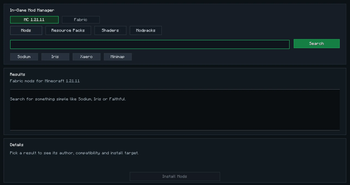
In-Game Mod Manager is a client-side Fabric mod for Minecraft 1.21.11 that lets you search, inspect, and download compatible content from Modrinth without leaving the game.
Instead of tabbing out to a browser, opening Modrinth manually, downloading files, and moving them into the correct folder yourself, this mod brings that workflow directly into Minecraft through a clean in-game interface. The goal is simple: make installing Fabric content faster, easier, and safer, especially for players who want a lightweight and convenient mod management experience.
What this mod does
With In-Game Mod Manager, you can:
- open an in-game mod browser with a keybind
- search Modrinth directly from inside Minecraft
- view project details before downloading
- find versions that match your current Minecraft version
- filter for compatible Fabric content
- download supported files directly into the correct Minecraft folder
- get a clear reminder that Minecraft must be restarted after installation
This mod is designed for players who want a smoother way to discover and install content without interrupting gameplay.
Supported content
The mod is built around Modrinth search and can be used to browse different kinds of client-side content, depending on what the current build exposes in the interface, including:
- mods
- resource packs
- shaders
- modpacks
For Fabric mods, the manager checks for versions that are compatible with the target Minecraft version and loader requirements before offering them for download.
In-game workflow
The intended workflow is simple:
- Open the manager in-game.
- Search for a project on Modrinth.
- Browse the results and inspect the project details.
- Choose a compatible version.
- Confirm the download.
- The file is saved into the normal Minecraft folder.
- Restart Minecraft so the newly downloaded content can be loaded.
This makes the installation process much easier for players who are not comfortable manually handling files.
Key features
Direct Modrinth search
The mod uses the official Modrinth API to search for projects from inside the Minecraft client. Search results are presented in a scrollable in-game GUI so you can quickly browse available content.
Compatibility-focused downloads
When downloading Fabric mods, the manager prefers versions that match:
- Minecraft 1.21.11
- Fabric loader compatibility
- valid downloadable
.jarfiles
When multiple releases are available, stable releases are preferred over beta or alpha versions unless configuration allows less stable channels.
Safe file handling
Downloads are handled carefully and are not loaded at runtime. The mod only downloads files after explicit user confirmation and stores them in the normal Minecraft directory structure.
Safety measures include:
- download only after a manual button click
- safe filename validation
.jar-only restriction where appropriate- temporary file download before final save
- hash verification when Modrinth provides hashes
- no automatic execution of downloaded files
- no runtime injection of newly downloaded mods
- no private account tokens or user credentials required
Clear restart reminder
Minecraft cannot load newly downloaded mods instantly during the same session. After a successful download, the mod clearly informs you that Minecraft must be restarted before the installed mod becomes active.
Why use this mod?
In-Game Mod Manager is useful if you want:
- a more beginner-friendly way to install Fabric mods
- fewer manual steps when downloading from Modrinth
- a faster workflow for browsing and testing client-side content
- an integrated mod search experience directly inside Minecraft
- a safer and more structured download flow than manually dragging files around
It is especially helpful for players who often install optimization mods, minimap mods, shaders, resource packs, or other client-side additions and want a smoother process.
Client-side only
This mod is client-side only.
That means:
- it is not required on servers
- it does not add server-side gameplay features
- it is intended only for use in the Minecraft client interface
If you install it on your client, other players and servers do not need to have it installed.
Important notes
- Downloaded mods are not loaded instantly.
- You must restart Minecraft after downloading a mod.
- Only compatible versions should be installed.
- Availability of icons, metadata, and project details depends on data returned by Modrinth.
- Internet access is required for search and download features.
Controls
- Press the configured keybind in-game to open the manager.
- The default keybind may vary depending on your current build and configuration.
Version / Loader
- Minecraft: 1.21.11
- Mod Loader: Fabric
- Environment: Client
Summary
In-Game Mod Manager brings Modrinth browsing and compatible Fabric downloads directly into Minecraft through an in-game GUI. It is made for convenience, safety, and ease of use, while keeping the actual installation flow clear and familiar: search, inspect, download, restart, and play.
Available Versions
How to Install Ingame Mod Manager on Your Server
Order Server
Order a Minecraft Java server with at least 3 GB RAM (4 GB recommended).
Set fabric Loader
In the panel under "Egg", select the fabric loader and matching Minecraft version (1.21.11).
Install Mod
Open the mod browser in the dashboard and search for "Ingame Mod Manager". Click "Install" – done! Alternatively, upload the .jar via SFTP to the /mods folder.
Compatibility
Mod Loaders
Minecraft Versions
1.21.11
Server-side
✗ UnsupportedRecommended RAM
4 GB(min. 3 GB)Frequently Asked Questions
Ingame Mod Manager server crashes on startup – what to do?
Most common cause: wrong fabric version or insufficient RAM. Check the server log (latest.log) for "OutOfMemoryError" or "Mixin" errors. With Mado Hosting: ensure at least 3 GB RAM is allocated and the loader matches the mod version (1.21.11). You can switch loaders with one click in the panel.
Is Ingame Mod Manager compatible with fabric?
Ingame Mod Manager officially supports fabric for Minecraft 1.21.11. The Mado dashboard automatically detects incompatible loader combinations.
Server lagging with Ingame Mod Manager – how to optimize performance?
Recommended RAM: 4 GB (per 8 players). Use /spark profiler to check if Ingame Mod Manager consumes the most tick time. Common fixes: reduce server view-distance to 8-10, install "performant" or "starlight" as supplementary mods on Forge. With Mado Hosting, your server runs on NVMe SSDs with dedicated CPU cores for minimal latency.
Similar Mods




Rent Modded Server
Install Ingame Mod Manager with just one click on your server.