
Inline Tooltips
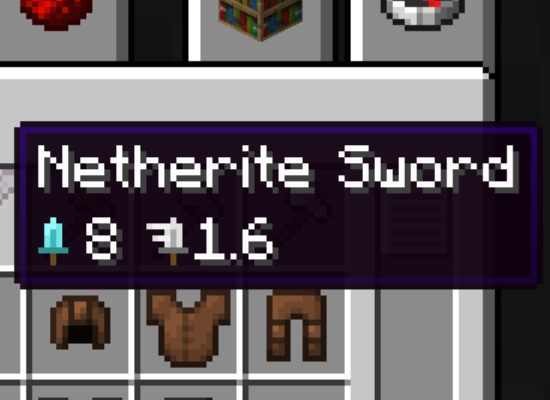
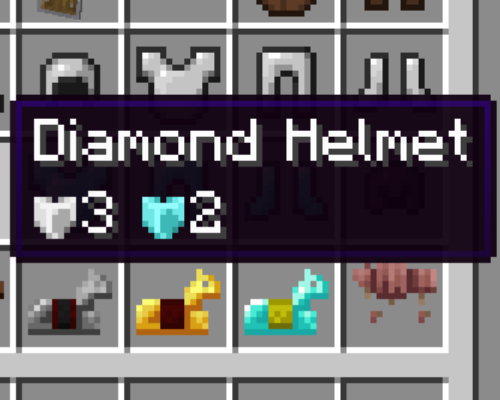
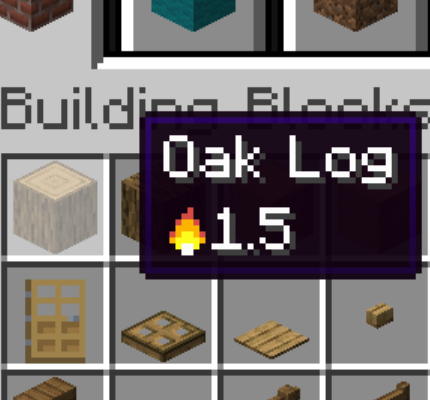
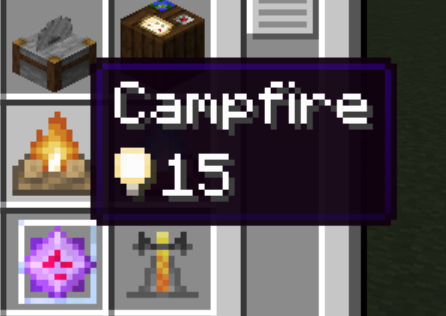
This mod adds styled tooltips for durability, attributes, components, fuel, and more.
Screenshots
About this Mod



This mod adds improved tooltips for attributes, components, fuel, and more. Most tooltips added by this mod have styled icons, adding information without lengthening the tooltip. Tooltips that replace vanilla ones can be disabled by holding shift.
Installation
Inline Tooltips is a clientside mod for Fabric and NeoForge. Its dependencies are listed below.
Dependencies
- On Fabric, Fabric API is required.
- On 1.20.1 and 1.21.1, Inline is required.
- Mod settings are available with McQoy.
- This mod does not support MinecraftForge, however it can be used on Forge via Sinytra Connector.
Icon Tooltips
These elements all have unique icons, contributed by noelledotjpg and ProbablyEkho.
- Attributes
- Attack Damage
- Attack Speed
- Armor
- Armor Toughness
- Block/Entity Interaction Range
- Knockback Resistance
- Mining Speed
- Oxygen Bonus
- Modded attributes can be added via resource packs by adding a
16x16 sprite to assets/modname/textures/inline_tooltip_icons/attributename.png.
- Components
- Bees
- Honey
- Fuel
- Light Level
Text Tooltips
These tooltips have text information, showing information where vanilla does not.
- Lodestone Compass Coordinates
- Shows coordinates of the Lodestone the compass is pointed to.
- Recovery Compass Coordinates
- Shows coordinates of the last death the compass is pointed to.
- Compass Coordinates
- Shows current coordinates.
- Durability
FAQ
- Will this mod be ported to other versions/loaders?
- I intend to have this mod continue to support the latest version of Minecraft, at the time this is 1.21.11. In addition, older versions of the mod are available on 1.20.1 and 1.21.1. These ports depend on Inline, and only the 1.21.1 version is actively maintained. There is no plan to backport to older versions or any other loaders, as this mod relies on rendering changes in 1.21.9 and above.
License

Inline Tooltips is available under the open source MIT License. Note that this means you are required to attribute the mod if you use any content from it in your own projects.
Credits
Features sprites from noelledotjpg and ProbablyEkho.
Code for detecting and correcting for Sharpness was based on Sharper Tooltips under its MIT License.
This mod's concept was inspired by Inspecio and Tooltip Icons. Give them a try if they suit your needs better!
Available Versions
How to Install Inline Tooltips on Your Server
Order Server
Order a Minecraft Java server with at least 3 GB RAM (4 GB recommended).
Set fabric Loader
In the panel under "Egg", select the fabric loader and matching Minecraft version (26.2-rc-2).
Install Mod
Open the mod browser in the dashboard and search for "Inline Tooltips". Click "Install" – done! Alternatively, upload the .jar via SFTP to the /mods folder.
Compatibility
Mod Loaders
Minecraft Versions
26.2-rc-2, 26.2-rc-1, 26.2-pre-1 (+24 more)
Server-side
✗ UnsupportedRecommended RAM
4 GB(min. 3 GB)Frequently Asked Questions
Inline Tooltips server crashes on startup – what to do?
Most common cause: wrong fabric version or insufficient RAM. Check the server log (latest.log) for "OutOfMemoryError" or "Mixin" errors. With Mado Hosting: ensure at least 3 GB RAM is allocated and the loader matches the mod version (26.2-rc-2). You can switch loaders with one click in the panel.
Is Inline Tooltips compatible with fabric and neoforge?
Inline Tooltips officially supports fabric, neoforge for Minecraft 26.2-rc-2, 26.2-rc-1, 26.2-pre-1. The Mado dashboard automatically detects incompatible loader combinations.
Server lagging with Inline Tooltips – how to optimize performance?
Recommended RAM: 4 GB (per 8 players). Use /spark profiler to check if Inline Tooltips consumes the most tick time. Common fixes: reduce server view-distance to 8-10, install "performant" or "starlight" as supplementary mods on Forge. With Mado Hosting, your server runs on NVMe SSDs with dedicated CPU cores for minimal latency.
Similar Mods




![[ETF] Entity Texture Features](https://cdn.modrinth.com/data/BVzZfTc1/af683d206d50b05258d865b0d6e4aa2f2cee12f2_96.webp)
![[EMF] Entity Model Features](https://cdn.modrinth.com/data/4I1XuqiY/6e5bbd0d06b1741bfdab6c0cfab6de8fdaf0064c_96.webp)
Rent Modded Server
Install Inline Tooltips with just one click on your server.