
inputbooster
InputBooster – Ultra-fast input polling for Minecraft PvP, capturing missed clicks, maintaining sprint, and improving combat responsiveness, even at low FPS. Compatible with Fabric and performance mods like Sodium & Lithium.
Screenshots
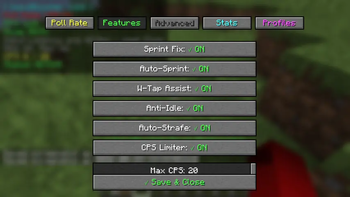
About this Mod
⚡ InputBooster
Never lose clicks during lag again.
High-performance Fabric utility mod that captures inputs even during FPS drops.









⚡ About
InputBooster is a client-side Fabric mod designed for players who want smoother and more reliable gameplay during PvP, survival, and low-FPS situations.
Minecraft can miss quick clicks and rapid key presses when FPS drops or the game stutters.
InputBooster improves responsiveness by:
- polling important inputs at a higher rate
- buffering short clicks safely
- replaying valid actions on the next tick
- preventing duplicate entity hits
The result is cleaner combat, smoother movement, and more consistent gameplay.
✨ Features
🎯 Smart Input Engine
- High-frequency input polling
- Buffered click recovery
- Tick-safe input replay
- Lag spike protection
- Reliable rapid key handling
⚔️ PvP Systems
- Entity double-hit prevention
- CPS limiter
- Humanized click modes
- Cooldown-aware combat logic
- Weapon-sensitive handling
🏃 Movement Helpers
- Sprint assist
- W-tap support
- Auto-strafe helper
- Jump optimization
- Sneak assistance
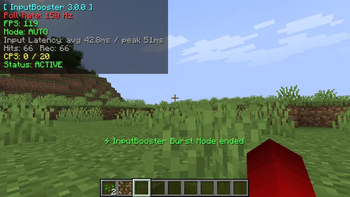
📊 Real-Time Overlay
Displays live statistics including:
- FPS
- CPS
- Poll rate
- Latency
- Recovered inputs
- Replay status
- Module states
- Safe mode status
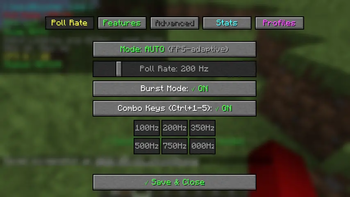
💾 Advanced Utilities
- Input replay recorder
- Playback system
- Per-server profiles
- Playstyle presets
- Safe mode recovery
- Keybind conflict warnings
⌨️ Default Keybinds
| Key | Action |
|---|---|
O |
Open InputBooster settings |
P |
Toggle InputBooster |
R |
Start/Stop replay recording |
K |
Play recorded replay |
All keybinds can be customized inside Minecraft controls.
📦 Requirements
| Component | Version |
|---|---|
| Minecraft | 1.21.x / 26.1.x |
| Fabric Loader | 0.16.0+ |
| Fabric API | Latest |
| Java | 21+ |
🚀 Installation
1️⃣ Install Fabric Loader
Download and install Fabric Loader for your Minecraft version.
2️⃣ Install Fabric API
Place Fabric API inside your mods folder.
3️⃣ Download InputBooster
Download the latest release from Modrinth or GitHub.
Crafted with ⚡ by Ahaduzzaman Khan
Built for smoother combat, cleaner movement, and reliable gameplay.
Available Versions
How to Install inputbooster on Your Server
Order Server
Order a Minecraft Java server with at least 3 GB RAM (4 GB recommended).
Set fabric Loader
In the panel under "Egg", select the fabric loader and matching Minecraft version (26.1.2).
Install Mod
Open the mod browser in the dashboard and search for "inputbooster". Click "Install" – done! Alternatively, upload the .jar via SFTP to the /mods folder.
Compatibility
Mod Loaders
Minecraft Versions
26.1.2, 26.1.1, 26.1 (+11 more)
Server-side
✗ UnsupportedRecommended RAM
4 GB(min. 3 GB)Frequently Asked Questions
inputbooster server crashes on startup – what to do?
Most common cause: wrong fabric version or insufficient RAM. Check the server log (latest.log) for "OutOfMemoryError" or "Mixin" errors. With Mado Hosting: ensure at least 3 GB RAM is allocated and the loader matches the mod version (26.1.2). You can switch loaders with one click in the panel.
Is inputbooster compatible with fabric and neoforge and quilt?
inputbooster officially supports fabric, neoforge, quilt for Minecraft 26.1.2, 26.1.1, 26.1. The Mado dashboard automatically detects incompatible loader combinations.
Server lagging with inputbooster – how to optimize performance?
Recommended RAM: 4 GB (per 8 players). Use /spark profiler to check if inputbooster consumes the most tick time. Common fixes: reduce server view-distance to 8-10, install "performant" or "starlight" as supplementary mods on Forge. With Mado Hosting, your server runs on NVMe SSDs with dedicated CPU cores for minimal latency.
Similar Mods


Rent Modded Server
Install inputbooster with just one click on your server.