
Instamine
A mod made to deal with harder blocks a lot easier, like deepslate.
Screenshots
About this Mod
Mining deepslate has always felt inconsistent. Same tools, same enchants, slower mining speed for no meaningful gameplay reason.
Instamine fixes that by reducing the hardness of selected blocks to match the hardness of regular stone. This means with Efficiency V & Haste II, affected blocks become practically instamineable, just like stone.
Features
- Makes deepslate, endstone, cobblestone, all ores and all logs instamineable
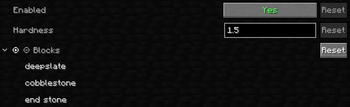
- Fully customizable block list through the Mod Menu mod or the config file
- Configurable target hardness for those who have other things in mind
- Works server-side without requiring clients to install the mod
Dependencies
Latest Release
- Required: Cloth Config API
- Optional: Mod Menu
Configuration
Default Changes
| Block | Vanilla Hardness | Instamine Hardness |
|---|---|---|
| Deepslate | 3.0 | 1.5 |
| Endstone | 3.0 | 1.5 |
| Cobblestone | 2.0 | 1.5 |
| Ores (all variants) | 3.0 | 1.5 |
| Logs & Wood (all variants) | 2.0 | 1.5 |
1.5 is the vanilla hardness of stone, and yes cobblestone is originally not instaminable.
The mod configuration includes the blocks list and the hardness value that can easily be edited through Mod Menu or directly through config/instamine.json after its generation.
Block Groups
The block list supports group keywords that expand to all blocks of that type:
| Keyword | Spans |
|---|---|
ores |
All 20 vanilla ore variants (stone & deepslate, nether quartz, ancient debris) |
logs |
All 34 vanilla log, wood, stripped log, and stripped wood variants |
Group keywords are preserved as-is in the config file and are not mutable.
Servers
Instamine works server-side for all players, even without the mod installed on their client.
Installing it on both server and client is recommended however so the mining animation stays visually consistent.
Available Versions
How to Install Instamine on Your Server
Order Server
Order a Minecraft Java server with at least 3 GB RAM (4 GB recommended).
Set fabric Loader
In the panel under "Egg", select the fabric loader and matching Minecraft version (26.2).
Install Mod
Open the mod browser in the dashboard and search for "Instamine". Click "Install" – done! Alternatively, upload the .jar via SFTP to the /mods folder.
Compatibility
Mod Loaders
Minecraft Versions
26.2, 26.1.2, 26.1.1 (+1 more)
Server-side
✓ RequiredRecommended RAM
4 GB(min. 3 GB)Frequently Asked Questions
Instamine server crashes on startup – what to do?
Most common cause: wrong fabric version or insufficient RAM. Check the server log (latest.log) for "OutOfMemoryError" or "Mixin" errors. With Mado Hosting: ensure at least 3 GB RAM is allocated and the loader matches the mod version (26.2). You can switch loaders with one click in the panel.
Is Instamine compatible with fabric?
Instamine officially supports fabric for Minecraft 26.2, 26.1.2, 26.1.1. The Mado dashboard automatically detects incompatible loader combinations.
Server lagging with Instamine – how to optimize performance?
Recommended RAM: 4 GB (per 8 players). Use /spark profiler to check if Instamine consumes the most tick time. Common fixes: reduce server view-distance to 8-10, install "performant" or "starlight" as supplementary mods on Forge. With Mado Hosting, your server runs on NVMe SSDs with dedicated CPU cores for minimal latency.
Similar Mods




Rent Modded Server
Install Instamine with just one click on your server.