
Instant Actions
Adds toggles that make common interactions faster and more convenient.
About this Mod
Instant Actions
Adds toggles that make common interactions faster and more convenient.
Available on Modrinth and CurseForge.
📖 Features
- Instant crop growth: Fully grow any crop with a single click, consuming the required amount of bone meal.
- Bone meal with spread: Applying bone meal to a crop also applies it to adjacent crops of the same type.
- Chain harvest: Breaking a fully grown crop harvests all connected crops of the same type within a 3-block radius.
- Instant composting: Fill a composter with a single click, consuming as much of the item as needed.
- Instant taming: Tame any tameable animal (e.g. horse, wolf) on first attempt.
- Restore hunger instantly: Consuming food uses as many of the same item as needed to fully restore hunger.
📋 Usage
- Press
Esc, go to Mods, find Instant Actions, click the Settings icon in the top right corner. - Enable whatever toggles you want.
- Save to apply changes
💡 Examples
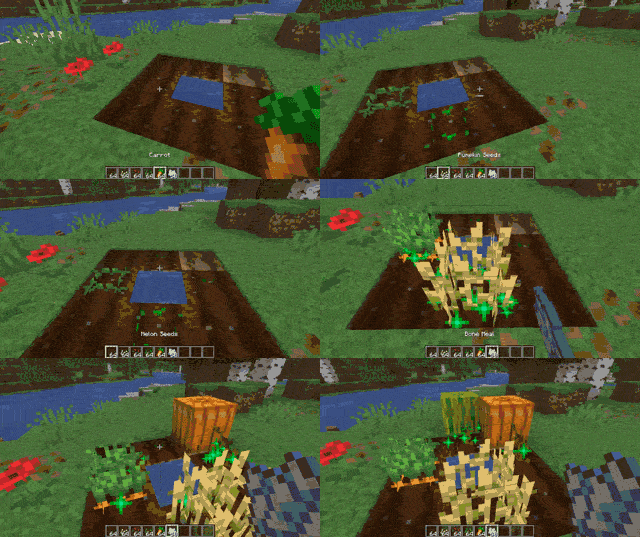
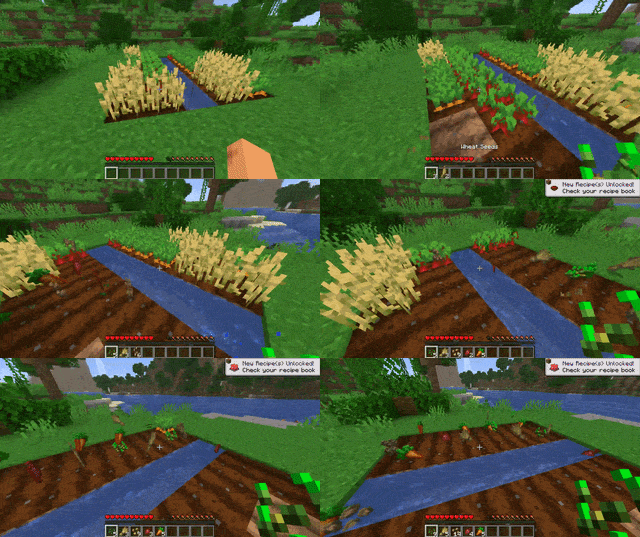
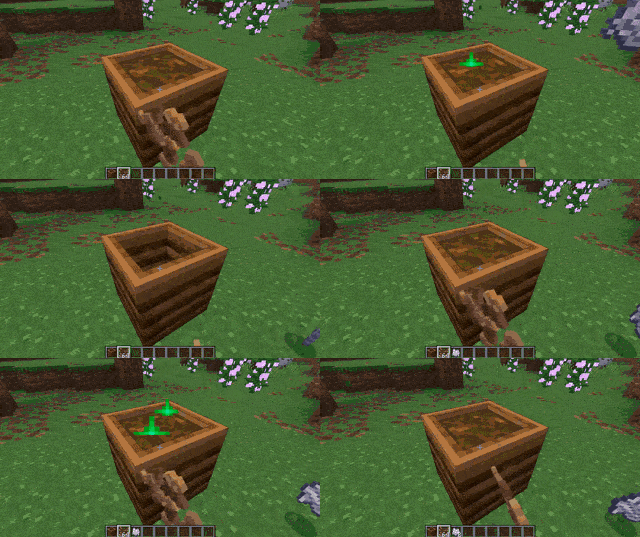
and more...
📌 Notes
This is a client-side mod. It works in singleplayer and with the integrated (Open to LAN) server.
Each player controls their own toggles independently. If you host a world and enable a toggle, it applies only to you. Another player who joins with the mod installed uses their own toggle settings. Another player who joins without the mod is unaffected.
Joining a world where the host doesn't have the mod will make it have no effect and a warning will be shown.
The mod does not work on dedicated servers.
🔗 Dependencies
Required
🏷️ Tags
minecraft, mod, fabric, quality of life, qol, instant action, quick action, quick use, instant use, taming, hunger, consume, bone meal
Available Versions
How to Install Instant Actions on Your Server
Order Server
Order a Minecraft Java server with at least 3 GB RAM (4 GB recommended).
Set fabric Loader
In the panel under "Egg", select the fabric loader and matching Minecraft version (26.2).
Install Mod
Open the mod browser in the dashboard and search for "Instant Actions". Click "Install" – done! Alternatively, upload the .jar via SFTP to the /mods folder.
Compatibility
Mod Loaders
Minecraft Versions
26.2, 26.1.2, 26.1.1 (+1 more)
Server-side
✗ UnsupportedRecommended RAM
4 GB(min. 3 GB)Frequently Asked Questions
Instant Actions server crashes on startup – what to do?
Most common cause: wrong fabric version or insufficient RAM. Check the server log (latest.log) for "OutOfMemoryError" or "Mixin" errors. With Mado Hosting: ensure at least 3 GB RAM is allocated and the loader matches the mod version (26.2). You can switch loaders with one click in the panel.
Is Instant Actions compatible with fabric?
Instant Actions officially supports fabric for Minecraft 26.2, 26.1.2, 26.1.1. The Mado dashboard automatically detects incompatible loader combinations.
Server lagging with Instant Actions – how to optimize performance?
Recommended RAM: 4 GB (per 8 players). Use /spark profiler to check if Instant Actions consumes the most tick time. Common fixes: reduce server view-distance to 8-10, install "performant" or "starlight" as supplementary mods on Forge. With Mado Hosting, your server runs on NVMe SSDs with dedicated CPU cores for minimal latency.
Similar Mods





Rent Modded Server
Install Instant Actions with just one click on your server.