
IG: Ore Amplifier (Vein count)
Multiply ore vein frequency (count) by up to 50x. Fully configurable via GameRules for both Vanilla and Modded ores. No config files required.
About this Mod





💎 Ore Amplifier
No Backports: This mod targets Minecraft 26.1+ (Snapshot 8). Older versions are unsupported.
Stop grinding. Start crafting.
Ore Amplifier solves the resource scarcity problem. Whether you want slightly more iron or an explosion of diamonds, it's just a GameRule away. Designed for players who value their time. Part of the Instant Gratification Collection.
✨ Features
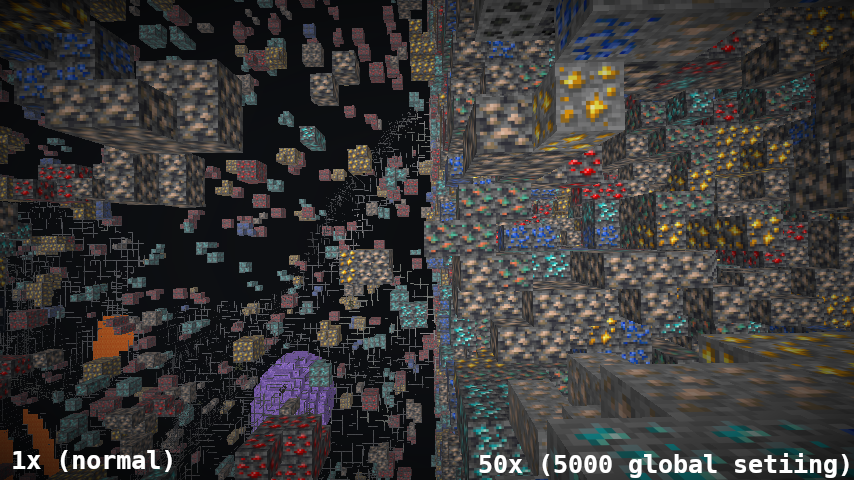
🔧 Amplified Generation
Multiply ore vein generation by any factor. 2x? 10x? 100x? You decide.
- Global Multipliers: Set a baseline for all Vanilla or Modded ores.
- Granular Control: Specific rules are automatically generated for every detected ore.
- Vein Count: Increases the number of veins per chunk, ensuring dense, rich worlds.
🧩 Modded Ore Support
Built with compatibility in mind.
- Auto-Detection: Scans your instance for any block with "ore" in its name.
- Dynamic Rules: Automatically creates GameRules for
techmod:tin_ore,magicmod:mythril_ore, etc. - Fail-Safe: If no specific rule is set, it falls back to the Global Modded multiplier.
⚙️ Pure GameRules

No config files to manage. Everything lives in the Edit Game Rules screen or /gamerule commands. Adjust settings in real-time without restarting.
ig_ore_vanilla_global: Multiplier for Minecraft ores (Coal, Iron, Diamond, etc.)ig_ore_modded_global: Multiplier for non-Minecraft ores.ig_ore_<mod>_<ore>: Specific multiplier for a specific ore.
🌍 Existing Worlds
Does this mod work on old worlds? Yes, but only for new chunks.
- Ores in chunks you have already explored are "baked in".
- To see changes in old areas, you must regenerate the chunks.
- Note: There is no vanilla command for this. You must delete the chunk files (e.g., using MCA Selector) so the game is forced to recreate them.
⚠️ Warning: High multipliers (>5000) may cause world generation to freeze or crash due to excessive placement attempts. Use with caution!
📋 Quick Start
/gamerule ig_ore_vanilla_global 200     → Double all vanilla ores
/gamerule ig_ore_modded_global 500      → 5x all modded ores
/gamerule ig_ore_minecraft_diamond_ore 1000 → 10x Diamonds specifically
📦 Install
- Install Fabric API.
- Download
ore-amplifier-1.0.0.jarand place it in yourmodsfolder. - Launch the game — default settings are 100% (Vanilla rates). Tune them to your liking!
☕ Support
If you enjoy the Instant Gratification collection, consider fueling the next update!


[!NOTE]
Indonesian Users: SocioBuzz supports local payment methods (Gopay, OVO, Dana, etc.) if you want to support me without using PayPal/Ko-fi!
📜 Credits
| Role | Author |
|---|---|
| Architect | Rifaditya (Dasik) |
| Collection | Instant Gratification |
| License | GPLv3 |
[!IMPORTANT]
Modpack Permissions: You are free to include this mod in modpacks, provided the modpack is hosted on the same platform (e.g. Modrinth).Cross-platform distribution is not permitted. If you download this mod from Modrinth, your modpack must also be published on Modrinth.
Made with ❤️ for the Minecraft community
Part of the Instant Gratification Collection
Available Versions
How to Install IG: Ore Amplifier (Vein count) on Your Server
Order Server
Order a Minecraft Java server with at least 4 GB RAM (6 GB recommended).
Set fabric Loader
In the panel under "Egg", select the fabric loader and matching Minecraft version (26.2-snapshot-5).
Install Mod
Open the mod browser in the dashboard and search for "IG: Ore Amplifier (Vein count)". Click "Install" – done! Alternatively, upload the .jar via SFTP to the /mods folder.
Compatibility
Mod Loaders
Minecraft Versions
26.2-snapshot-5, 26.2-snapshot-4, 26.2-snapshot-3 (+21 more)
Server-side
✓ RequiredRecommended RAM
6 GB(min. 4 GB)Frequently Asked Questions
IG: Ore Amplifier (Vein count) server crashes on startup – what to do?
Most common cause: wrong fabric version or insufficient RAM. Check the server log (latest.log) for "OutOfMemoryError" or "Mixin" errors. With Mado Hosting: ensure at least 4 GB RAM is allocated and the loader matches the mod version (26.2-snapshot-5). You can switch loaders with one click in the panel.
Is IG: Ore Amplifier (Vein count) compatible with fabric?
IG: Ore Amplifier (Vein count) officially supports fabric for Minecraft 26.2-snapshot-5, 26.2-snapshot-4, 26.2-snapshot-3. The Mado dashboard automatically detects incompatible loader combinations.
Server lagging with IG: Ore Amplifier (Vein count) – how to optimize performance?
Recommended RAM: 6 GB (per 5 players). Use /spark profiler to check if IG: Ore Amplifier (Vein count) consumes the most tick time. Common fixes: reduce server view-distance to 8-10, install "performant" or "starlight" as supplementary mods on Forge. With Mado Hosting, your server runs on NVMe SSDs with dedicated CPU cores for minimal latency.
Similar Mods



Rent Modded Server
Install IG: Ore Amplifier (Vein count) with just one click on your server.