
Intuitive Netherite
Makes netherite alittle more intuitive
Screenshots
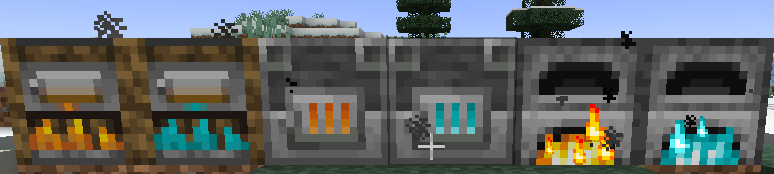
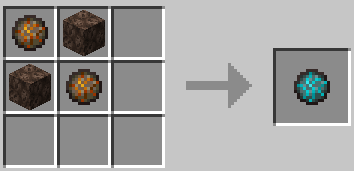
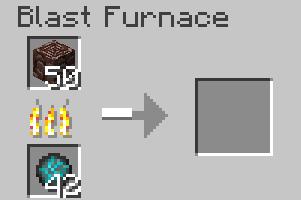
About this Mod
The Problem
After update 1.20, Mojang changed how getting netherite equipment worked. Originally you only needed to get 4 pieces of scrap, 4 gold ingots, and then slap it into a smithing table. 1.20 introduced the smithing templates and overhauled the smithing table, and as a result added the netherite smithing template, but this change still feels to simple, to easy, and not intuitive. Instead, I would rather focus on the logistical issues with the netherite process, specifically, smelting. For an unburnable item, why can it be smelted normally?? The item, that can survive being thrown into lava, cannot last 2 seconds in a furnace powered by coal. Ridiculous.
Soul Charging
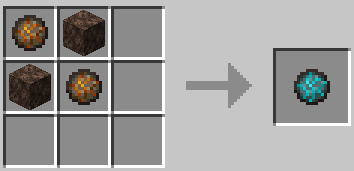
Soul Charging is a new mechanic introduced to all furnaces. To Soul Charge your furnace, you simply need to craft a Soul Charge. You can see how to craft it with the diagram below.
Soul Blasting
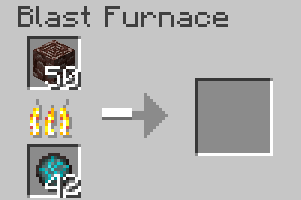
Soul Blasting is a new recipe type, it only works in a blast furnace if the furnace is Soul Charged (or has a soul charge in the fuel slot.) This is data-driven and can be added onto by taking a look at this recipe
Netherite Scrap Smelting
Now for the reason this mod was made. Simply put a soul charge into the fuel slot of the blast furnace, then move the ancient debris (no shift clicking yet) to the ingredient slot of the furnace to begin the smelting proccess. We will look past the fact that in game netherite does not burn in soul fire... thats just for consistency in game I suppose...
Available Versions
How to Install Intuitive Netherite on Your Server
Order Server
Order a Minecraft Java server with at least 3 GB RAM (4 GB recommended).
Set fabric Loader
In the panel under "Egg", select the fabric loader and matching Minecraft version (1.20.1).
Install Mod
Open the mod browser in the dashboard and search for "Intuitive Netherite". Click "Install" – done! Alternatively, upload the .jar via SFTP to the /mods folder.
Compatibility
Mod Loaders
Minecraft Versions
1.20.1
Server-side
✓ RequiredRecommended RAM
4 GB(min. 3 GB)Frequently Asked Questions
Intuitive Netherite server crashes on startup – what to do?
Most common cause: wrong fabric version or insufficient RAM. Check the server log (latest.log) for "OutOfMemoryError" or "Mixin" errors. With Mado Hosting: ensure at least 3 GB RAM is allocated and the loader matches the mod version (1.20.1). You can switch loaders with one click in the panel.
Is Intuitive Netherite compatible with fabric?
Intuitive Netherite officially supports fabric for Minecraft 1.20.1. The Mado dashboard automatically detects incompatible loader combinations.
Server lagging with Intuitive Netherite – how to optimize performance?
Recommended RAM: 4 GB (per 8 players). Use /spark profiler to check if Intuitive Netherite consumes the most tick time. Common fixes: reduce server view-distance to 8-10, install "performant" or "starlight" as supplementary mods on Forge. With Mado Hosting, your server runs on NVMe SSDs with dedicated CPU cores for minimal latency.
Similar Mods




Rent Modded Server
Install Intuitive Netherite with just one click on your server.