
Inv Tweaker
Inventory sorting and grouping mod, also has auto fill for the hotbar
Screenshots
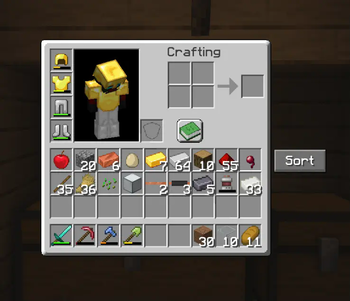
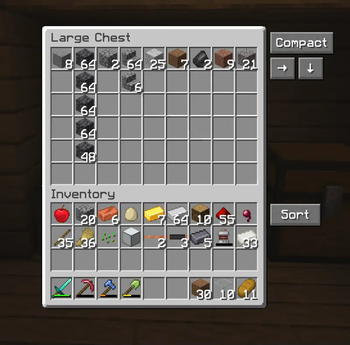



About this Mod
An inventory sorting mod trying to be a homage to the old original "Inventory Tweaks" mod.
The difference to some of the other sorting mods, this one does not only sort alphabetically, but also has the ability to sort in horizontal and vertical groups, making chests etc. look less cluttered and more tidy. This is what Inventory Tweaks did in the past and i haven't found a modern and updated sorting mod, that did exactly that, only alphabetical sorting.
Another feature is the automatic refilling of the hotbar. Inventory Tweaks had a feature, where when you finished a stack of food or a stack of blocks, it would take another stack from your inventory and put it in the last used slot slot in your hotbar, so that you can continue building, eating etc. without having to open your inventory or pressing middle mouse button. Really just quality of life things that bother me lol.
How to use:
Simply use the buttons next to the inventory, or use the key binds as explained below.
The arrows simply mean which way it's sorted, so the arrow pointing right means it's row grouped and the arrow pointing down means it's column grouped.
To sort the player inventory simply press R. To sort chests etc. press T. To cycle between compact sorting (alphabetical), Row Grouping and Column Grouping, simply press Z, or rebind the keys.
Hotbar auto refill can be enabled, or disabled, by pressing H.
The horizontal and vertical sorting works best when chests aren't too full with many different item types, otherwise it starts putting stuff where it doesn't seem logical. I'm trying to improve that. Compact sorting works quite well in all cases.
Works both in singleplayer and multiplayer. Also supports other mods, like Reinforced Chests.
Requires the Fabric API mod.
License & Use
May not be altered, changed or redistributed without permission.
Using and sharing it in mod packs is allowed.
Available Versions
How to Install Inv Tweaker on Your Server
Order Server
Order a Minecraft Java server with at least 3 GB RAM (4 GB recommended).
Set fabric Loader
In the panel under "Egg", select the fabric loader and matching Minecraft version (1.21.8).
Install Mod
Open the mod browser in the dashboard and search for "Inv Tweaker". Click "Install" – done! Alternatively, upload the .jar via SFTP to the /mods folder.
Compatibility
Mod Loaders
Minecraft Versions
1.21.8, 1.21.7, 1.21.6
Server-side
✗ UnsupportedRecommended RAM
4 GB(min. 3 GB)Frequently Asked Questions
Inv Tweaker server crashes on startup – what to do?
Most common cause: wrong fabric version or insufficient RAM. Check the server log (latest.log) for "OutOfMemoryError" or "Mixin" errors. With Mado Hosting: ensure at least 3 GB RAM is allocated and the loader matches the mod version (1.21.8). You can switch loaders with one click in the panel.
Is Inv Tweaker compatible with fabric?
Inv Tweaker officially supports fabric for Minecraft 1.21.8, 1.21.7, 1.21.6. The Mado dashboard automatically detects incompatible loader combinations.
Server lagging with Inv Tweaker – how to optimize performance?
Recommended RAM: 4 GB (per 8 players). Use /spark profiler to check if Inv Tweaker consumes the most tick time. Common fixes: reduce server view-distance to 8-10, install "performant" or "starlight" as supplementary mods on Forge. With Mado Hosting, your server runs on NVMe SSDs with dedicated CPU cores for minimal latency.
Similar Mods




Rent Modded Server
Install Inv Tweaker with just one click on your server.