
InvAlert
A one-shot sound and on-screen warning when your inventory is almost full so you don't keep mining and silently lose drops.
Screenshots
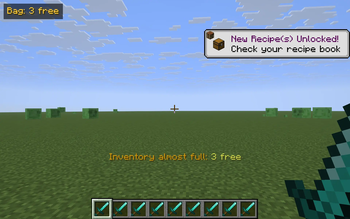
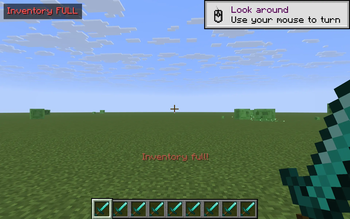
About this Mod
InvAlert watches your inventory and warns you the moment free space runs out. No more strip-mining a vein only to realize half the cobble fell on the floor — the moment your bag drops to a few free slots, you hear it and see it.
What it does
- Tracks the 36 main inventory slots (hotbar + backpack). Armor and the off-hand are excluded because picked-up items never go there anyway.
- When free slots drop to less than or equal to 3, it fires a one-shot warning:
- An action-bar message above the hotbar: "Inventory almost full: N free".
- A short pling sound, so you notice even when you're not looking at the corner.
- A persistent badge in the top-left of the HUD: "Bag: N free" (turns red and reads "Inventory FULL" when you hit zero).
- The warning re-fires only when free space drops further (3 -> 1 -> 0), so it doesn't spam you while you're managing items. The badge disappears the moment you free up a slot.
Controls
- V — toggle the alert on/off. Action-bar confirmation tells you the current state.
Why
You're deep in a cave, mining a vein. Your bag fills up. The next ten ores drop on the floor and despawn. By the time you check the inventory you've lost half the haul. InvAlert is the smallest possible fix: one badge, one sound, one alert, no config screens, no dependencies.
Notes
- Pure client-side — install on your client only. Works on any Fabric server, fully vanilla compatible.
- Sound and action bar are suppressed while an inventory or other screen is open, so the alert isn't noisy while you're already sorting.
- The HUD badge respects F1 (hide HUD).
- ~140 lines of code, no config files, no dependencies beyond Fabric API.
Compatibility
Minecraft 1.21.8, 1.21.9, 1.21.10, 1.21.11 — Fabric Loader 0.16+. One JAR covers all four. Drop into your mods/ folder alongside Fabric API.
Available Versions
How to Install InvAlert on Your Server
Order Server
Order a Minecraft Java server with at least 3 GB RAM (4 GB recommended).
Set fabric Loader
In the panel under "Egg", select the fabric loader and matching Minecraft version (1.21.11).
Install Mod
Open the mod browser in the dashboard and search for "InvAlert". Click "Install" – done! Alternatively, upload the .jar via SFTP to the /mods folder.
Compatibility
Mod Loaders
Minecraft Versions
1.21.11, 1.21.10, 1.21.9 (+1 more)
Server-side
✗ UnsupportedRecommended RAM
4 GB(min. 3 GB)Frequently Asked Questions
InvAlert server crashes on startup – what to do?
Most common cause: wrong fabric version or insufficient RAM. Check the server log (latest.log) for "OutOfMemoryError" or "Mixin" errors. With Mado Hosting: ensure at least 3 GB RAM is allocated and the loader matches the mod version (1.21.11). You can switch loaders with one click in the panel.
Is InvAlert compatible with fabric?
InvAlert officially supports fabric for Minecraft 1.21.11, 1.21.10, 1.21.9. The Mado dashboard automatically detects incompatible loader combinations.
Server lagging with InvAlert – how to optimize performance?
Recommended RAM: 4 GB (per 8 players). Use /spark profiler to check if InvAlert consumes the most tick time. Common fixes: reduce server view-distance to 8-10, install "performant" or "starlight" as supplementary mods on Forge. With Mado Hosting, your server runs on NVMe SSDs with dedicated CPU cores for minimal latency.
Similar Mods




![[ETF] Entity Texture Features](https://cdn.modrinth.com/data/BVzZfTc1/af683d206d50b05258d865b0d6e4aa2f2cee12f2_96.webp)
![[EMF] Entity Model Features](https://cdn.modrinth.com/data/4I1XuqiY/6e5bbd0d06b1741bfdab6c0cfab6de8fdaf0064c_96.webp)
Rent Modded Server
Install InvAlert with just one click on your server.