
Invariable Paintings: Crafting (legacy)
Randomized painting recipes for Invariable Paintings
Screenshots
About this Mod
Note of Archival: I'm not happy with the balance changes this brings, and I can't think of a good way to enhance the concept in ways that haven't already been done since. As alternatives, consider using datapacks based on Craftable Painting Variants or Painting Selector instead.
Invariable Paintings: Crafting Recipes
This addon for Invariable Paintings contains the experimental crafting recipes that have since been removed from the base mod.
Different recipes presets are provided as built-in datapacks; each provides varying degrees of crafting freedom. You can manage them in the datapack menu when creating a new world, or using the /datapack command in already created worlds. None of these packs are enabled by default.
Cloning
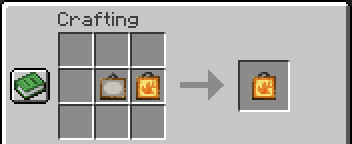
Paintings can be duplicated in the same way you would a banner or a book, by placing an empty one and a fileld one together in a crafting grid.
I am considering adding additional materials as cost (similarly to armour trims), but I'm not sure what expensive materials would feel appropriate. Suggestions are welcome.
Crafting with dyes
General rules
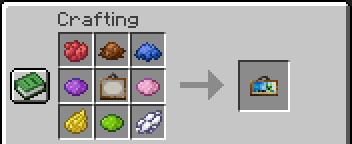
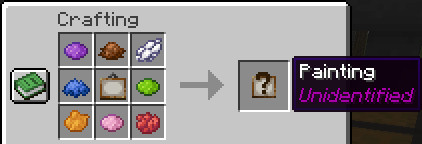
Filling a painting is done by combining it with one or more dyes of different colours. The colour of the dyes has no particular meaning. The correspondance between each combination and variant is semi-random; it will vary depending on the set of paintings you have installed, but should remain the same for a given set.
In most presets, the resulting painting is obfuscated until you take it out of the crafting table.
Provided datapacks:
Only one of these presets can be enabled at a time.
Unbound: The least restrictive crafting pack. Paintings can be crafted using any amount of dyes, using either a blank painting or an already filled one. This is the only pack were crafting results are not obfuscated.
Expensive: Crafting costs 8 different dies, and only accept Blank paintings as ingredients.
Iterative: Crafting only requires a single dye, thus only 16 different variants can be crafted from a blank canvas. More variants can be crafted by reusing filled paintings as ingredients. This will work better with more painting variants installed into the game.
Recycling: The most restrictive crafting pack. Blank paintings cannot be used as ingredients, making it impossible to craft filled paintings solely from raw materials. Your only option is to recycle another one acquired through other means. This will work better with cloning disabled.
Available Versions
How to Install Invariable Paintings: Crafting (legacy) on Your Server
Order Server
Order a Minecraft Java server with at least 3 GB RAM (4 GB recommended).
Set fabric Loader
In the panel under "Egg", select the fabric loader and matching Minecraft version (1.21.1).
Install Mod
Open the mod browser in the dashboard and search for "Invariable Paintings: Crafting (legacy)". Click "Install" – done! Alternatively, upload the .jar via SFTP to the /mods folder.
Compatibility
Mod Loaders
Minecraft Versions
1.21.1, 1.21, 1.20.6 (+1 more)
Server-side
✓ RequiredRecommended RAM
4 GB(min. 3 GB)Frequently Asked Questions
Invariable Paintings: Crafting (legacy) server crashes on startup – what to do?
Most common cause: wrong fabric version or insufficient RAM. Check the server log (latest.log) for "OutOfMemoryError" or "Mixin" errors. With Mado Hosting: ensure at least 3 GB RAM is allocated and the loader matches the mod version (1.21.1). You can switch loaders with one click in the panel.
Is Invariable Paintings: Crafting (legacy) compatible with fabric?
Invariable Paintings: Crafting (legacy) officially supports fabric for Minecraft 1.21.1, 1.21, 1.20.6. The Mado dashboard automatically detects incompatible loader combinations.
Server lagging with Invariable Paintings: Crafting (legacy) – how to optimize performance?
Recommended RAM: 4 GB (per 8 players). Use /spark profiler to check if Invariable Paintings: Crafting (legacy) consumes the most tick time. Common fixes: reduce server view-distance to 8-10, install "performant" or "starlight" as supplementary mods on Forge. With Mado Hosting, your server runs on NVMe SSDs with dedicated CPU cores for minimal latency.
Similar Mods

![[ETF] Entity Texture Features](https://cdn.modrinth.com/data/BVzZfTc1/af683d206d50b05258d865b0d6e4aa2f2cee12f2_96.webp)
![[EMF] Entity Model Features](https://cdn.modrinth.com/data/4I1XuqiY/6e5bbd0d06b1741bfdab6c0cfab6de8fdaf0064c_96.webp)



Rent Modded Server
Install Invariable Paintings: Crafting (legacy) with just one click on your server.