
Inventora
This is a simple Minecraft Forge mod that adds 5 new Custom Items and 5 new Custom Blocks, including 3 Glowing Blocks! It's perfect for learning how to add custom content while keeping everything clean,unique, and fun.
Screenshots
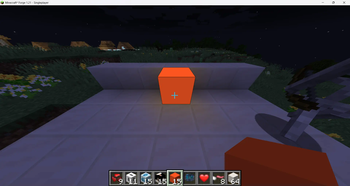
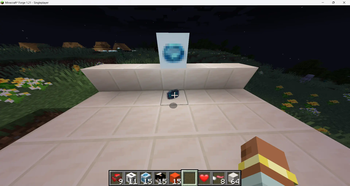
About this Mod
🛠️ Custom Minecraft Mod - Inventora(v1)
This is a simple Minecraft Forge mod that adds 5 new Custom Items and 5 new Custom Blocks, including 3 Glowing Blocks! It's perfect for learning how to add custom content while keeping everything clean,unique, and fun.
🔧 Requirements
- Minecraft
1.21.x - Forge
1.21.x - IDE like
InteliJ IDEA or Eclipse - Game Version:
Java Edition
🚀 Setup Instruction
- Clone this repository or copy the project files into your Forge workspace.
- Open the project in your IDE.
- Run 'genInteliJRuns' (or 'setupDecompoWorkspace' for Eclipse).
- Place tectures under the resources/assets/craftedbynaran/textures/item/ and texture/block/.
- Run the mod using the client run configuration
📦 Mod Features
| Block Name | Description | Properties |
|---|---|---|
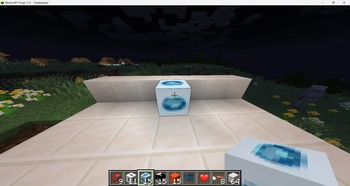
| Alexandrite Block | Emits strong light. A block form of the cusstom item added named Alexandrite | LightLevel = 15, Strength 4.0 |
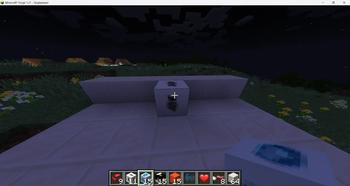
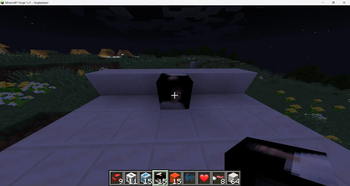
| Naran Block | A simple block that can be used as an image by defining the images as a texture and it does not glow. | Non-Glowing, Strength 4.0 |
| Orange Block | Warm, bright block with orange glow and orange texture. | LightLevel = 20, Strength 4.8 |
| Night Owls Block | Smooth white stone used to build structure and in this the pixeleted 16*16px image of Night Owls Logo is used as texture. | Non-glowing, Strength 4.0 |
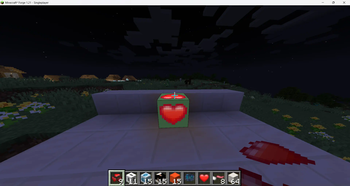
| Love Block | Decorative block in which Love heart pixeleted design is used as texture and a clean greenigh background with a glowing property. | LightLevel = 17, Strength 4.0 |
🧰 Custom Items
| Item Name | Description | Use Case |
|---|---|---|
| Alexandrite | A custom gem like diamond which looks cool and great to see. | Showcase |
| Raw Alexandrite | A custom item representing the raw form of the custom item Alexandrite. | Decoration |
| Love | A Love signifying item shaped like a love heart representation . | Emotion Representaion |
| Hack | A custom item shaped like the Hackclub Flag Sticker. | USed to signify Hackclub in designs |
| Icecream | A custom item shaped like an Icecream as a resemblance of . | Signifying the SWIRL Workshop done by member of Night Owls |
📁 File Structure Overview
src/
├── main/
│   ├── java/
│   │   └── net/
│   │       └── naran/
│   │           └── lifeless/
│   │               ├── block/               # All custom blocks
│   │               ├── item/                # All custom items
│   │               ├── Config.java          # Configuration or registry setup
│   │               └── craftthisthing.java  # Main mod file
│   └── resources/
│       ├── assets/
│       │   └── craftedbynaran/
│       │       ├── blockstates/             # Blockstate JSONs
│       │       ├── lang/                    # Language localization files
│       │       ├── models/
│       │       │   ├── block/               # Block model JSONs
│       │       │   └── item/                # Item model JSONs
│       │       └── textures/
│       │           ├── block/               # Block textures (PNG)
│       │           └── item/                # Item textures (PNG)
│       └── META-INF/                        # Mod metadata
🙏Credits
Created by naranbhusal02 as a Minecraft modding project for a HACKCRAFT workshop.
Special thanks to the Minecraft Forge community for their helpful documentation.
📜 License
All rights reserved by @naranbhusal02.
Available Versions
How to Install Inventora on Your Server
Order Server
Order a Minecraft Java server with at least 3 GB RAM (4 GB recommended).
Set forge Loader
In the panel under "Egg", select the forge loader and matching Minecraft version (1.21.5).
Install Mod
Open the mod browser in the dashboard and search for "Inventora". Click "Install" – done! Alternatively, upload the .jar via SFTP to the /mods folder.
Compatibility
Mod Loaders
Minecraft Versions
1.21.5, 1.21.4, 1.21.3 (+3 more)
Server-side
✓ RequiredRecommended RAM
4 GB(min. 3 GB)Frequently Asked Questions
Inventora server crashes on startup – what to do?
Most common cause: wrong forge version or insufficient RAM. Check the server log (latest.log) for "OutOfMemoryError" or "Mixin" errors. With Mado Hosting: ensure at least 3 GB RAM is allocated and the loader matches the mod version (1.21.5). You can switch loaders with one click in the panel.
Is Inventora compatible with forge?
Inventora officially supports forge for Minecraft 1.21.5, 1.21.4, 1.21.3. The Mado dashboard automatically detects incompatible loader combinations.
Server lagging with Inventora – how to optimize performance?
Recommended RAM: 4 GB (per 8 players). Use /spark profiler to check if Inventora consumes the most tick time. Common fixes: reduce server view-distance to 8-10, install "performant" or "starlight" as supplementary mods on Forge. With Mado Hosting, your server runs on NVMe SSDs with dedicated CPU cores for minimal latency.
Similar Mods

![[ETF] Entity Texture Features](https://cdn.modrinth.com/data/BVzZfTc1/af683d206d50b05258d865b0d6e4aa2f2cee12f2_96.webp)
![[EMF] Entity Model Features](https://cdn.modrinth.com/data/4I1XuqiY/6e5bbd0d06b1741bfdab6c0cfab6de8fdaf0064c_96.webp)



Rent Modded Server
Install Inventora with just one click on your server.