
Inventory Buttons
Brings the "Inventory Buttons" feature from NotEnoughUpdates (NEU) to 1.21.11 / 1.21.5
Screenshots
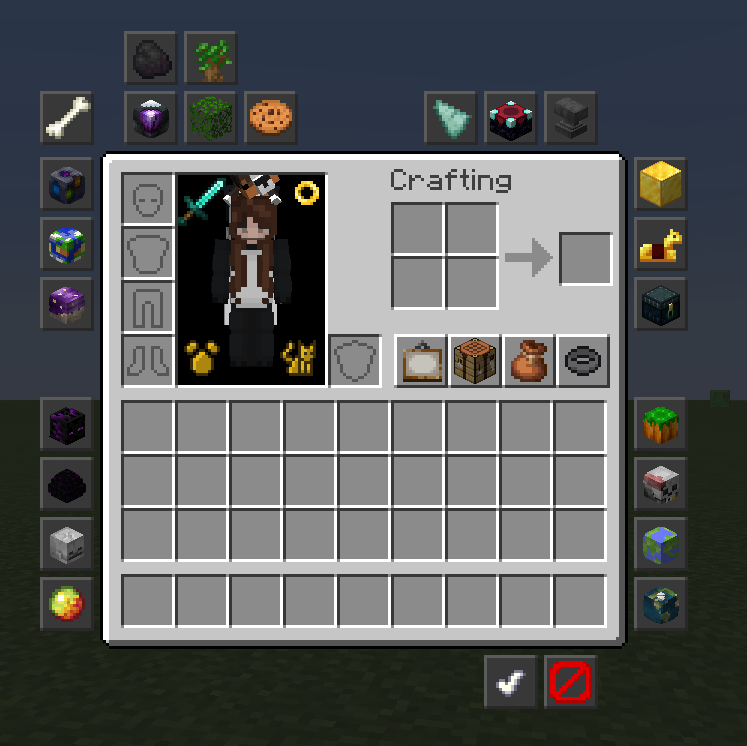
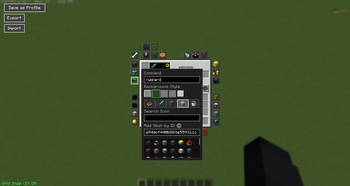
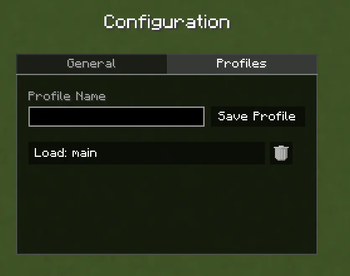
About this Mod
Inventory Buttons (Unofficial Port)
A Fabric mod that brings the popular "Inventory Buttons" feature from NotEnoughUpdates (NEU) to the 1.21.11 and 1.21.5 versions of Minecraft.
Features
- Quick Inventory Access: Add customizable buttons to your inventory and chest GUIs for quick actions.
- Editor Mode: Easily move and configure buttons to suit your playstyle.
- Fabric Port: Native support for Minecraft 1.21.11 or 1.21.5 using the Fabric Mod Loader.
Mod Commands
Use /invbuttons or /inventorybuttons to open the mod's main config. At the moment, there are just a few qol settings.
Access the button editor through the config or use the command /inventorybuttons edit (or /invbuttons edit)
Bugs and Issues
Please report bugs and issues to the mod's GitHub issues page here (also accessible on the right hand side of the Modrinth page)
Credits & Attribution
This mod is a derivative work based on NotEnoughUpdates (NEU).
- Original Author: Moulberry, Many other contributors
- Original Repository: NotEnoughUpdate
- Assets & Design: All textures and design concepts for the buttons and editor are the intellectual property of the NotEnoughUpdates contributors.
This port is not endorsed by, affiliated with, or supported by the official NotEnoughUpdates team. Please do not report bugs regarding this mod to the official NEU tracker.
License
This project is licensed under the GNU Lesser General Public License v3.0 (LGPLv3), the same license as the original NotEnoughUpdates mod.
You are free to modify and redistribute this mod under the terms of the LGPLv3. See the LICENSE file for the full text.
Available Versions
How to Install Inventory Buttons on Your Server
Order Server
Order a Minecraft Java server with at least 3 GB RAM (4 GB recommended).
Set fabric Loader
In the panel under "Egg", select the fabric loader and matching Minecraft version (1.21.11).
Install Mod
Open the mod browser in the dashboard and search for "Inventory Buttons". Click "Install" – done! Alternatively, upload the .jar via SFTP to the /mods folder.
Compatibility
Mod Loaders
Minecraft Versions
1.21.11, 1.21.5
Server-side
✗ UnsupportedRecommended RAM
4 GB(min. 3 GB)Frequently Asked Questions
Inventory Buttons server crashes on startup – what to do?
Most common cause: wrong fabric version or insufficient RAM. Check the server log (latest.log) for "OutOfMemoryError" or "Mixin" errors. With Mado Hosting: ensure at least 3 GB RAM is allocated and the loader matches the mod version (1.21.11). You can switch loaders with one click in the panel.
Is Inventory Buttons compatible with fabric?
Inventory Buttons officially supports fabric for Minecraft 1.21.11, 1.21.5. The Mado dashboard automatically detects incompatible loader combinations.
Server lagging with Inventory Buttons – how to optimize performance?
Recommended RAM: 4 GB (per 8 players). Use /spark profiler to check if Inventory Buttons consumes the most tick time. Common fixes: reduce server view-distance to 8-10, install "performant" or "starlight" as supplementary mods on Forge. With Mado Hosting, your server runs on NVMe SSDs with dedicated CPU cores for minimal latency.
Similar Mods




![[ETF] Entity Texture Features](https://cdn.modrinth.com/data/BVzZfTc1/af683d206d50b05258d865b0d6e4aa2f2cee12f2_96.webp)
![[EMF] Entity Model Features](https://cdn.modrinth.com/data/4I1XuqiY/6e5bbd0d06b1741bfdab6c0cfab6de8fdaf0064c_96.webp)
Rent Modded Server
Install Inventory Buttons with just one click on your server.