
Inventory Slots
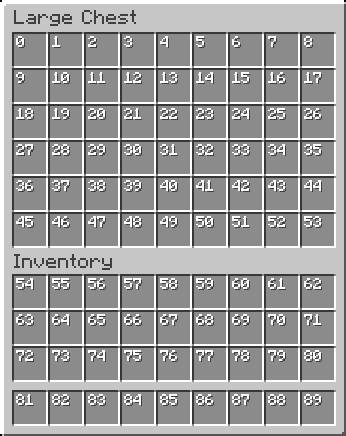
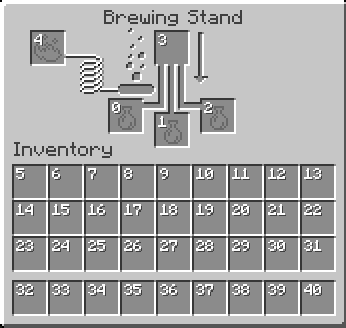
A Fabric Minecraft mod for viewing container slot index's at the click of a button! Useful for development/configuration!
Screenshots
About this Mod
InventorySlots
InventorySlots is a lightweight Fabric mod designed for developers and UI configurators. It provides a client-side overlay for inventory slots, making it easier to visualize slot indices and debug layout positioning in real-time.
Features
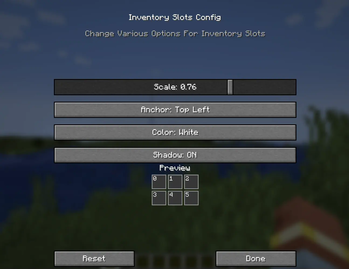
The mod includes a built-in configuration menu that allows for live adjustments without requiring a game restart.
- Customizable text scale (0.25x to 2.0x) and hex color support.
- Multiple anchor points for precise text alignment (e.g., top-left, center, bottom-right).
- Optional text shadowing for better visibility against different UI textures.
- Persisted configuration settings across game sessions.
- Fully client-side implementation; compatible with all servers.
Keybinds
- Toggle Overlays:
HOME - Open Config Menu:
END
Note: Keybinds can be remapped via the standard Minecraft controls menu if they conflict with other mods.
Requirements
This mod requires Minecraft 1.21.4 or newer and the following dependencies:
- Fabric API
Support
For bug reports or feature requests, please submit an issue through the GitHub repository:
https://github.com/BitByLogics/InventorySlots/issues
Available Versions
How to Install Inventory Slots on Your Server
Order Server
Order a Minecraft Java server with at least 3 GB RAM (4 GB recommended).
Set fabric Loader
In the panel under "Egg", select the fabric loader and matching Minecraft version (1.21.11).
Install Mod
Open the mod browser in the dashboard and search for "Inventory Slots". Click "Install" – done! Alternatively, upload the .jar via SFTP to the /mods folder.
Compatibility
Mod Loaders
Minecraft Versions
1.21.11, 1.21.10, 1.21.8 (+4 more)
Server-side
✗ UnsupportedRecommended RAM
4 GB(min. 3 GB)Frequently Asked Questions
Inventory Slots server crashes on startup – what to do?
Most common cause: wrong fabric version or insufficient RAM. Check the server log (latest.log) for "OutOfMemoryError" or "Mixin" errors. With Mado Hosting: ensure at least 3 GB RAM is allocated and the loader matches the mod version (1.21.11). You can switch loaders with one click in the panel.
Is Inventory Slots compatible with fabric?
Inventory Slots officially supports fabric for Minecraft 1.21.11, 1.21.10, 1.21.8. The Mado dashboard automatically detects incompatible loader combinations.
Server lagging with Inventory Slots – how to optimize performance?
Recommended RAM: 4 GB (per 8 players). Use /spark profiler to check if Inventory Slots consumes the most tick time. Common fixes: reduce server view-distance to 8-10, install "performant" or "starlight" as supplementary mods on Forge. With Mado Hosting, your server runs on NVMe SSDs with dedicated CPU cores for minimal latency.
Similar Mods




![[ETF] Entity Texture Features](https://cdn.modrinth.com/data/BVzZfTc1/af683d206d50b05258d865b0d6e4aa2f2cee12f2_96.webp)
![[EMF] Entity Model Features](https://cdn.modrinth.com/data/4I1XuqiY/6e5bbd0d06b1741bfdab6c0cfab6de8fdaf0064c_96.webp)
Rent Modded Server
Install Inventory Slots with just one click on your server.