
Inventory Stopwatch Mod
A lightweight client-side mod that times how fast you open and close your inventory, featuring session averages and speed rankings.
Screenshots
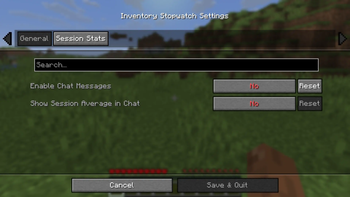
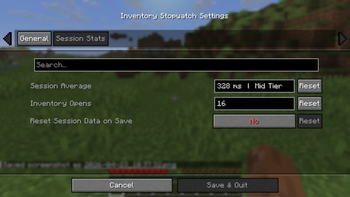
About this Mod
Inventory Stopwatch Mod
How fast is your refill? Inventory Stopwatch is a client-side utility designed for competitive players and kit-peddlers who want to optimize their inventory management speed. Whether you are practicing for high-tier combat or just want to see how much time you spend in your UI, this mod provides frame-perfect timing for every inventory session.
✨ Features
Precise Timing: Automatically measures the exact duration (in milliseconds) from the moment you open your inventory to the moment you close it.
Speed Ratings: Receive immediate feedback on your performance with a built-in tier system that ranges from “Too Slow” to the legendary “HT1 LEVEL.”
Session Statistics: It records your total inventory opens and your average for this session.
Complete Customization: The Mod Menu integration allows you to toggle chat messages, display or hide session averages, or reset your statistics instantly.
Lightweight Commands: Manage your settings quickly with
/invstopwatchcommands.
📊 Speed Tiers
Do you have what it takes to hit the top tier?
HT1 LEVEL: < 220ms
High Tier: < 300ms
Mid Tier: < 450ms
Average: < 600ms
🛠 Configuration
This mod requires Cloth Config and Mod Menu for the settings interface.
Available commands:
/invstopwatch msgOn/msgOff- Toggle the result message./invstopwatch average- View your current session average./invstopwatch reset- Wipe your current session data.
Special thanks to _Kewl for the help with development!
Available Versions
How to Install Inventory Stopwatch Mod on Your Server
Order Server
Order a Minecraft Java server with at least 3 GB RAM (4 GB recommended).
Set fabric Loader
In the panel under "Egg", select the fabric loader and matching Minecraft version (1.21.11).
Install Mod
Open the mod browser in the dashboard and search for "Inventory Stopwatch Mod". Click "Install" – done! Alternatively, upload the .jar via SFTP to the /mods folder.
Compatibility
Mod Loaders
Minecraft Versions
1.21.11
Server-side
✗ UnsupportedRecommended RAM
4 GB(min. 3 GB)Frequently Asked Questions
Inventory Stopwatch Mod server crashes on startup – what to do?
Most common cause: wrong fabric version or insufficient RAM. Check the server log (latest.log) for "OutOfMemoryError" or "Mixin" errors. With Mado Hosting: ensure at least 3 GB RAM is allocated and the loader matches the mod version (1.21.11). You can switch loaders with one click in the panel.
Is Inventory Stopwatch Mod compatible with fabric?
Inventory Stopwatch Mod officially supports fabric for Minecraft 1.21.11. The Mado dashboard automatically detects incompatible loader combinations.
Server lagging with Inventory Stopwatch Mod – how to optimize performance?
Recommended RAM: 4 GB (per 8 players). Use /spark profiler to check if Inventory Stopwatch Mod consumes the most tick time. Common fixes: reduce server view-distance to 8-10, install "performant" or "starlight" as supplementary mods on Forge. With Mado Hosting, your server runs on NVMe SSDs with dedicated CPU cores for minimal latency.
Similar Mods




![[ETF] Entity Texture Features](https://cdn.modrinth.com/data/BVzZfTc1/af683d206d50b05258d865b0d6e4aa2f2cee12f2_96.webp)
![[EMF] Entity Model Features](https://cdn.modrinth.com/data/4I1XuqiY/6e5bbd0d06b1741bfdab6c0cfab6de8fdaf0064c_96.webp)
Rent Modded Server
Install Inventory Stopwatch Mod with just one click on your server.