
IQ Addons
IQ is a Hypixel SkyBlock mod made especially for Kuudra. While it includes a few general features, most of them are Kuudra-focused.
Screenshots
About this Mod
🎯 What is IQ?
IQ is a lightweight Fabric mod designed to enhance your Kuudra experience on Hypixel SkyBlock. While it includes some general features, the core focus is on providing useful, non-intrusive QoL improvements for every phase of Kuudra runs.
From the very beginning, our goal has been to keep IQ clean and minimal — offering only useful features with no unnecessary clutter.
✨ Features
Phase 1 — Supplies
🎯 Pearl Waypoints
Shows precise waypoints for pearl throws based on your position. Includes stand block indicators and timing labels.
- Automatically detects your current area
- Shows optimal pearl landing spots
- Displays recommended throw timing
- Fully customizable via JSON config
📦 Supply Waypoints
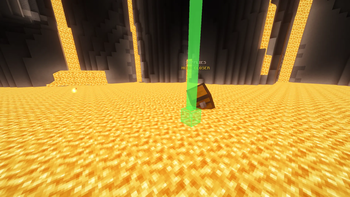
Draws beacon beams at supply crate locations carried by giants.
- Real-time tracking of supply carriers
- Customizable waypoint colors
- Automatic updates as giants move
🏔️ Pile Waypoints
Displays beacons at all crate pile locations.
- Highlights remaining piles
- Different color for "no pre" piles
- Automatically hides completed piles
⏱️ Supply Timers
Tracks and displays supply pickup times for all players.
- Shows player name and pickup time
- Color-coded based on speed
- Clean HUD overlay
🔔 Supply Alerts
Multiple alert systems to keep you informed:
- No Pre Alert — Automatically announces missing pre supplies to party chat
- Already Picking Alert — Shows title when someone else is picking your supply
- Second Supply Alert — Announces second supply position (Shop/X Cannon/Square)
- Supply Recover Message — Sends your custom chat message when you recover a supply
- Supply Giant Hitbox Alert — Highlights and alerts when you recover inside giant hitbox
📈 Supply Progress Widget
Replaces the default supply title with a clean, movable widget.
- Live 0/6 progress updates
- Better visibility than vanilla title spam
- Fully HUD-editable position
Phase 2 — Build
🏗️ Build Progress Overlay
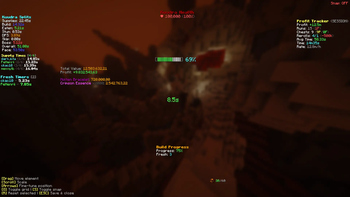
Displays a comprehensive build progress HUD.
- Current build percentage
- Fresh count tracker
- ETA estimation
- Color-coded progress bar
🔥 Fresh Alerts & Timers
Complete fresh tracking system:
- Fresh Message — Sends party message when you fresh (with build %)
- Fresh Timers — Renders countdown above fresher's heads
- Fresh Countdown — Personal HUD countdown for your fresh
- Fresh Highlight — Glowing effect on players who are fresh
👷 Build Helper Waypoints
Shows beacon beams at build piles with progress-based colors.
- Red → Orange → Yellow → Green color progression
- Displays pile progress percentage
- Helps prioritize which piles need attention
👤 Elle Highlight
Draws a visible hitbox around Elle during the build phase for easy tracking.
🔊 Ballista Build Sound Replace
Replaces the default Ballista build sound during Phase 2 with IQ custom audio.
Phase 3 — Stun
💚 Kuudra HP Bossbar
Custom health display for Kuudra.
- Shows current HP and percentage
- Color-coded health bar
- Damage calculator during boss phase
📍 Stun Waypoints
Displays waypoints at optimal stun positions.
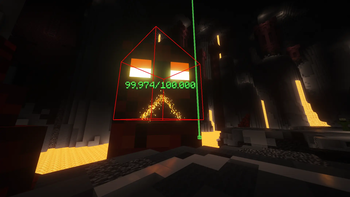
🎯 Kuudra Hitbox
Renders Kuudra's hitbox with a glowing outline for easier targeting.
- Customizable color
- Works through walls
🚫 Block Useless Perks
Prevents accidentally purchasing useless perks from the perk menu.
- Blocks: Steady Hands, Bomberman, Auto Revive, Human Cannonball, Elle's Lava Rod, Elle's Pickaxe
Phase 4 — Boss Fight
🧭 Kuudra Direction Alert
Shows which direction Kuudra will spawn from.
- Color-coded direction indicator
- Large on-screen title alert
⚔️ Rend Damage Tracker
Tracks when teammates deal Rend damage to Kuudra.
- Shows damage amount
- Displays timing since boss start
- Color-coded damage tiers
⚠️ Danger Zone Alert
Alerts when you're standing on tentacle danger zones.
- JUMP! alert on yellow/orange/red terracotta
- Audio notification
🦴 Backbone Alert
Tracks Bonemerang backbone timing with on-screen progress and Rend sync alert.
🙈 Hide Kuudra Damage Title
Hides the vanilla Kuudra damage title (e.g. ☠ 240M/240M❤) for a cleaner boss screen.
General Features
📊 Custom Splits
Comprehensive run timing display.
- Individual phase times with color grading
- Overall run time
- Pace estimation
- Customizable thresholds
👥 Team Highlight
Highlights your teammates with a glowing effect during runs.
- Distinguishes real players from NPCs
- Customizable highlight color
💜 Mana Drain Notify
Announces Extreme Focus mana usage to party chat with affected player count.
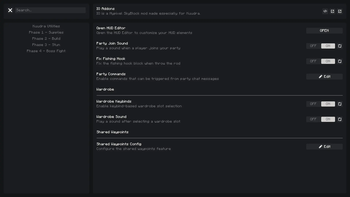
🔔 Party Join Sound
Plays a notification sound when someone joins your party.
🔇 Hide Mob Nametags
Prevents Kuudra mob nametags from rendering, reducing visual clutter.
🏆 Personal Best Tracker
Tracks your best Kuudra run time and notifies you when you beat your PB.
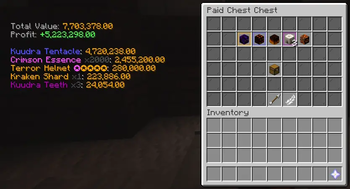
💰 Kuudra Profit Tracker
Calculates profit/loss per run with configurable pricing logic.
- Bazaar and Auction-aware pricing
- Includes keys, essence, books, armor and pet bonus adjustments
- Hourly rate and session tracking
🧰 Chest Utilities
Utility set for chest-focused runs.
- Chest Value Display — Shows chest value when opening reward chests
- Chest Counter Tracker — Tracks progress toward the 60 chest cap
- Chest Counter Party Reminders — Optional milestone/cap announcements in party chat
- Croesus Helper — Highlights already opened chests in Croesus/Vesuvius menus
🔁 Auto Requeue
Automatically queues the next Kuudra run after boss completion with configurable delay.
📣 Kuudra Notifications
Centralized event notifications for key run moments.
- Build started / build done
- Supplies done
- Ichor used
- Cannonball purchased
- No pre reminder
- SOS (pre-stun) reminder
- Phase change alerts
- Optional notification sound
🪄 Ability Announce
Announces selected ability casts in party chat.
- Spirit Spark
- Hollowed Rush
- Raging Wind
- Ichor Pool
- Mana Drain
🎮 Party Commands
Supports chat-based party commands triggered by `!` messages.
- Warp / transfer / promote / kick shortcuts
- Quick joininstance commands (
!t1to!t5) - Ping and TPS replies
- Share runs, chest progress, and profit stats in party chat
👔 Wardrobe Keybinds
Lets you swap Wardrobe sets instantly using configurable keybinds with optional sound feedback.
🚨 Limbo Alert
Detects SkyBlock limbo kicks and alerts your party automatically.
🧹 Extra Visual Cleanup
Additional clutter-reduction options for cleaner gameplay.
- Hide Kuudra vanilla boss bar
- Hide selected useless armor stands
Pearl Waypoints Customization
Advanced users can edit pearl_waypoints.json to customize pearl throw locations. The mod will automatically reload changes.
💬 Support
Need help or have suggestions?
- 🐛 Bug Reports: Open an issue on GitHub
- 💡 Feature Requests: Join our Discord
- 💬 General Help: Ask in our Discord server
👥 Credits
| PeHenrii Lead Developer |
DarkJota Mind behind the features |
⭐ Star us on GitHub if you find this useful!
Available Versions
How to Install IQ Addons on Your Server
Order Server
Order a Minecraft Java server with at least 3 GB RAM (4 GB recommended).
Set fabric Loader
In the panel under "Egg", select the fabric loader and matching Minecraft version (1.21.11).
Install Mod
Open the mod browser in the dashboard and search for "IQ Addons". Click "Install" – done! Alternatively, upload the .jar via SFTP to the /mods folder.
Compatibility
Mod Loaders
Minecraft Versions
1.21.11, 1.21.10
Server-side
✗ UnsupportedRecommended RAM
4 GB(min. 3 GB)Frequently Asked Questions
IQ Addons server crashes on startup – what to do?
Most common cause: wrong fabric version or insufficient RAM. Check the server log (latest.log) for "OutOfMemoryError" or "Mixin" errors. With Mado Hosting: ensure at least 3 GB RAM is allocated and the loader matches the mod version (1.21.11). You can switch loaders with one click in the panel.
Is IQ Addons compatible with fabric?
IQ Addons officially supports fabric for Minecraft 1.21.11, 1.21.10. The Mado dashboard automatically detects incompatible loader combinations.
Server lagging with IQ Addons – how to optimize performance?
Recommended RAM: 4 GB (per 8 players). Use /spark profiler to check if IQ Addons consumes the most tick time. Common fixes: reduce server view-distance to 8-10, install "performant" or "starlight" as supplementary mods on Forge. With Mado Hosting, your server runs on NVMe SSDs with dedicated CPU cores for minimal latency.
Similar Mods




![[ETF] Entity Texture Features](https://cdn.modrinth.com/data/BVzZfTc1/af683d206d50b05258d865b0d6e4aa2f2cee12f2_96.webp)
![[EMF] Entity Model Features](https://cdn.modrinth.com/data/4I1XuqiY/6e5bbd0d06b1741bfdab6c0cfab6de8fdaf0064c_96.webp)
Rent Modded Server
Install IQ Addons with just one click on your server.