
Iridium Exporter
Export item data and icons for the program Iridium.
Screenshots
About this Mod
Iridium
The Program - Iridium
The program Iridium (currently in beta) is a visual editor for minecraft recipes. The "Holy Grail" of minecraft recipe editors, this program allows you to drag and drop items to build new recipes or remove preexisting ones.
If you wish to use it, you can either find it under the same organization the source code for this mod is in or you can go to the link here: https://github.com/Iridium-Visual-Recipe-Editor/Iridium
This Mod - The Exporter
This mod acts as a data collector for the program Iridium. It will collect item data and item images from in your game to use with Iridium.
How to Use
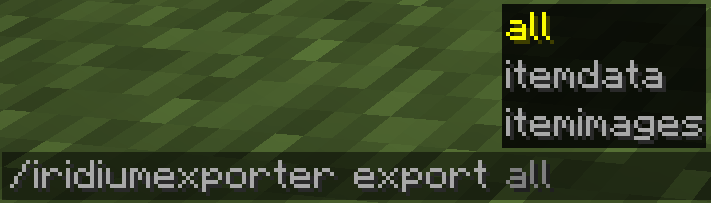
Use the command /iridium exporter and one of its three parameters:
all: Runs all data collection methods.itemdata: Only generates the itemdata.txt file.itemimages: Only generates the item images.
All data generated will be put inside the Minecraft directory under the folder "exporteddata".
FAQ
Q: Will you update to version 1.XX.X?
A: In the future, I plan to update to every version that CraftTweaker and KubeJS is on, that's also supported by Architectury.
Q: I noticed that between versions (specifically after 1.20.2 and 1.20.5) when creating the images, the background is different. Is that normal?
A: From what I've tested, it shouldn't affect anything. The only minor problem is that on 1.20.5+ the blur makes it harder to see how many images have been generated, but that's not a big problem by any means.
Credits
I'd like to thank the mods IconExporter and TellMe for taking a fair amount of inspiration from their code.
Available Versions
How to Install Iridium Exporter on Your Server
Order Server
Order a Minecraft Java server with at least 3 GB RAM (4 GB recommended).
Set fabric Loader
In the panel under "Egg", select the fabric loader and matching Minecraft version (1.20.6).
Install Mod
Open the mod browser in the dashboard and search for "Iridium Exporter". Click "Install" – done! Alternatively, upload the .jar via SFTP to the /mods folder.
Compatibility
Mod Loaders
Minecraft Versions
1.20.6, 1.20.5, 1.20.4 (+2 more)
Server-side
✗ UnsupportedRecommended RAM
4 GB(min. 3 GB)Frequently Asked Questions
Iridium Exporter server crashes on startup – what to do?
Most common cause: wrong fabric version or insufficient RAM. Check the server log (latest.log) for "OutOfMemoryError" or "Mixin" errors. With Mado Hosting: ensure at least 3 GB RAM is allocated and the loader matches the mod version (1.20.6). You can switch loaders with one click in the panel.
Is Iridium Exporter compatible with fabric and forge?
Iridium Exporter officially supports fabric, forge for Minecraft 1.20.6, 1.20.5, 1.20.4. Note: Forge and Fabric mods are NOT cross-compatible – pick one loader and stick with it. The Mado dashboard automatically detects incompatible loader combinations.
Server lagging with Iridium Exporter – how to optimize performance?
Recommended RAM: 4 GB (per 8 players). Use /spark profiler to check if Iridium Exporter consumes the most tick time. Common fixes: reduce server view-distance to 8-10, install "performant" or "starlight" as supplementary mods on Forge. With Mado Hosting, your server runs on NVMe SSDs with dedicated CPU cores for minimal latency.
Similar Mods




![[ETF] Entity Texture Features](https://cdn.modrinth.com/data/BVzZfTc1/af683d206d50b05258d865b0d6e4aa2f2cee12f2_96.webp)
![[EMF] Entity Model Features](https://cdn.modrinth.com/data/4I1XuqiY/6e5bbd0d06b1741bfdab6c0cfab6de8fdaf0064c_96.webp)
Rent Modded Server
Install Iridium Exporter with just one click on your server.