
Item Transform Helper
A Minecraft helper tool to interactively adjust the rotation, position, and scale of Items.
Screenshots
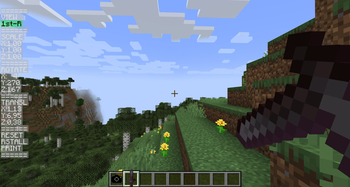
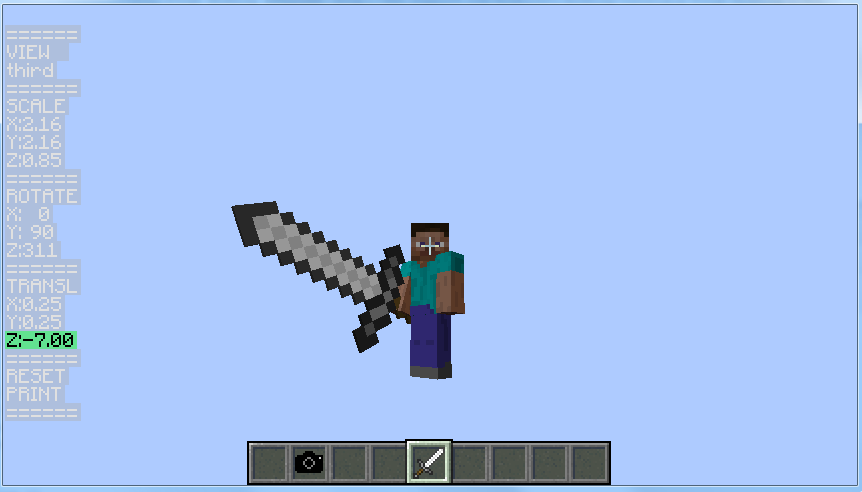
About this Mod
Item Transform Helper
Missing Versions
This mod is missing some versions (1.1 and 1.2 for MC 1.8 and 1.0.0 up to 1.3 deobfuscated for MC 1.8, 1.10.2a and most likely also some other ones).
If you still have access to these "missing" versions, please contact me and I will gladly add them to this project as an archive!
Description
When you create a custom item, you need to provide ItemCameraTransforms for it. This project is an interactive
tool to help you get the transforms right by interactively adjusting them.
How to use:
- Place the Camera item somewhere in the player's hotbar
- Hold the Item you want to modify in the player's hand
- Use the up/down keys to move up and down the menu.
- Use the left/right keys to edit the value (e.g. scaleX)
- To select a different view (e.g. first person, third person) use left/right to change the VIEW menu item.
- To modify the transform for an item on the ground:
- Throw your Item onto the ground, and then put another copy of your Item into the player's hand
- Use left/right to change the VIEW menu item to grnd
Use the same technique for items in the gui, on your head (eg pumpkin), fixed (in picture frames), or in the
player's left hand.
- To reset the parameters for the current view, select the RESET menu item and press left or right. Use RESET ALL (RSTALL) to reset the parameters for all views.
You can also copy parameters from a vanilla item to your custom item:- Hold the vanilla item in your hand
- Select RESET or RSTALL, press left or right.
- Hold your custom item in your hand.
- When your item looks right, select PRINT and press left or right to print the current parameters to the console
- Copy the appropriate lines from the console to your item model json file
The item will appear in the Helpers tab in the creative inventory.
For background information on
- Items: see here https://greyminecraftcoder.blogspot.com/2013/12/items.html
- Rendering items: see here https://greyminecraftcoder.blogspot.com/2014/12/item-rendering-18.html
- This link describes the structure of the JSON Item Model file (see the Item Models section halfway down):
- https://minecraft.fandom.com/wiki/Model#Item_models
As an alternative to the Item Transform Helper, you can also use BlockBench (https://blockbench.net/) to determine the correct transforms for your model, i.e. either
- Create a new model in BlockBench; or
- Import an existing model (either the json model file, or the item "generated" texture)
Thanks to TheGreyGhost for creating the mod and maintaining it until 1.16.1, ThexXTURBOXx for updating to 1.11.2 and Architectury (Forge + Fabric + Quilt) 1.16.5+, Romejanic for updating to 1.12.2, and to lehrj for updating to 1.16.1!
Original Video Showcase

Other Links
Available Versions
How to Install Item Transform Helper on Your Server
Order Server
Order a Minecraft Java server with at least 3 GB RAM (4 GB recommended).
Set fabric Loader
In the panel under "Egg", select the fabric loader and matching Minecraft version (26.1.2).
Install Mod
Open the mod browser in the dashboard and search for "Item Transform Helper". Click "Install" – done! Alternatively, upload the .jar via SFTP to the /mods folder.
Compatibility
Mod Loaders
Minecraft Versions
26.1.2, 26.1.1, 26.1 (+34 more)
Server-side
✓ RequiredRecommended RAM
4 GB(min. 3 GB)Frequently Asked Questions
Item Transform Helper server crashes on startup – what to do?
Most common cause: wrong fabric version or insufficient RAM. Check the server log (latest.log) for "OutOfMemoryError" or "Mixin" errors. With Mado Hosting: ensure at least 3 GB RAM is allocated and the loader matches the mod version (26.1.2). You can switch loaders with one click in the panel.
Is Item Transform Helper compatible with fabric and forge and neoforge and quilt?
Item Transform Helper officially supports fabric, forge, neoforge, quilt for Minecraft 26.1.2, 26.1.1, 26.1. Note: Forge and Fabric mods are NOT cross-compatible – pick one loader and stick with it. The Mado dashboard automatically detects incompatible loader combinations.
Server lagging with Item Transform Helper – how to optimize performance?
Recommended RAM: 4 GB (per 8 players). Use /spark profiler to check if Item Transform Helper consumes the most tick time. Common fixes: reduce server view-distance to 8-10, install "performant" or "starlight" as supplementary mods on Forge. With Mado Hosting, your server runs on NVMe SSDs with dedicated CPU cores for minimal latency.
Similar Mods




Rent Modded Server
Install Item Transform Helper with just one click on your server.