
Item Use Delay Fixer
Removes the delay to use items when holding right click
Screenshots

About this Mod
Item Use Delay Fixer
Fixes a behaviour in the game with the right click (use item) delay timer.
How Minecraft works
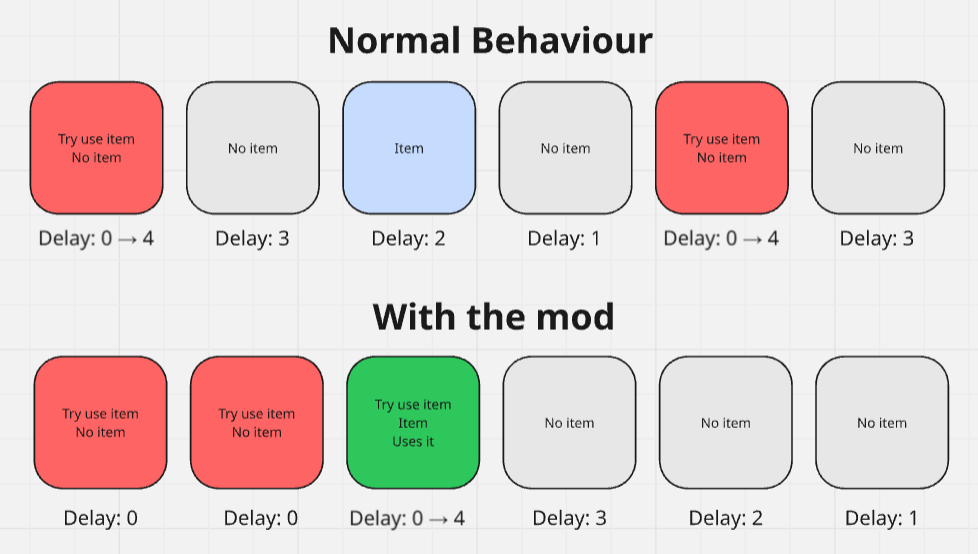
Minecraft is simple on that part. If you press the right click button, it sets a variable to 4.
This variable decreases every tick (50ms), and once it reaches 0, if you're still holding right click it'll try to use an item again.
The issue? What if you have no item, no block to be used. Then it still sets the variable to 4 again.
private void rightClickMouse() {
    if (!this.playerController.getIsHittingBlock()) { // if not using left click at the same time
        // set the variable to 4
        this.rightClickDelayTimer = 4; // that's the very first thing done in the right click function!
        // ...
        // rest of the code with the item detection handling
    }
}
What does the mod do?
That behaviour is pretty annoying, because it can make so if you start holding your click too early/at a bad timing, it delays your item use and could make it never happen.
So instead of staying at 4, if no action happened it jumps back to 0, letting the function run the tick just after too, for as long as needed.
This mod is NOT a FastPlace (or "Fast Item", whatever people call it nowadays to bypass the cheating term)
Compatibility/Version
This project should work with every version of the game, on Fabric/NeoForge/Forge/Quilt.
It may break on Forge 1.13-1.16~, unsure.
It should work on every version from 1.7-1.12.2 and 1.20-26.2 (feel free to report to me on my discord server if it DOES or doesn't)
Available Versions
How to Install Item Use Delay Fixer on Your Server
Order Server
Order a Minecraft Java server with at least 3 GB RAM (4 GB recommended).
Set fabric Loader
In the panel under "Egg", select the fabric loader and matching Minecraft version (26.2).
Install Mod
Open the mod browser in the dashboard and search for "Item Use Delay Fixer". Click "Install" – done! Alternatively, upload the .jar via SFTP to the /mods folder.
Compatibility
Mod Loaders
Minecraft Versions
26.2, 26.1.2, 26.1.1 (+80 more)
Server-side
✗ UnsupportedRecommended RAM
4 GB(min. 3 GB)Frequently Asked Questions
Item Use Delay Fixer server crashes on startup – what to do?
Most common cause: wrong fabric version or insufficient RAM. Check the server log (latest.log) for "OutOfMemoryError" or "Mixin" errors. With Mado Hosting: ensure at least 3 GB RAM is allocated and the loader matches the mod version (26.2). You can switch loaders with one click in the panel.
Is Item Use Delay Fixer compatible with fabric and forge and neoforge and quilt?
Item Use Delay Fixer officially supports fabric, forge, neoforge, quilt for Minecraft 26.2, 26.1.2, 26.1.1. Note: Forge and Fabric mods are NOT cross-compatible – pick one loader and stick with it. The Mado dashboard automatically detects incompatible loader combinations.
Server lagging with Item Use Delay Fixer – how to optimize performance?
Recommended RAM: 4 GB (per 8 players). Use /spark profiler to check if Item Use Delay Fixer consumes the most tick time. Common fixes: reduce server view-distance to 8-10, install "performant" or "starlight" as supplementary mods on Forge. With Mado Hosting, your server runs on NVMe SSDs with dedicated CPU cores for minimal latency.
Similar Mods




Rent Modded Server
Install Item Use Delay Fixer with just one click on your server.