
Item Finder
A Fabric server mod for finding items and loot tables in a large area.
Screenshots
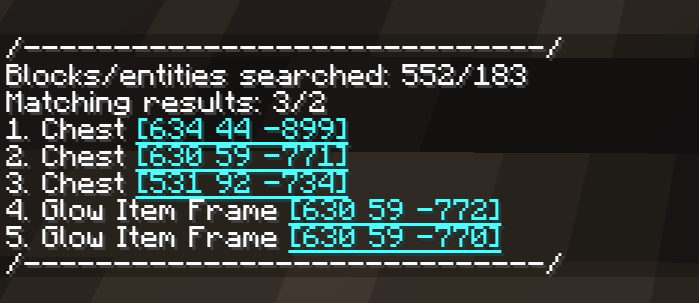
About this Mod
About
Allows performing a large-scale filtered search for items in all loaded/generated chunks.
Checks for items in (probably) all "storage" block entities and entities.
Runs on server side. Install on client for some useful keybinds.
YetAnotherConfigLib for config.
Usage
Full information - README.
/finditem id <id> - search for items with exact ID.
/finditem name <name> - search for items that contain
/finditem data <data> - search for items that contain string in their NBT/data components.
/finditem loot_table <loot_table> - search for lootable block entities with this loot table.
Special arguments: any, none, none_empty.
Search modes
Normal mode only checks currently loaded chunks & entities, runs instantly.
Global mode can be activated by adding global to the command: /finditem <search_type> <argument> global
Searches all generated chunks in the current dimension, may take a few seconds.
Additional
- You can teleport to search results in order by pressing a keybind (
Nby default). - Mod has keybinds to perform a normal/global item search using the currently held item (unset by default).
- Hovering mouse over the BE/entity names in search results will show the item stacks/loot tables that matched the search parameters.
- Mod will do nested search for shulker boxes and bundles found inside containers.
- Check the config! Useful stuff there.
Available Versions
How to Install Item Finder on Your Server
Order Server
Order a Minecraft Java server with at least 3 GB RAM (4 GB recommended).
Set fabric Loader
In the panel under "Egg", select the fabric loader and matching Minecraft version (1.21.11).
Install Mod
Open the mod browser in the dashboard and search for "Item Finder". Click "Install" – done! Alternatively, upload the .jar via SFTP to the /mods folder.
Compatibility
Mod Loaders
Minecraft Versions
1.21.11, 1.21.10, 1.21.6 (+3 more)
Server-side
✓ RequiredRecommended RAM
4 GB(min. 3 GB)Frequently Asked Questions
Item Finder server crashes on startup – what to do?
Most common cause: wrong fabric version or insufficient RAM. Check the server log (latest.log) for "OutOfMemoryError" or "Mixin" errors. With Mado Hosting: ensure at least 3 GB RAM is allocated and the loader matches the mod version (1.21.11). You can switch loaders with one click in the panel.
Is Item Finder compatible with fabric?
Item Finder officially supports fabric for Minecraft 1.21.11, 1.21.10, 1.21.6. The Mado dashboard automatically detects incompatible loader combinations.
Server lagging with Item Finder – how to optimize performance?
Recommended RAM: 4 GB (per 8 players). Use /spark profiler to check if Item Finder consumes the most tick time. Common fixes: reduce server view-distance to 8-10, install "performant" or "starlight" as supplementary mods on Forge. With Mado Hosting, your server runs on NVMe SSDs with dedicated CPU cores for minimal latency.
Similar Mods




![[ETF] Entity Texture Features](https://cdn.modrinth.com/data/BVzZfTc1/af683d206d50b05258d865b0d6e4aa2f2cee12f2_96.webp)
![[EMF] Entity Model Features](https://cdn.modrinth.com/data/4I1XuqiY/6e5bbd0d06b1741bfdab6c0cfab6de8fdaf0064c_96.webp)
Rent Modded Server
Install Item Finder with just one click on your server.