
ItemBeam
Highlights dropped items with customizable colored beams based on tooltip keywords.
Screenshots

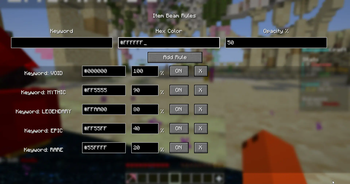
About this Mod
ItemBeam - Advanced Item Highlighting Mod
ItemBeam is a powerful visual enhancement mod that transforms how you interact with dropped items in Minecraft by adding customizable colored beams to highlight valuable loot based on tooltip keywords.
🌟 Core Features
- Tooltip-Based Scanning: The mod intelligently scans item tooltips for specific keywords and highlights matching dropped items with colored beams
- Full Tooltip Analysis: Examines all tooltip text including item names, descriptions, enchantments, and modded content
- Real-Time Processing: Instantly detects and highlights items as they're dropped or enter your view range
- Colored Light Beams: Items are highlighted with vertical beacon-style light beams that extend upward from dropped items
- Dynamic Animation: Beams feature animated textures that move smoothly, making them highly visible
- Adjustable Transparency: Each beam rule supports individual opacity settings from 0-100% for perfect visibility balance
- Color Customization: Full hex color support (#RRGGBB format) allowing unlimited color combinations
- Priority System: Rules are processed in order, with the first matching rule determining the beam color
- Enable/Disable Toggle: Individual rules can be quickly enabled or disabled without deletion
- Persistent Configuration: All settings are automatically saved to
config/itembeam.json - Easy Access: Press 'V' key (configurable) to open the rules management screen
- Visual Rule Management: Clean interface showing keyword, color, opacity, and status for each rule
- Scrollable List: Handles unlimited rules with smooth scrolling for large rule sets
- Validation: Built-in validation prevents invalid hex colors or opacity values
I got the inspiration to make this mod from a server I play on called DungeonCraft.
If you want to check it out the ip is DungeonCraft.co.
Pre-Configured Rarity Settings for DungeonCraft
- VOID - Black beams (100% opacity)
- MYTHIC - Red beams (75% opacity)
- LEGENDARY - Orange beams (50% opacity)
- EPIC - Magenta beams (35% opacity)
- RARE - Cyan beams (20% opacity)
Available Versions
How to Install ItemBeam on Your Server
Order Server
Order a Minecraft Java server with at least 3 GB RAM (4 GB recommended).
Set fabric Loader
In the panel under "Egg", select the fabric loader and matching Minecraft version (1.21.8).
Install Mod
Open the mod browser in the dashboard and search for "ItemBeam". Click "Install" – done! Alternatively, upload the .jar via SFTP to the /mods folder.
Compatibility
Mod Loaders
Minecraft Versions
1.21.8, 1.21.4
Server-side
✗ UnsupportedRecommended RAM
4 GB(min. 3 GB)Frequently Asked Questions
ItemBeam server crashes on startup – what to do?
Most common cause: wrong fabric version or insufficient RAM. Check the server log (latest.log) for "OutOfMemoryError" or "Mixin" errors. With Mado Hosting: ensure at least 3 GB RAM is allocated and the loader matches the mod version (1.21.8). You can switch loaders with one click in the panel.
Is ItemBeam compatible with fabric?
ItemBeam officially supports fabric for Minecraft 1.21.8, 1.21.4. The Mado dashboard automatically detects incompatible loader combinations.
Server lagging with ItemBeam – how to optimize performance?
Recommended RAM: 4 GB (per 8 players). Use /spark profiler to check if ItemBeam consumes the most tick time. Common fixes: reduce server view-distance to 8-10, install "performant" or "starlight" as supplementary mods on Forge. With Mado Hosting, your server runs on NVMe SSDs with dedicated CPU cores for minimal latency.
Similar Mods




Rent Modded Server
Install ItemBeam with just one click on your server.