ItemFramer
[Datapack/mod] that allows you to make an itemframe invisible and lock itemframes
Screenshots
About this Mod
ItemFramer
By: FerranV
Description:
This is a datapack that adds a custom item that makes it so you can make item frames invisible by simply right clicking on it.
Obtaining the ItemFramer item:
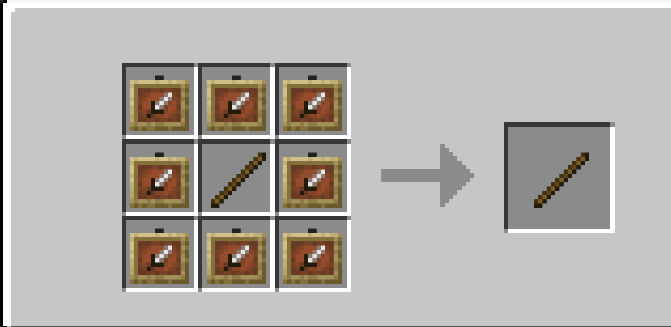
Recipe:
You can simply craft it like this:- (item frames and glow item frames are interchangeable)
Trigger command (disabled by default): type
/trigger ItemFramerin chat to obtain the ItemFramer item, this command is disabled by default and can be enabled through typing/function itemframer:admin/toggle_triggeras an operator in chat or in console.
Usage:
- Shift+Right_click on an item frame while holding the ItemFramer item to reset the rotation of the item inside.
- Right_click on an item frame while holding the ItemFramer item to make the item frame invisible.
- Left_click on an item frame while holding the ItemFramer to lock the item frame meaning that you can no longer rotate or take the item out of the item frame until the item frame is unlocked again.
Patchnotes:
v2.1.0_26.1-26.1.2(+mod): Added support for the 26.1-26.1.2 versions of Minecraft
v2.1.0_1.21.9-1.21.11(+mod): Added support for the 1.21.9-1.21.11 versions of Minecraft
v2.1.0
- Bugs:
- Optimised code a bit to produce a little less lag.
- Fixed crafting recipe not working
- New Features:
- Added a command to toggle the
/trigger commandfrom being able to be used by players (see "Obtaining the ItemFramer item") - From now on I will be packaging the datapacks as mods for easier installation on modded instances.
- Added a command to toggle the
- Bugs:
1.21.7_v2.0.1: Added support for the 1.21.7 and 1.21.8 versions of Minecraft.
1.21.6_v2.0.1: Added support for the 1.21.6 version of Minecraft.
V2.0.1: Fixed a bug where the
/trigger ItemFramercommand wouldn't always be available to everyone.V2.0.0: Added support for Minecraft 1.21.4.
V1.2.0: You can now shift+right_click on an item frame using the ItemFramer item to reset the rotation of the item inside the item frame.
V1.1.0: You can now left_click on an item frame with the ItemFramer item to lock the item frame. This makes it so that you cannot rotate the item or take out the item out of the item frame until you unlock it again.
V1.0.0: First release, you can right_click on any item frame that has an item in it with the custom ItemFramer item to make the item frame invisible
Setting it up:
Step by step Guide:
Adding it to a new world:
Step 1:
PressCreate New Worldand thenMoreStep 2:
PressData Packs
Step 3:
PressOpen Pack Folderand drop the.zipin there
Step 4:
Now the datapack should appear in the list. Just simply press the arrow to insert it into your world and hitDoneto complete
- Adding it to an existing world:
Step 1:
Locate yoursavesfolderStep 2:
Open folder of the world you want the datapack to be inStep 3:
Locate thedatapacksfolder inside your world folderStep 4:
Drop the.zipdownload into the datapacks folder
Not working?
- Try typing
/reload(in singleplayer) and if on a server also try restarting the server - Try typing
/datapack enable "file/<folder name here>"In console or in chat as an operator (this means that the datapack wouldn't be enabled previously)
Available Versions
How to Install ItemFramer on Your Server
Order Server
Order a Minecraft Java server with at least 3 GB RAM (4 GB recommended).
Set datapack Loader
In the panel under "Egg", select the datapack loader and matching Minecraft version (26.1.2).
Install Mod
Open the mod browser in the dashboard and search for "ItemFramer". Click "Install" – done! Alternatively, upload the .jar via SFTP to the /mods folder.
Compatibility
Mod Loaders
Minecraft Versions
26.1.2, 26.1.1, 26.1 (+10 more)
Server-side
✓ RequiredRecommended RAM
4 GB(min. 3 GB)Frequently Asked Questions
ItemFramer server crashes on startup – what to do?
Most common cause: wrong datapack version or insufficient RAM. Check the server log (latest.log) for "OutOfMemoryError" or "Mixin" errors. With Mado Hosting: ensure at least 3 GB RAM is allocated and the loader matches the mod version (26.1.2). You can switch loaders with one click in the panel.
Is ItemFramer compatible with datapack and fabric and forge and neoforge and quilt?
ItemFramer officially supports datapack, fabric, forge, neoforge, quilt for Minecraft 26.1.2, 26.1.1, 26.1. Note: Forge and Fabric mods are NOT cross-compatible – pick one loader and stick with it. The Mado dashboard automatically detects incompatible loader combinations.
Server lagging with ItemFramer – how to optimize performance?
Recommended RAM: 4 GB (per 8 players). Use /spark profiler to check if ItemFramer consumes the most tick time. Common fixes: reduce server view-distance to 8-10, install "performant" or "starlight" as supplementary mods on Forge. With Mado Hosting, your server runs on NVMe SSDs with dedicated CPU cores for minimal latency.
Similar Mods




![[ETF] Entity Texture Features](https://cdn.modrinth.com/data/BVzZfTc1/af683d206d50b05258d865b0d6e4aa2f2cee12f2_96.webp)
![[EMF] Entity Model Features](https://cdn.modrinth.com/data/4I1XuqiY/6e5bbd0d06b1741bfdab6c0cfab6de8fdaf0064c_96.webp)
Rent Modded Server
Install ItemFramer with just one click on your server.