
ItemPro
ItemPro - Because knowledge is power, even in Minecraft! ⚔️📚✨
Screenshots
About this Mod
ItemPro
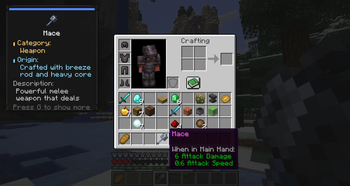
Advanced item information panel for Minecraft. ItemPro enhances your inventory experience by providing detailed information about items directly in the game.
Features
🏷️ Item Information Panel
- Category: Shows what type of item it is (Weapon, Tool, Armor, etc.)
- Origin: How to obtain the item (Crafting recipe, Drop location, etc.)
- Description: Detailed explanation of the item's purpose and stats
- Enchantments: Lists all enchantments with their levels
📱 Smart Display
- Responsive Design: Panel adapts to screen size and inventory position
- Clean Layout: Modern UI with rounded corners, shadows, and color-coded sections
- Text Wrapping: Long descriptions automatically wrap to fit the panel
- Clipping Protection: All text stays within panel boundaries
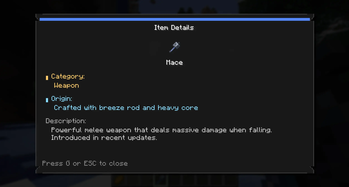
🔍 Detail View
- Press G while hovering over an item to open the detailed view
- Full Information: Complete item details in a scrollable window
- Large Icons: Items displayed prominently for easy identification
- Comprehensive Data: All categories, origins, and descriptions in one place
📚 Extensive Database
- 60+ Items Supported: From basic tools to rare treasures
- Vanilla Items: Swords, armor, tools, materials, blocks, and special items
- Detailed Entries: Each item has category, origin, and description
- Regular Updates: Database grows with new Minecraft content
Installation
- Install Fabric Loader for Minecraft 1.21.10
- Install Fabric API (required dependency)
- Download ItemPro from Modrinth
- Place the jar file in your
modsfolder - Launch Minecraft and enjoy!
Dependencies
- Fabric API
Available Versions
How to Install ItemPro on Your Server
Order Server
Order a Minecraft Java server with at least 3 GB RAM (4 GB recommended).
Set fabric Loader
In the panel under "Egg", select the fabric loader and matching Minecraft version (1.21.10).
Install Mod
Open the mod browser in the dashboard and search for "ItemPro". Click "Install" – done! Alternatively, upload the .jar via SFTP to the /mods folder.
Compatibility
Mod Loaders
Minecraft Versions
1.21.10
Server-side
✗ UnsupportedRecommended RAM
4 GB(min. 3 GB)Frequently Asked Questions
ItemPro server crashes on startup – what to do?
Most common cause: wrong fabric version or insufficient RAM. Check the server log (latest.log) for "OutOfMemoryError" or "Mixin" errors. With Mado Hosting: ensure at least 3 GB RAM is allocated and the loader matches the mod version (1.21.10). You can switch loaders with one click in the panel.
Is ItemPro compatible with fabric?
ItemPro officially supports fabric for Minecraft 1.21.10. The Mado dashboard automatically detects incompatible loader combinations.
Server lagging with ItemPro – how to optimize performance?
Recommended RAM: 4 GB (per 8 players). Use /spark profiler to check if ItemPro consumes the most tick time. Common fixes: reduce server view-distance to 8-10, install "performant" or "starlight" as supplementary mods on Forge. With Mado Hosting, your server runs on NVMe SSDs with dedicated CPU cores for minimal latency.
Similar Mods




Rent Modded Server
Install ItemPro with just one click on your server.