
ItemRadial
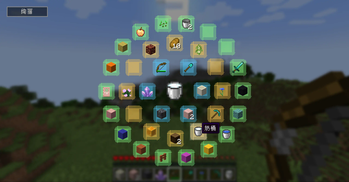
Quick item switching - Press the shortcut key to open the menu, select the item with the mouse, and release the shortcut key to equip it on your hand
Screenshots
About this Mod
Item Radial is an innovative Minecraft assistant mod that provides players with a visually appealing and practical radial menu system to quickly access their item bar. The main features include:
- Intuitive radial menu design - Use the R key (default) to call up a circular shortcut menu
- Three visual themes to choose from:
-Dazzling style (default): Color grouping, hover highlighting effect
-Original style: Simple gray tone design
-Minimalist style: Translucent black background, minimizing interference - Item Preview - Hovering items will be enlarged and displayed in the center position
- Quick item switching - Press the shortcut key to open the menu, select the item with the mouse, and release the shortcut key to equip it on your hand
This module is particularly suitable for quickly switching tools and items in survival mode, or for quickly selecting building materials during construction. All visual elements can be switched in real-time through theme buttons to meet the aesthetic preferences of different players.
Available Versions
How to Install ItemRadial on Your Server
Order Server
Order a Minecraft Java server with at least 3 GB RAM (4 GB recommended).
Set fabric Loader
In the panel under "Egg", select the fabric loader and matching Minecraft version (1.21.3).
Install Mod
Open the mod browser in the dashboard and search for "ItemRadial". Click "Install" – done! Alternatively, upload the .jar via SFTP to the /mods folder.
Compatibility
Mod Loaders
Minecraft Versions
1.21.3, 1.21.2, 1.21.1
Server-side
✗ UnsupportedRecommended RAM
4 GB(min. 3 GB)Frequently Asked Questions
ItemRadial server crashes on startup – what to do?
Most common cause: wrong fabric version or insufficient RAM. Check the server log (latest.log) for "OutOfMemoryError" or "Mixin" errors. With Mado Hosting: ensure at least 3 GB RAM is allocated and the loader matches the mod version (1.21.3). You can switch loaders with one click in the panel.
Is ItemRadial compatible with fabric?
ItemRadial officially supports fabric for Minecraft 1.21.3, 1.21.2, 1.21.1. The Mado dashboard automatically detects incompatible loader combinations.
Server lagging with ItemRadial – how to optimize performance?
Recommended RAM: 4 GB (per 8 players). Use /spark profiler to check if ItemRadial consumes the most tick time. Common fixes: reduce server view-distance to 8-10, install "performant" or "starlight" as supplementary mods on Forge. With Mado Hosting, your server runs on NVMe SSDs with dedicated CPU cores for minimal latency.
Similar Mods


Rent Modded Server
Install ItemRadial with just one click on your server.