
NBT viewer
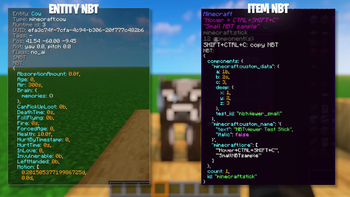
NBT Viewer lets you inspect item NBT data at a glance by displaying it directly in tooltips, making debugging and mod development easier.
Screenshots



About this Mod
NBTviewer
NBTviewer is a lightweight client-side NeoForge mod that displays NBT (SNBT) data directly in-game.
It is designed for modders, pack makers, and advanced players who want to inspect, debug, and understand data instantly — without commands or external tools.
Main Features
NBT directly in tooltips
- Displays the full SNBT of the hovered item directly in its tooltip
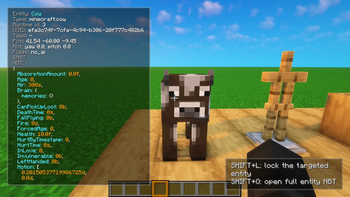
Entity NBT overlay
- Press N to toggle entity NBT display while looking at entities
- Displays key entity data directly on the player HUD
- Works seamlessly alongside item tooltips
Entity lock system
- Shift + L to lock the currently targeted entity
- Keeps displaying its NBT even when not looking at it anymore
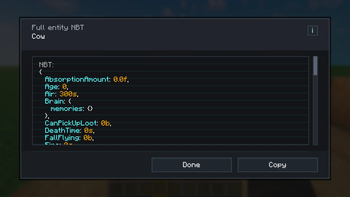
Advanced entity NBT viewer
- Shift + O to open a clean and scrollable interface
- Better readability for large and complex NBT structures
- Includes a copy button for quick access
Hold SHIFT to show (optional)
- By default, NBT is only shown while holding SHIFT
- Optional hint line when SHIFT is not held
Syntax highlighting (HEX colors)
- Keys
- Strings
- Numbers
- Booleans
- Punctuation (
{ } [ ] , :) - Identifiers
All colors are configurable using HEX format (#RRGGBB).
Formatting modes
- Single-line: compact raw SNBT on one line
- Multi-line: formatted with indentation and line breaks
Includes safety limits to avoid excessively large tooltips.
Safe truncation & limits
- Maximum total character count
- Maximum line length
- Configurable indentation size
Tooltip scaling
- Auto-scale: adapts to NBT size and line count
- Manual scale: fixed size (ignored when auto-scale is enabled)
Copy NBT to clipboard
- Press CTRL + SHIFT + C to copy item SNBT
- Optional feedback:
- Small popup confirmation
- Optional local sound effects (client-side only)
Configuration
- SHIFT-only display
- Single-line or multi-line formatting
- Tooltip hint lines
- Tooltip size limits
- Indentation spacing
- Auto-scale or manual scale
- Clipboard popup and sounds
- Full HEX color customization
Multiplayer
- Client-side only
- No server installation required
- No network traffic
- Only affects local tooltips
Language Support
- English
- French
- German
- Spanish
- Italian
- Portuguese (Brazil)
Available Versions
How to Install NBT viewer on Your Server
Order Server
Order a Minecraft Java server with at least 3 GB RAM (4 GB recommended).
Set fabric Loader
In the panel under "Egg", select the fabric loader and matching Minecraft version (1.21.11).
Install Mod
Open the mod browser in the dashboard and search for "NBT viewer". Click "Install" – done! Alternatively, upload the .jar via SFTP to the /mods folder.
Compatibility
Mod Loaders
Minecraft Versions
1.21.11, 1.21.10, 1.21.6 (+2 more)
Server-side
✗ UnsupportedRecommended RAM
4 GB(min. 3 GB)Frequently Asked Questions
NBT viewer server crashes on startup – what to do?
Most common cause: wrong fabric version or insufficient RAM. Check the server log (latest.log) for "OutOfMemoryError" or "Mixin" errors. With Mado Hosting: ensure at least 3 GB RAM is allocated and the loader matches the mod version (1.21.11). You can switch loaders with one click in the panel.
Is NBT viewer compatible with fabric and neoforge?
NBT viewer officially supports fabric, neoforge for Minecraft 1.21.11, 1.21.10, 1.21.6. The Mado dashboard automatically detects incompatible loader combinations.
Server lagging with NBT viewer – how to optimize performance?
Recommended RAM: 4 GB (per 8 players). Use /spark profiler to check if NBT viewer consumes the most tick time. Common fixes: reduce server view-distance to 8-10, install "performant" or "starlight" as supplementary mods on Forge. With Mado Hosting, your server runs on NVMe SSDs with dedicated CPU cores for minimal latency.
Similar Mods




Rent Modded Server
Install NBT viewer with just one click on your server.