ItemSwap
Swap items between hotbar and inventory slots easily!
Screenshots
About this Mod
Description
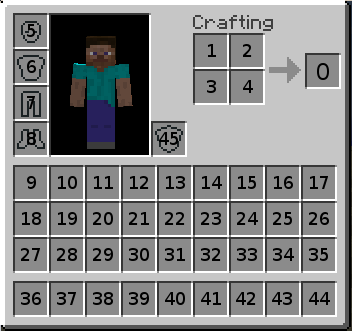
This mod provides an easy way of swapping items between inventory and hotbar slots.
There is no in-inventory item swap, because the mod uses a hotbar swap (like, hovering over a hotbar slot and pressing that hotbar slot's key to swap the items). This is less error-prone than picking up the item, placing in the other slot and placing the item that was in the slot in the previous slot. It also makes the mod undetectable on servers unless you spam the swap.
Usage
In the inventory screen, hold the configuration key (L by default) while hovering a slot, drag your cursor to another slot and release the configuration key. If both slots are valid, you've successfully created a mapping. A mapping can only be created between inventory/armor slots and a hotbar slot. A hotbar slot has to be involved due to how the item swap is performed.
A mapping allows you to shift-click items between those 2 slots, rather than sending the item to the first available slot in the inventory/hotbar.
As of version 2.1.0, you can also chain the mappings. Clicking on any of the slots in the chain will perform the next swap in the cycle. The chain cycles from the first swap to last swap and back to first swap. For example, a chain of 5 swaps would be 1 2 3 4 5 4 3 2 (back to start).
If you mess up the cycle, you can ctrl click to reset the cycle and move the items back into their starting positions manually.
With chaining, you can bind a slot to hotbar, and that hotbar slot to another slot, and swap the items between the 2 slots in 3 clicks. This achieves in-inventory item swap that is still undetectable if you don't spam the swaps. This is especially useful for quickly swapping 2 armor items. If the requirement of 3 clicks is too much for you, know that you can alternate between left and right click to make it easier (so, shift + (left-right-left) to swap the 2 armor items).
This isn't limited to 3 swaps, but I doubt there's much use for chains beyond that.
You can also delete slot swap chains using the delete chain keybinding (defaults to Del.)
Configuring
Execute /itemswap config or use Mod Menu.
Available Versions
How to Install ItemSwap on Your Server
Order Server
Order a Minecraft Java server with at least 3 GB RAM (4 GB recommended).
Set fabric Loader
In the panel under "Egg", select the fabric loader and matching Minecraft version (1.21.5).
Install Mod
Open the mod browser in the dashboard and search for "ItemSwap". Click "Install" – done! Alternatively, upload the .jar via SFTP to the /mods folder.
Compatibility
Mod Loaders
Minecraft Versions
1.21.5, 1.21.4, 1.21.3 (+5 more)
Server-side
✗ UnsupportedRecommended RAM
4 GB(min. 3 GB)Frequently Asked Questions
ItemSwap server crashes on startup – what to do?
Most common cause: wrong fabric version or insufficient RAM. Check the server log (latest.log) for "OutOfMemoryError" or "Mixin" errors. With Mado Hosting: ensure at least 3 GB RAM is allocated and the loader matches the mod version (1.21.5). You can switch loaders with one click in the panel.
Is ItemSwap compatible with fabric?
ItemSwap officially supports fabric for Minecraft 1.21.5, 1.21.4, 1.21.3. The Mado dashboard automatically detects incompatible loader combinations.
Server lagging with ItemSwap – how to optimize performance?
Recommended RAM: 4 GB (per 8 players). Use /spark profiler to check if ItemSwap consumes the most tick time. Common fixes: reduce server view-distance to 8-10, install "performant" or "starlight" as supplementary mods on Forge. With Mado Hosting, your server runs on NVMe SSDs with dedicated CPU cores for minimal latency.
Similar Mods




![[ETF] Entity Texture Features](https://cdn.modrinth.com/data/BVzZfTc1/af683d206d50b05258d865b0d6e4aa2f2cee12f2_96.webp)
![[EMF] Entity Model Features](https://cdn.modrinth.com/data/4I1XuqiY/6e5bbd0d06b1741bfdab6c0cfab6de8fdaf0064c_96.webp)
Rent Modded Server
Install ItemSwap with just one click on your server.