
ItemTranslate
The mod for translate the text on your item
Screenshots
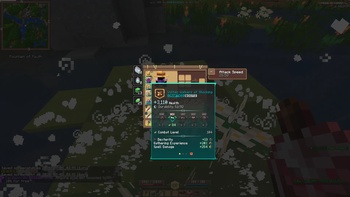
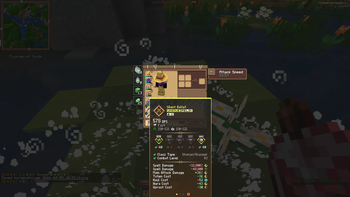

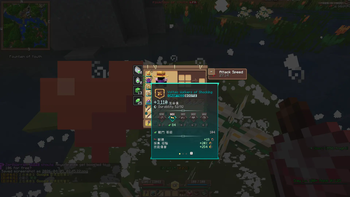
About this Mod
繁體中文介紹
itemTranslate 是一個專為《Wynncraft》等大型 RPG 伺服器設計的 Fabric 純客戶端 裝備翻譯模組。滑鼠移到物品上,就能瞬間將複雜的英文屬性替換為你熟悉的語言!
✨ 核心功能 (Features)
🔍 智慧單字擷取 (G 鍵):自動過濾裝備上的顏色代碼與標點符號,精準抓取未知的英文單字,並透過 Google 翻譯即時轉換入庫!
🎨 完美支援顏色與格式:支援 Minecraft 原生 & 顏色代碼(例如將 Legendary 翻譯設定為 &6&l傳奇&r,即可顯示金色粗體字)。
⚙️ 強大的 GUI 設定介面 (P 鍵):內建完整的「翻譯規則總表」與「Google 暫存區」,可自由調整翻譯優先級,並支援 JSON 檔案的導入與匯出。
🛡️ 100% 純客戶端模組:伺服器端完全不需要安裝。在 Wynncraft、Hypixel 或任何生存伺服器使用皆安全且合法!
⌨️ 快捷鍵說明 (Keybindings)
(為防止誤觸,G 鍵與 O 鍵僅在開啟背包或容器介面時生效)
P 鍵:開啟模組設定介面
G 鍵:擷取當前游標所指裝備的英文單字,並進行 Google 翻譯
O 鍵:一鍵開啟 / 關閉翻譯功能
⚠️ 必備前置模組 (Dependencies)
安裝本模組前,請務必確認您的 mods 資料夾內已安裝以下兩款前置模組,否則遊戲將無法啟動:
Fabric API
YetAnotherConfigLib (YACL) (請使用 v3 以上版本)
English Description
itemTranslate is a client-side Fabric mod designed specifically for RPG servers like Wynncraft. It allows you to instantly translate item tooltips and stats into your preferred language on the fly!
✨ Key Features
🔍 Smart Word Extraction (Press G): Hover over any item and press G. The mod automatically filters out color codes/symbols, captures unknown English words, and translates them instantly via Google Translate!
🎨 Custom Color Codes: Fully supports Minecraft's & formatting codes. (e.g., set translation to &6&lLegendary&r for Gold + Bold text).
⚙️ Powerful Config GUI (Press P): Easily manage your translation priority rules and Google cache. Supports importing/exporting JSON rule files.
🛡️ Client-Side Only: Does not need to be installed on the server. 100% safe and allowed to use on multiplayer servers like Wynncraft or Hypixel!
⌨️ Keybindings
(To prevent accidental clicks, 'G' and 'O' are only active when an inventory/GUI is open)
P : Open Config Menu
G : Extract and translate untranslated words from the hovered item
O : Toggle translation ON/OFF
⚠️ Required Dependencies
This mod requires the following mods to run. The game will crash upon startup if they are missing:
Fabric API
YetAnotherConfigLib (YACL) (v3 or higher)
generate by gemini cause im lazy :)
Available Versions
How to Install ItemTranslate on Your Server
Order Server
Order a Minecraft Java server with at least 3 GB RAM (4 GB recommended).
Set fabric Loader
In the panel under "Egg", select the fabric loader and matching Minecraft version (1.21.11).
Install Mod
Open the mod browser in the dashboard and search for "ItemTranslate". Click "Install" – done! Alternatively, upload the .jar via SFTP to the /mods folder.
Compatibility
Mod Loaders
Minecraft Versions
1.21.11
Server-side
✗ UnsupportedRecommended RAM
4 GB(min. 3 GB)Frequently Asked Questions
ItemTranslate server crashes on startup – what to do?
Most common cause: wrong fabric version or insufficient RAM. Check the server log (latest.log) for "OutOfMemoryError" or "Mixin" errors. With Mado Hosting: ensure at least 3 GB RAM is allocated and the loader matches the mod version (1.21.11). You can switch loaders with one click in the panel.
Is ItemTranslate compatible with fabric?
ItemTranslate officially supports fabric for Minecraft 1.21.11. The Mado dashboard automatically detects incompatible loader combinations.
Server lagging with ItemTranslate – how to optimize performance?
Recommended RAM: 4 GB (per 8 players). Use /spark profiler to check if ItemTranslate consumes the most tick time. Common fixes: reduce server view-distance to 8-10, install "performant" or "starlight" as supplementary mods on Forge. With Mado Hosting, your server runs on NVMe SSDs with dedicated CPU cores for minimal latency.
Similar Mods




![[ETF] Entity Texture Features](https://cdn.modrinth.com/data/BVzZfTc1/af683d206d50b05258d865b0d6e4aa2f2cee12f2_96.webp)
![[EMF] Entity Model Features](https://cdn.modrinth.com/data/4I1XuqiY/6e5bbd0d06b1741bfdab6c0cfab6de8fdaf0064c_96.webp)
Rent Modded Server
Install ItemTranslate with just one click on your server.