
Jello
A Mod based around Slime and Color
Screenshots

About this Mod

Overview


Jello's main goal is to be a comprehensive implementation of the Gelatin Library. With it comes some bonus and special features unique to this mod:
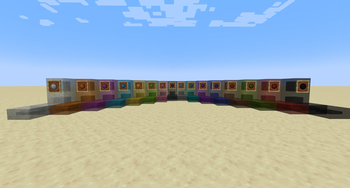
Many New Colors
Jello adds 1000+ new colors to give you more options to color your base with a growing collective of available blocks! Currently, each color gets a dozen new blocks meaning you have around 12,000 new blocks to enhance your builds. This comes to little cost to memory or load times thanks to Gelatin's heavily optimize Cached Based loading System.

Various Ways of Coloring
Thanks to Gelatin, you have multiple ways of coloring blocks now either using Minecraft Cauldron to dye bulk amounts of blocks more efficiently to new Dye Tools allow you to change the various Compatible blocks to any of the new colors within the game or even the regular crafting methods.
Additional Slime Block Types
Jello adds new variants of vanilla slime blocks in the new colors available but also adds a new variant, the Slime Slab. This block has special properties that allow for finer control of what blocks stick to it. Once more is that each color can only stick to its corresponding colored slime blocks similar to honey and normal slime blocks within vanilla.
Other Features
By default, Gelatin adds the ability to Color any entity with any new DyeColorant added allowing you to have an orange pig, pink sheep, or even a blue cow just for fun.
Support
Should you have any questions, issues or comments, simply join the Wisp Forest Discord and we will try our best to help out

Available Versions
How to Install Jello on Your Server
Order Server
Order a Minecraft Java server with at least 3 GB RAM (4 GB recommended).
Set fabric Loader
In the panel under "Egg", select the fabric loader and matching Minecraft version (1.20.1).
Install Mod
Open the mod browser in the dashboard and search for "Jello". Click "Install" – done! Alternatively, upload the .jar via SFTP to the /mods folder.
Compatibility
Mod Loaders
Minecraft Versions
1.20.1, 1.19.4, 1.19.2 (+5 more)
Server-side
✓ RequiredRecommended RAM
4 GB(min. 3 GB)Frequently Asked Questions
Jello server crashes on startup – what to do?
Most common cause: wrong fabric version or insufficient RAM. Check the server log (latest.log) for "OutOfMemoryError" or "Mixin" errors. With Mado Hosting: ensure at least 3 GB RAM is allocated and the loader matches the mod version (1.20.1). You can switch loaders with one click in the panel.
Is Jello compatible with fabric?
Jello officially supports fabric for Minecraft 1.20.1, 1.19.4, 1.19.2. The Mado dashboard automatically detects incompatible loader combinations.
Server lagging with Jello – how to optimize performance?
Recommended RAM: 4 GB (per 8 players). Use /spark profiler to check if Jello consumes the most tick time. Common fixes: reduce server view-distance to 8-10, install "performant" or "starlight" as supplementary mods on Forge. With Mado Hosting, your server runs on NVMe SSDs with dedicated CPU cores for minimal latency.
Similar Mods

![[ETF] Entity Texture Features](https://cdn.modrinth.com/data/BVzZfTc1/af683d206d50b05258d865b0d6e4aa2f2cee12f2_96.webp)
![[EMF] Entity Model Features](https://cdn.modrinth.com/data/4I1XuqiY/6e5bbd0d06b1741bfdab6c0cfab6de8fdaf0064c_96.webp)



Rent Modded Server
Install Jello with just one click on your server.