
Jet Elytra
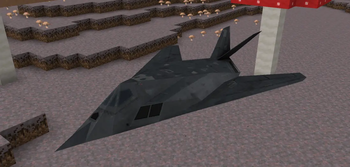
Replaces the player model with jets when flying, Looks cool for drain pvp, and even just normal survival.
Screenshots




About this Mod
JetEly



Required:
New! - jet boost flames (afterburner) use the keybind to open it
Replaces when you fly with elytra, or other players with a model of a aircraft of your choice
comes with pre-added models, tutorial on how to add you're own in my discord
Fully client side works on servers - The bombing also works on servers if you have /summon perms
If you would like to help support the development of this mod
Help
- How do I change my jet/model? Just go to settings in the elytra tab delete the mcjet text inside the search bar then it will suggest all the models you have click on one or scroll through them to select it then click save and it should be there!
optional to hide the player model so it looks fully like you're the model. also works with other players and has a randomize model option for other players - when its off they just have the same as yours.
I recommend using the freelook mod
Also supports shader glow with textures that match the obj file name but with _e.png at the end - it has to be .png
includes tnt minecart replacement and then a bombing feature that includes a keybind you can hold it down customize the bombing speed and cool down basiclly what it does is summon a tnt minecart and since theres models for the tnt minecart it looks like actual bombs
/gamerule sendCommandFeedback false to disable the summon msgs in chat
theres more models that gallery doesn't show, and you can get them from my discord



Available Versions
How to Install Jet Elytra on Your Server
Order Server
Order a Minecraft Java server with at least 3 GB RAM (4 GB recommended).
Set fabric Loader
In the panel under "Egg", select the fabric loader and matching Minecraft version (1.21.11).
Install Mod
Open the mod browser in the dashboard and search for "Jet Elytra". Click "Install" – done! Alternatively, upload the .jar via SFTP to the /mods folder.
Compatibility
Mod Loaders
Minecraft Versions
1.21.11, 1.21.10, 1.21.9 (+9 more)
Server-side
✗ UnsupportedRecommended RAM
4 GB(min. 3 GB)Frequently Asked Questions
Jet Elytra server crashes on startup – what to do?
Most common cause: wrong fabric version or insufficient RAM. Check the server log (latest.log) for "OutOfMemoryError" or "Mixin" errors. With Mado Hosting: ensure at least 3 GB RAM is allocated and the loader matches the mod version (1.21.11). You can switch loaders with one click in the panel.
Is Jet Elytra compatible with fabric?
Jet Elytra officially supports fabric for Minecraft 1.21.11, 1.21.10, 1.21.9. The Mado dashboard automatically detects incompatible loader combinations.
Server lagging with Jet Elytra – how to optimize performance?
Recommended RAM: 4 GB (per 8 players). Use /spark profiler to check if Jet Elytra consumes the most tick time. Common fixes: reduce server view-distance to 8-10, install "performant" or "starlight" as supplementary mods on Forge. With Mado Hosting, your server runs on NVMe SSDs with dedicated CPU cores for minimal latency.
Similar Mods

![[ETF] Entity Texture Features](https://cdn.modrinth.com/data/BVzZfTc1/af683d206d50b05258d865b0d6e4aa2f2cee12f2_96.webp)
![[EMF] Entity Model Features](https://cdn.modrinth.com/data/4I1XuqiY/6e5bbd0d06b1741bfdab6c0cfab6de8fdaf0064c_96.webp)



Rent Modded Server
Install Jet Elytra with just one click on your server.