
JFlashlight
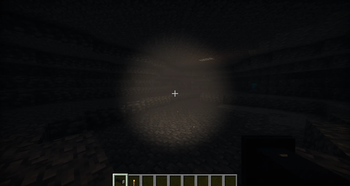
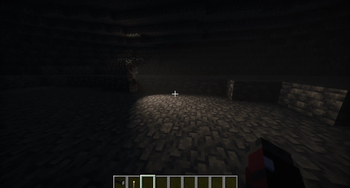
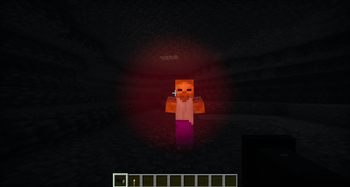
Illuminate your world with a toggleable, photon-forked shader-powered flashlight. Creates a directional beam with 16 colors, volumetric dust, and multiplayer support.
Screenshots
About this Mod
Flashlight Mod
Add a fully featured flashlight to Minecraft with a realistic directional beam, 16 color options, and immersive volumetric dust particles.
Features
- Toggle on/off by right-clicking with the flashlight in hand
- 16 beam colors --> change anytime with
/flashlight color set <color> - Realistic directional beam with a bright hotspot center and smooth edges
- Volumetric glow --> subtle light brightening the air in the beam's path
- Dust particles --> tiny animated particles drift through the beam, more indoors than outside
- Dynamic fill lighting via LambDynamicLights --> lights up blocks around you even without shaders
- Multiplayer support --> other players' beams are visible to you in real time
Requirements
- Fabric Loader + Fabric API
- LambDynamicLights
- Iris Shaders + Sodium
- Photon Flashlight Fork --> custom shader pack required for the beam visuals
Shader Setup
The beam is off by default. After installing the shader:
- Go to Video Settings → Shader Packs → Shader Options → Lighting
- Enable FLASHLIGHT to turn on the directional beam
- Optionally enable FLASHLIGHT_VOLUMETRIC for the glow and dust particles
- Optionally enable FLASHLIGHT_MULTIPLAYER to see other players' beams
Colors
white warm red orange yellow lime green teal cyan light_blue blue purple magenta pink gold uv
Change color with: /flashlight color set <color>
The color is saved when you toggle the flashlight off and restored when you turn it back on.
Multiplayer
The mod needs to be installed on the server and all clients. With everyone set up, you can see each other's beams, colors, and dynamic fill lighting in real time.
Links
- Photon Flashlight Fork — required shader pack
- Source Code
Available Versions
How to Install JFlashlight on Your Server
Order Server
Order a Minecraft Java server with at least 3 GB RAM (4 GB recommended).
Set fabric Loader
In the panel under "Egg", select the fabric loader and matching Minecraft version (1.21.1).
Install Mod
Open the mod browser in the dashboard and search for "JFlashlight". Click "Install" – done! Alternatively, upload the .jar via SFTP to the /mods folder.
Compatibility
Mod Loaders
Minecraft Versions
1.21.1
Server-side
✓ RequiredRecommended RAM
4 GB(min. 3 GB)Frequently Asked Questions
JFlashlight server crashes on startup – what to do?
Most common cause: wrong fabric version or insufficient RAM. Check the server log (latest.log) for "OutOfMemoryError" or "Mixin" errors. With Mado Hosting: ensure at least 3 GB RAM is allocated and the loader matches the mod version (1.21.1). You can switch loaders with one click in the panel.
Is JFlashlight compatible with fabric?
JFlashlight officially supports fabric for Minecraft 1.21.1. The Mado dashboard automatically detects incompatible loader combinations.
Server lagging with JFlashlight – how to optimize performance?
Recommended RAM: 4 GB (per 8 players). Use /spark profiler to check if JFlashlight consumes the most tick time. Common fixes: reduce server view-distance to 8-10, install "performant" or "starlight" as supplementary mods on Forge. With Mado Hosting, your server runs on NVMe SSDs with dedicated CPU cores for minimal latency.
Similar Mods




Rent Modded Server
Install JFlashlight with just one click on your server.