
JimmyTools
A Minecraft mod full of QoL and utility enhancements for LoM2, and Bingo.
Screenshots

About this Mod
Description
JimmyTools is a mod created to give a few Quality of Life and Utility enhancements to the LoM2 (Lords of Minecraft 2) Minecraft Server. It was originally made as a mod to help with maintaining character transformations, although it has since gotten various different enhancements to enhance a players experience.
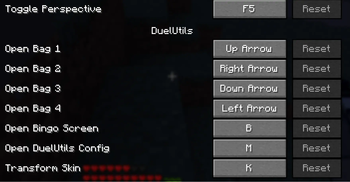
NOTE: Many features may have to be toggled on through the mod menu (M key by default).
Features
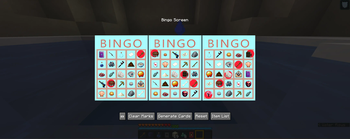
- BINGO - In-game support for playing Bingo at the Snake-Eyes Lounge & Teahouse. The colors of the bingo card can be customized from the config menu, and markers can be customized via resource packs.
- Bag Hotkeys - Support for opening the newly added inventory bags by a hotkey (Set to arrow keys by default).
- Transformations - Support for transforming from a dynamic skin to a constant skin. This is useful for players that have characters that transform (Mermaid, Magical Girl, Vampire, etc.) and want their character to revert to their previous skin after the transformation.
- LevelUp Messages - Support for displaying level up messages in the Minecraft chat.
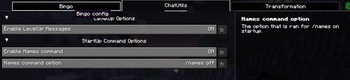
- Startup Commands - Support for executing certain commands on server join (Currently, only /names is supported).
Available Versions
How to Install JimmyTools on Your Server
Order Server
Order a Minecraft Java server with at least 3 GB RAM (4 GB recommended).
Set fabric Loader
In the panel under "Egg", select the fabric loader and matching Minecraft version (1.21.4).
Install Mod
Open the mod browser in the dashboard and search for "JimmyTools". Click "Install" – done! Alternatively, upload the .jar via SFTP to the /mods folder.
Compatibility
Mod Loaders
Minecraft Versions
1.21.4, 1.21.3, 1.21.2 (+2 more)
Server-side
✗ UnsupportedRecommended RAM
4 GB(min. 3 GB)Frequently Asked Questions
JimmyTools server crashes on startup – what to do?
Most common cause: wrong fabric version or insufficient RAM. Check the server log (latest.log) for "OutOfMemoryError" or "Mixin" errors. With Mado Hosting: ensure at least 3 GB RAM is allocated and the loader matches the mod version (1.21.4). You can switch loaders with one click in the panel.
Is JimmyTools compatible with fabric?
JimmyTools officially supports fabric for Minecraft 1.21.4, 1.21.3, 1.21.2. The Mado dashboard automatically detects incompatible loader combinations.
Server lagging with JimmyTools – how to optimize performance?
Recommended RAM: 4 GB (per 8 players). Use /spark profiler to check if JimmyTools consumes the most tick time. Common fixes: reduce server view-distance to 8-10, install "performant" or "starlight" as supplementary mods on Forge. With Mado Hosting, your server runs on NVMe SSDs with dedicated CPU cores for minimal latency.
Similar Mods




![[ETF] Entity Texture Features](https://cdn.modrinth.com/data/BVzZfTc1/af683d206d50b05258d865b0d6e4aa2f2cee12f2_96.webp)
![[EMF] Entity Model Features](https://cdn.modrinth.com/data/4I1XuqiY/6e5bbd0d06b1741bfdab6c0cfab6de8fdaf0064c_96.webp)
Rent Modded Server
Install JimmyTools with just one click on your server.