
JSCore
Extend your game with JavaScript, create and publish commands, menus, toggles and much more!
Screenshots
About this Mod
BEFORE DOWNLOADINGRead the JSCore Player Guide and Join Discord
FabricMC + JavaScript = JSCore
JSCore is a thin wrapper around FabricMC.
What does this mod do?
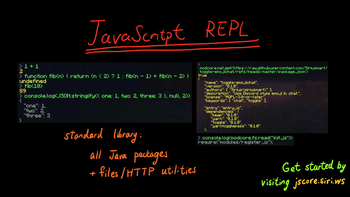
This mod provides full JavaScript support for Minecraft modding, you can create or use community modules to customise your game.
In short, JSCore can do
- Everything a typical JS runtime, such as KubeJS, can do.
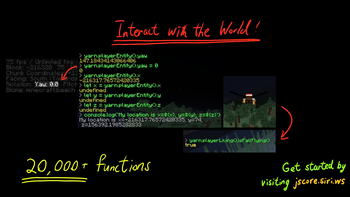
- Everything in FabricMC that does not use Mixins*
- Interact with other mods.
*Mixins support depends on whether one guy on Discord can get it to work or not.
How to use it?
Just download the mod and run the game!
Read the Quickstart Guide.
How is it different from KubeJS/JSMacros?
Access to Minecraft Internals
JSCore allows access to classes in the net.minecraft package - anything that FabricMC can do (except Mixins), JSCore can also do it.
// client: net.minecraft.client.MinecraftClient
let client = net.minecraft.client.MinecraftClient.getInstance();
// player: net.minecraft.client.network.ClientPlayerEntity
let player = client.player;
// position: net.minecraft.util.math.BlockPos
let position = player.getBlockPos();
Module System Similar to Node.js
The module system from Node.js allows complex game mechanics to be built from small and managable chunks, so we brought it to JSCore.
// init.js
let savePlayers = require("./savePlayers");
savePlayers();
// savePlayers.js
let fs = require("fs");
let { getPlayers } = require("./getPlayers");

function savePlayers() {
    let players = getPlayers();
    let content = JSON.stringify(players);
    fs.writeFileSync("./playerList.json", content);
}

module.exports = savePlayers;
What features does this mod have?
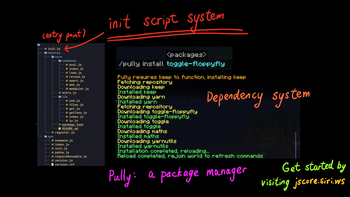
This mod runs init.js on start.
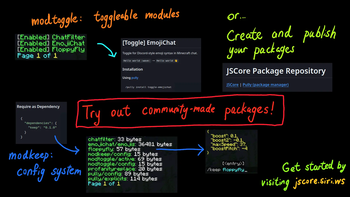
Additional features are provided by third-party modules, such as
- Rinode: provide Node.js features such as
console.logandfs. - Command: Declarative Minecraft command registration.
- Pully: package manager for JSCore.
A list of package can be found in the package repository, anyone can publish packages to this repository.
How does this mod work?
The Minecraft code is obfuscated and cannot be referred to by their real name. This mod uses Yarnwrap, which wraps all net.minecraft classes so their real name can be used instead of their obfuscated name.
This mod is still in its early stages, please join Discord for support or to sway its development.
Available Versions
How to Install JSCore on Your Server
Order Server
Order a Minecraft Java server with at least 3 GB RAM (4 GB recommended).
Set fabric Loader
In the panel under "Egg", select the fabric loader and matching Minecraft version (1.21.10).
Install Mod
Open the mod browser in the dashboard and search for "JSCore". Click "Install" – done! Alternatively, upload the .jar via SFTP to the /mods folder.
Compatibility
Mod Loaders
Minecraft Versions
1.21.10, 1.21.9, 1.21.8 (+8 more)
Server-side
✗ UnsupportedRecommended RAM
4 GB(min. 3 GB)Frequently Asked Questions
JSCore server crashes on startup – what to do?
Most common cause: wrong fabric version or insufficient RAM. Check the server log (latest.log) for "OutOfMemoryError" or "Mixin" errors. With Mado Hosting: ensure at least 3 GB RAM is allocated and the loader matches the mod version (1.21.10). You can switch loaders with one click in the panel.
Is JSCore compatible with fabric?
JSCore officially supports fabric for Minecraft 1.21.10, 1.21.9, 1.21.8. The Mado dashboard automatically detects incompatible loader combinations.
Server lagging with JSCore – how to optimize performance?
Recommended RAM: 4 GB (per 8 players). Use /spark profiler to check if JSCore consumes the most tick time. Common fixes: reduce server view-distance to 8-10, install "performant" or "starlight" as supplementary mods on Forge. With Mado Hosting, your server runs on NVMe SSDs with dedicated CPU cores for minimal latency.
Similar Mods




Rent Modded Server
Install JSCore with just one click on your server.