
JSST
A suite of server-sided quality of life tweaks and survival-friendly tools.
Screenshots
About this Mod
Archived
JSST has been archived so I can stay focused on a smaller amount of mods for now. It was mainly just a sandbox-y type mod I could add random features for, but would require a rewrite to make it more maintainable in current versions.
⚙️ Jack's Server Side Tweaks v2
Provides a suite of server-side tweaks and survival-friendly tools to the game.
Features
All features can be disabled individually, and are highly configurable. For more details, see the wiki.
🗺️ Map Editor

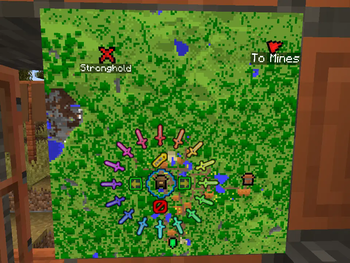
An in-game map editor, accessible by placing a map in an item frame and right clicking with a feather. You can add, rotate and add labels to a variety of icons, and easily remove them after.
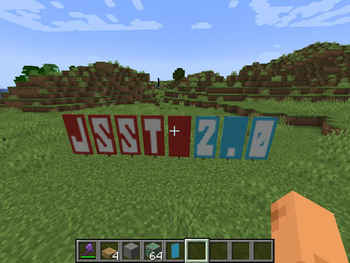
🔤 Banner Writer

A command to generate text on banners. Works in survival, as long as you have enough banners in your hand.
👻 Concealable Item Frames

Players can now toggle the invisibility of item frames by sneak-right clicking with any invisibility potion. Shows particles when they're empty, so you don't lose them.
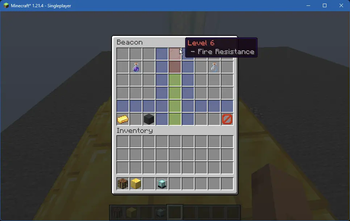
🚨 Beacon Enhancement

Adds the ability to customize the beacon's primary and secondary power set, as well as increasing the maximum level to 6. All features are fully configurable.
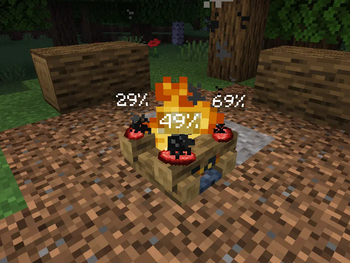
🔥 Campfire Timers

Adds a progress bar above cooking campfire items.
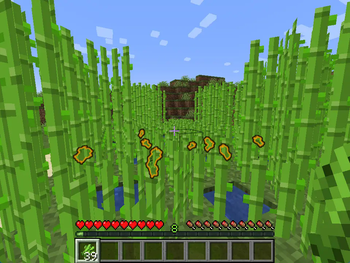
💡 Extra Highlights


Sugarcane, when held in hand, will now highlight nearby dropped sugarcane items; useful for dense farms.
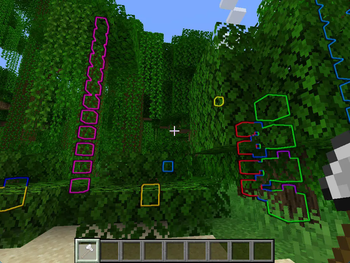
Players can also sneak-right click with an axe to find logs hidden in leaves.
🫵 Item Nudging

Mined items will now aim towards the player when mined, and will always gain enough height to be picked up from above. Especially useful for Skyblock; you'll notice it pretty quick.
🎄 Sapling Replanting

Sapling items, upon decaying, will now try to replant themselves nearby. They give eachother space and will group together for 2x2 saplings.
❓ Other features
There are also a handful of other features not easily shown:
- Portable Crafting: Use crafting tables from the inventory,
- Effector Ranges: Adjust the range of active Beacons and Conduits,
- Item Editor: WIP, adds an exstensive server-side item editor GUI.
🛠️ Install & Requirements
Works both in single players worlds, and server-side only. JSST is fine to add to existing worlds, but removing it will cause some custom map decorations and beacon powers to reset.
JSST requires Fabric API and YACL.
Available Versions
How to Install JSST on Your Server
Order Server
Order a Minecraft Java server with at least 3 GB RAM (4 GB recommended).
Set fabric Loader
In the panel under "Egg", select the fabric loader and matching Minecraft version (1.21.5).
Install Mod
Open the mod browser in the dashboard and search for "JSST". Click "Install" – done! Alternatively, upload the .jar via SFTP to the /mods folder.
Compatibility
Mod Loaders
Minecraft Versions
1.21.5, 1.21.4, 1.21.1 (+7 more)
Server-side
✓ RequiredRecommended RAM
4 GB(min. 3 GB)Frequently Asked Questions
JSST server crashes on startup – what to do?
Most common cause: wrong fabric version or insufficient RAM. Check the server log (latest.log) for "OutOfMemoryError" or "Mixin" errors. With Mado Hosting: ensure at least 3 GB RAM is allocated and the loader matches the mod version (1.21.5). You can switch loaders with one click in the panel.
Is JSST compatible with fabric and quilt?
JSST officially supports fabric, quilt for Minecraft 1.21.5, 1.21.4, 1.21.1. The Mado dashboard automatically detects incompatible loader combinations.
Server lagging with JSST – how to optimize performance?
Recommended RAM: 4 GB (per 8 players). Use /spark profiler to check if JSST consumes the most tick time. Common fixes: reduce server view-distance to 8-10, install "performant" or "starlight" as supplementary mods on Forge. With Mado Hosting, your server runs on NVMe SSDs with dedicated CPU cores for minimal latency.
Similar Mods




Rent Modded Server
Install JSST with just one click on your server.