
JTMM (Just too many mods)
this mod will add far too many things into minecraft, anything I could think of and my take on other mods too.
Screenshots
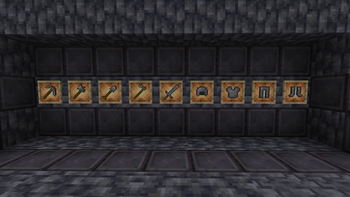
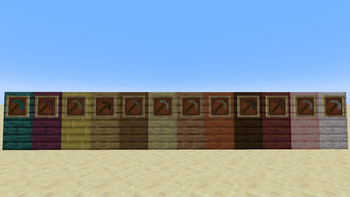
About this Mod
Welcome to JTMM by Berserker Studios.
This mods adds from ores to dimentions to mobs to items and more, if I could think it up, it is here.
(one of the mods that was recreated here was my mod on another website called BerserkTools)
at the moment, there isn't as much as there should be but you have to start somewhere, right?
If you install this expecting there to be a shift in default gameplay textures or features at the start, think again because I can't code so I just used Mcreator's default features and way too many tutorials.
Road Map:
Wood tools change based off what wood you use (in progress)
Deepslate tools (in progress)
Redstone farm craftable guide book (est release, 1 week after deepslate tools)
(the current Alpha that is available has very little in it with all of the tools but they are not all finished so youmight want to wait for the next alpha when they are done but if you do install the first edition, be prepared that it may be not usefull for a bit until I can finish the first 3 things on the roadmap)
Available Versions
How to Install JTMM (Just too many mods) on Your Server
Order Server
Order a Minecraft Java server with at least 3 GB RAM (4 GB recommended).
Set neoforge Loader
In the panel under "Egg", select the neoforge loader and matching Minecraft version (1.21.8).
Install Mod
Open the mod browser in the dashboard and search for "JTMM (Just too many mods)". Click "Install" – done! Alternatively, upload the .jar via SFTP to the /mods folder.
Compatibility
Mod Loaders
Minecraft Versions
1.21.8, 1.21.4
Server-side
✓ RequiredRecommended RAM
4 GB(min. 3 GB)Frequently Asked Questions
JTMM (Just too many mods) server crashes on startup – what to do?
Most common cause: wrong neoforge version or insufficient RAM. Check the server log (latest.log) for "OutOfMemoryError" or "Mixin" errors. With Mado Hosting: ensure at least 3 GB RAM is allocated and the loader matches the mod version (1.21.8). You can switch loaders with one click in the panel.
Is JTMM (Just too many mods) compatible with neoforge?
JTMM (Just too many mods) officially supports neoforge for Minecraft 1.21.8, 1.21.4. The Mado dashboard automatically detects incompatible loader combinations.
Server lagging with JTMM (Just too many mods) – how to optimize performance?
Recommended RAM: 4 GB (per 8 players). Use /spark profiler to check if JTMM (Just too many mods) consumes the most tick time. Common fixes: reduce server view-distance to 8-10, install "performant" or "starlight" as supplementary mods on Forge. With Mado Hosting, your server runs on NVMe SSDs with dedicated CPU cores for minimal latency.
Similar Mods

![[ETF] Entity Texture Features](https://cdn.modrinth.com/data/BVzZfTc1/af683d206d50b05258d865b0d6e4aa2f2cee12f2_96.webp)
![[EMF] Entity Model Features](https://cdn.modrinth.com/data/4I1XuqiY/6e5bbd0d06b1741bfdab6c0cfab6de8fdaf0064c_96.webp)



Rent Modded Server
Install JTMM (Just too many mods) with just one click on your server.