
Just Graves
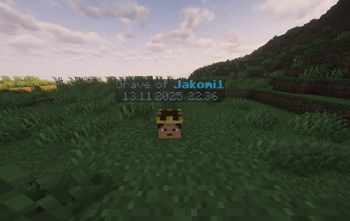
JustGraves lets players keep their items and XP after death with easy-to-use graves.
Screenshots
About this Mod
JustGraves
Version: 1.0.0
Fabric: 1.21.8-1.21.10
Dependency: Collective >=8.8
Overview
JustGraves adds a simple yet powerful grave system to Minecraft that saves a player's inventory and XP upon death and allows them to retrieve it later.
With Collective integration, even complex inventories are reliably serialized and restored. The mod is fully compatible with both server and client environments and integrates seamlessly into vanilla gameplay.
Features
- 🪦 Grave System: Stores XP and inventory on player death.
- ⏱️ Protection Time: Graves can be protected for a configurable time before others can loot them.
- 📜 Grave Command:
/graveslists all your graves with locations and timestamps. - 🔄 Loot & XP Recovery: Players can reclaim their items and XP after death.
- 🎵 Sound & Feedback: Visual and audio cues when opening a grave.
- 🔗 Collective Integration: Uses Collective for reliable item serialization.
- 🛠️ Easy Configuration: Protection times and messages can be adjusted in the config files.
Installation
- Install Fabric Loader (>=0.15.0).
- Install Fabric API.
- Install Collective (>=8.8).
- Place the
JustGravesmod file in yourmodsfolder. - Launch Minecraft with Fabric.
Configuration
- Default grave protection time: configurable via
GRAVE_PROTECTION_TIME. - Messages and chat formatting can be customized in the mod files.
- Fully server-synced; no additional plugins required.
Commands
/graves– Shows a list of all your graves with coordinates and timestamps.
FAQ
Q: Is Collective required?
A: Yes, JustGraves depends on Collective for proper item storage. Without it, the mod will not work.
Q: Can I loot other players' graves?
A: Only after the protection time has expired or if you are the owner.
Q: Is the mod multiplayer-friendly?
A: Yes, JustGraves works fully on multiplayer servers.
License
JustGraves is MIT licensed, with the note that it is an addon for Collective.
See LICENSE for details.
Changelog
1.0.0
- Initial release
- Core grave and XP system
/gravescommand- Collective integration
Support / Contact
- Discord: https://discord.gg/2rkPqrnBC5
- Author: Jakomi1
Tags
Fabric, Minecraft 1.21, Graves, Death, XP, Loot, Server, Client, Collective, JustGraves
Available Versions
How to Install Just Graves on Your Server
Order Server
Order a Minecraft Java server with at least 3 GB RAM (4 GB recommended).
Set fabric Loader
In the panel under "Egg", select the fabric loader and matching Minecraft version (1.21.10).
Install Mod
Open the mod browser in the dashboard and search for "Just Graves". Click "Install" – done! Alternatively, upload the .jar via SFTP to the /mods folder.
Compatibility
Mod Loaders
Minecraft Versions
1.21.10, 1.21.9, 1.21.8
Server-side
✓ RequiredRecommended RAM
4 GB(min. 3 GB)Frequently Asked Questions
Just Graves server crashes on startup – what to do?
Most common cause: wrong fabric version or insufficient RAM. Check the server log (latest.log) for "OutOfMemoryError" or "Mixin" errors. With Mado Hosting: ensure at least 3 GB RAM is allocated and the loader matches the mod version (1.21.10). You can switch loaders with one click in the panel.
Is Just Graves compatible with fabric?
Just Graves officially supports fabric for Minecraft 1.21.10, 1.21.9, 1.21.8. The Mado dashboard automatically detects incompatible loader combinations.
Server lagging with Just Graves – how to optimize performance?
Recommended RAM: 4 GB (per 8 players). Use /spark profiler to check if Just Graves consumes the most tick time. Common fixes: reduce server view-distance to 8-10, install "performant" or "starlight" as supplementary mods on Forge. With Mado Hosting, your server runs on NVMe SSDs with dedicated CPU cores for minimal latency.
Similar Mods




Rent Modded Server
Install Just Graves with just one click on your server.