
Just Like Cauldron
Rotatable cauldrons with resourcepack support for custom models
Screenshots
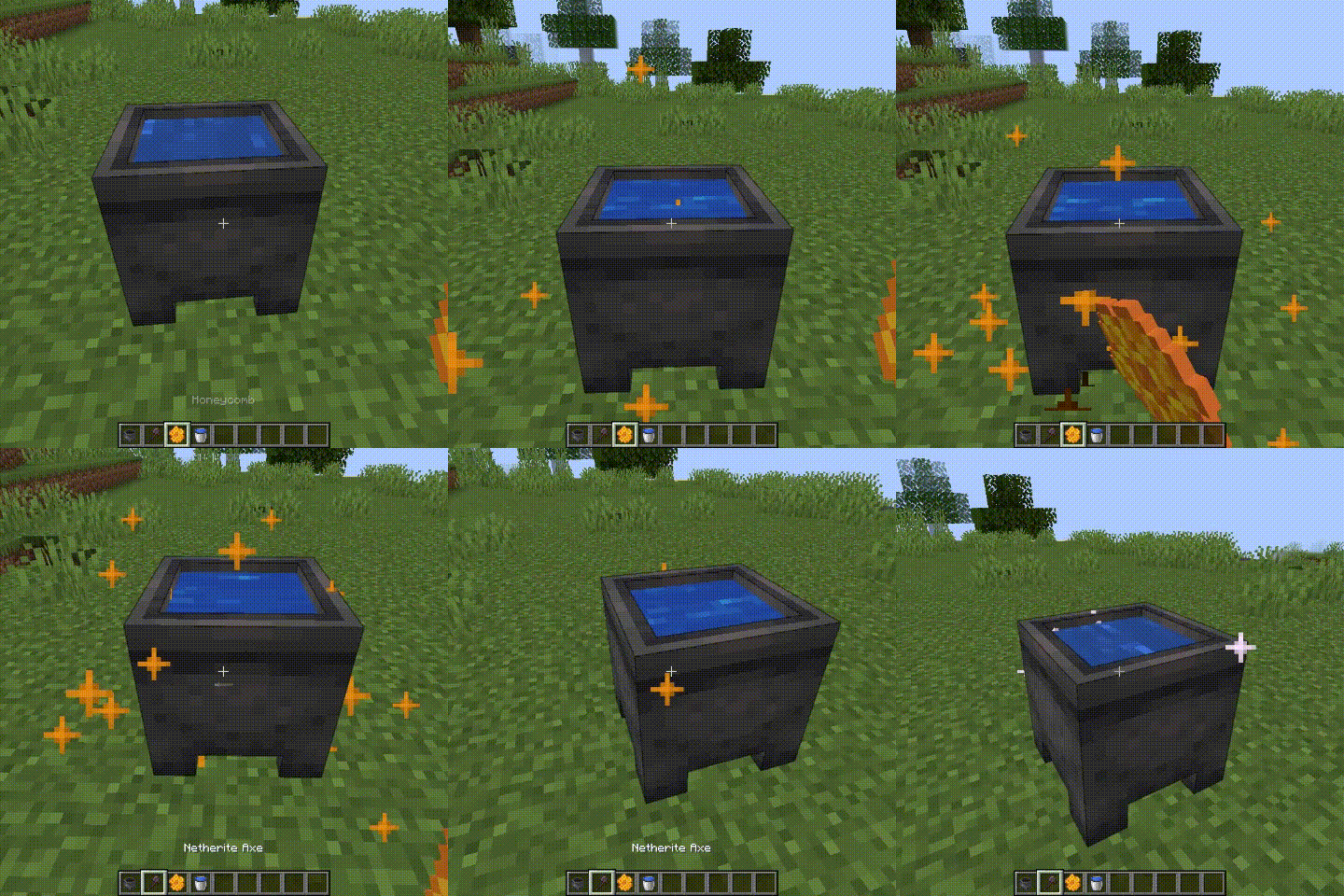
About this Mod

Key Features
- 🧭Facing Blockstate: Just Like Cauldron introduces a facing blockstate for cauldrons, allowing them to face in different directions.
- 🍯Honeycomb Waxing: You can apply wax to any vanilla cauldron, regardless of whether it's empty or contains water (of any level), lava, or powder snow. Simply right-click a cauldron with honeycomb, and the blockstate will change accordingly.
- 🔃Switch "Skins" with Wax: Reapplying wax using honeycomb on a cauldron that’s already waxed will cycle through available "skins", i.e. "data" blockstate values (from 0 to 7). This allows you to switch between different looks easily without removing the wax.
- 🪓⛏️Wax Removal: To remove wax from a cauldron, just right-click it with an axe. This will reset the blockstate, allowing you to reapply wax if needed. A cauldron can also be mined using pickaxe to reset cauldron to the default "data" value.
Decorative Customization
While the mod functions fine on its own, it's designed to work best alongside resource packs that alter cauldrons based on a specific "data" value. By using resource packs, you can transform the look of cauldrons depending on the applied blockstate.
Resource packs
Want to make a skin for a cauldron yourself? Resource pack templates are avalable in the downloads alongside the mod itself
Available Versions
How to Install Just Like Cauldron on Your Server
Order Server
Order a Minecraft Java server with at least 3 GB RAM (4 GB recommended).
Set fabric Loader
In the panel under "Egg", select the fabric loader and matching Minecraft version (1.19.2).
Install Mod
Open the mod browser in the dashboard and search for "Just Like Cauldron". Click "Install" – done! Alternatively, upload the .jar via SFTP to the /mods folder.
Compatibility
Mod Loaders
Minecraft Versions
1.19.2
Server-side
✓ RequiredRecommended RAM
4 GB(min. 3 GB)Frequently Asked Questions
Just Like Cauldron server crashes on startup – what to do?
Most common cause: wrong fabric version or insufficient RAM. Check the server log (latest.log) for "OutOfMemoryError" or "Mixin" errors. With Mado Hosting: ensure at least 3 GB RAM is allocated and the loader matches the mod version (1.19.2). You can switch loaders with one click in the panel.
Is Just Like Cauldron compatible with fabric?
Just Like Cauldron officially supports fabric for Minecraft 1.19.2. The Mado dashboard automatically detects incompatible loader combinations.
Server lagging with Just Like Cauldron – how to optimize performance?
Recommended RAM: 4 GB (per 8 players). Use /spark profiler to check if Just Like Cauldron consumes the most tick time. Common fixes: reduce server view-distance to 8-10, install "performant" or "starlight" as supplementary mods on Forge. With Mado Hosting, your server runs on NVMe SSDs with dedicated CPU cores for minimal latency.
Similar Mods

![[ETF] Entity Texture Features](https://cdn.modrinth.com/data/BVzZfTc1/af683d206d50b05258d865b0d6e4aa2f2cee12f2_96.webp)
![[EMF] Entity Model Features](https://cdn.modrinth.com/data/4I1XuqiY/6e5bbd0d06b1741bfdab6c0cfab6de8fdaf0064c_96.webp)



Rent Modded Server
Install Just Like Cauldron with just one click on your server.