
Just SYBAU
Client-side chat category filter that lets you turn off chat partially
Screenshots
About this Mod
Just SYBAU
Just SYBAU is a client-side Fabric mod that gives you full control over which chat messages you see in Minecraft.
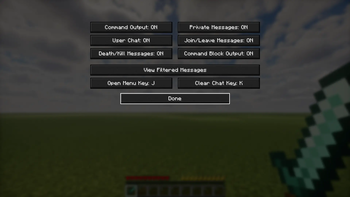
You can hide specific categories of chat instantly, open a clean vanilla-style menu, assign your own shortcuts, clear chat with a custom key, and review hidden messages in a built-in archive.
No server install is required.
Features
- 100% client-side (works on vanilla servers and modded servers)
- Live toggles (no restart needed)
- Filter categories:
- Command output (
/say,/tellraw, command feedback, etc.) - Private messages (
/msg,/tell,/w) - User chat (normal player messages)
- Join/leave messages
- Death/kill messages
- Command block output
- Command output (
- Open menu with command:
/justsybau - Customizable shortcuts inside the GUI:
- Open menu key (default:
None) - Clear chat key (default:
None)
- Open menu key (default:
- Filtered message archive:
- Read past messages that were hidden by filters
- Scrollable history view
- Clear archive button
- Clean vanilla-style UI
Requirements
- Minecraft:
1.21.11 - Fabric Loader:
0.18.6+ - Fabric API:
0.141.3+1.21.11(or compatible) - Java:
21+
Installation
- Install Fabric Loader for Minecraft
1.21.11. - Put Fabric API into your
modsfolder. - Put
just-sybau-1.0.0.jarinto yourmodsfolder. - Start Minecraft.
Quick Tutorial
1) Open the menu
Use:
/justsybau
2) Toggle chat categories
- In the menu, each button controls one message type.
ONmeans visible.OFFmeans hidden.- Changes apply instantly.
3) Set custom shortcuts
- In the same menu, click
Open Menu KeyorClear Chat Key. - Press any keyboard key or mouse button.
- Press
ESCwhile assigning to reset it toNone.
4) Read hidden messages
- Click
View Filtered Messages. - Scroll with mouse wheel or arrow keys.
- Use
Clear Stored Messagesif you want to wipe history.
Notes
- This mod only changes what you see.
- It does not block, edit, or modify server messages.
- It does not require the server to have the mod.
Troubleshooting
The menu does not open
- Confirm you are using
/justsybau(with slash). - Make sure the correct jar is in the
modsfolder. - Confirm game version and Fabric API match the requirements.
Filters seem not to work
- Check each category button state (
OFF= filtered). - Some custom server/plugin formats may not match perfectly.
- If needed, open an issue with logs and an example message format.
Game crashes or UI conflicts
- Update Fabric Loader and Fabric API.
- Test with only Fabric API + Just SYBAU to confirm conflict source.
License
This project is licensed under CC0 1.0 Universal.
Available Versions
How to Install Just SYBAU on Your Server
Order Server
Order a Minecraft Java server with at least 3 GB RAM (4 GB recommended).
Set fabric Loader
In the panel under "Egg", select the fabric loader and matching Minecraft version (26.1.2).
Install Mod
Open the mod browser in the dashboard and search for "Just SYBAU". Click "Install" – done! Alternatively, upload the .jar via SFTP to the /mods folder.
Compatibility
Mod Loaders
Minecraft Versions
26.1.2, 26.1.1, 26.1 (+1 more)
Server-side
✗ UnsupportedRecommended RAM
4 GB(min. 3 GB)Frequently Asked Questions
Just SYBAU server crashes on startup – what to do?
Most common cause: wrong fabric version or insufficient RAM. Check the server log (latest.log) for "OutOfMemoryError" or "Mixin" errors. With Mado Hosting: ensure at least 3 GB RAM is allocated and the loader matches the mod version (26.1.2). You can switch loaders with one click in the panel.
Is Just SYBAU compatible with fabric?
Just SYBAU officially supports fabric for Minecraft 26.1.2, 26.1.1, 26.1. The Mado dashboard automatically detects incompatible loader combinations.
Server lagging with Just SYBAU – how to optimize performance?
Recommended RAM: 4 GB (per 8 players). Use /spark profiler to check if Just SYBAU consumes the most tick time. Common fixes: reduce server view-distance to 8-10, install "performant" or "starlight" as supplementary mods on Forge. With Mado Hosting, your server runs on NVMe SSDs with dedicated CPU cores for minimal latency.
Similar Mods




Rent Modded Server
Install Just SYBAU with just one click on your server.