
jwAutoDoors
jwAutoDoors — Forget About Manual Door Opening Forever!
Screenshots

About this Mod
🚪jwAutoDoors — Forget About Manual Door Opening Forever!
Have you ever thought about how many split seconds you waste constantly clicking on doors when returning to your base with an inventory full of resources? jwAutoDoors is an ultra-lightweight, super-optimized, and smart mod that completely automates this routine.
Doors will smoothly open right in front of your nose and neatly close behind your back. No pressure plates messing up your interior design, and absolutely no redstone spam!
✨ Key Features & Perks:
- ⚡ Smart Step-Based Caching (0 Lag): Unlike other mods that constantly scan the world and tank your CPU, jwAutoDoors utilizes an advanced step-based caching system. The mod only "thinks" when you actually move.
- 🎵 Anti-Spam Buffer Zone (+0.5 blocks): Doors won't start slamming or spamming sounds if you decide to stand right on the threshold. The closing zone is slightly extended for your ultimate comfort.
- 👥 Multiplayer Safe: A door will never slam in your friend's face! The mod carefully verifies the positions of all nearby players before closing a block.
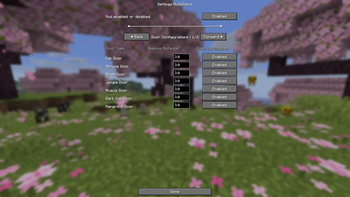
- 🛠️ In-Game Configuration Screen: Adjust the activation distance (from 1 to 5 blocks) or completely disable automation for specific door types right in the game via the ModMenu interface.
- 🌍 Full Localization: The interface seamlessly supports dynamic switching between English and Russian languages.
⚙️ Installation & Requirements
- Download the latest Fabric API and drop it into your
modsfolder. - (Highly Recommended) Install ModMenu to get access to the gorgeous graphical config screen.
- Place the jwAutoDoors .jar file into your
modsfolder and enjoy the comfort!
Available Versions
How to Install jwAutoDoors on Your Server
Order Server
Order a Minecraft Java server with at least 3 GB RAM (4 GB recommended).
Set fabric Loader
In the panel under "Egg", select the fabric loader and matching Minecraft version (26.1.2).
Install Mod
Open the mod browser in the dashboard and search for "jwAutoDoors". Click "Install" – done! Alternatively, upload the .jar via SFTP to the /mods folder.
Compatibility
Mod Loaders
Minecraft Versions
26.1.2, 1.21.11, 1.21.10 (+19 more)
Server-side
✓ RequiredRecommended RAM
4 GB(min. 3 GB)Frequently Asked Questions
jwAutoDoors server crashes on startup – what to do?
Most common cause: wrong fabric version or insufficient RAM. Check the server log (latest.log) for "OutOfMemoryError" or "Mixin" errors. With Mado Hosting: ensure at least 3 GB RAM is allocated and the loader matches the mod version (26.1.2). You can switch loaders with one click in the panel.
Is jwAutoDoors compatible with fabric?
jwAutoDoors officially supports fabric for Minecraft 26.1.2, 1.21.11, 1.21.10. The Mado dashboard automatically detects incompatible loader combinations.
Server lagging with jwAutoDoors – how to optimize performance?
Recommended RAM: 4 GB (per 8 players). Use /spark profiler to check if jwAutoDoors consumes the most tick time. Common fixes: reduce server view-distance to 8-10, install "performant" or "starlight" as supplementary mods on Forge. With Mado Hosting, your server runs on NVMe SSDs with dedicated CPU cores for minimal latency.
Similar Mods

![[ETF] Entity Texture Features](https://cdn.modrinth.com/data/BVzZfTc1/af683d206d50b05258d865b0d6e4aa2f2cee12f2_96.webp)
![[EMF] Entity Model Features](https://cdn.modrinth.com/data/4I1XuqiY/6e5bbd0d06b1741bfdab6c0cfab6de8fdaf0064c_96.webp)



Rent Modded Server
Install jwAutoDoors with just one click on your server.