
KeepOnMining
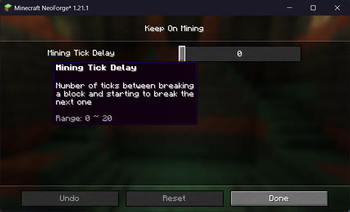
Configure the delay between breaking blocks
Screenshots
About this Mod
KeepOnMining
If you don't break a block instantly, then there is a 5-tick cooldown between breaking a block and starting to break the next one.
This mod simply makes this cooldown configurable, with the delay being set to 0 by default.
The delay can be changed any time in-game by accessing the mod's config menu.
This mod will do nothing if installed on a dedicated server.
Warning
This is a purely client-side mod, but server software can detect that you're breaking blocks faster than you should be able to.
Only use this mod on servers that explicitly allow it. I am not responsible for any punishments doled out by server admins as a result of using this mod.
Q: Why is this a whole mod / why isn't this just a feature in Train's Tweaks?
A: Firstly, there are already mods which achieve this on Fabric 1.21, but not on NeoForge. Since I want all Train's Tweaks features to work near-identically on both platforms and there's no reason to implement it on Fabric, a new mod for NeoForge is the answer.
Second, since servers may consider this mod cheating, a single mod makes the cause easier to identify.
Available Versions
How to Install KeepOnMining on Your Server
Order Server
Order a Minecraft Java server with at least 3 GB RAM (4 GB recommended).
Set neoforge Loader
In the panel under "Egg", select the neoforge loader and matching Minecraft version (1.21.8).
Install Mod
Open the mod browser in the dashboard and search for "KeepOnMining". Click "Install" – done! Alternatively, upload the .jar via SFTP to the /mods folder.
Compatibility
Mod Loaders
Minecraft Versions
1.21.8, 1.21.7, 1.21.6 (+5 more)
Server-side
~ OptionalRecommended RAM
4 GB(min. 3 GB)Frequently Asked Questions
KeepOnMining server crashes on startup – what to do?
Most common cause: wrong neoforge version or insufficient RAM. Check the server log (latest.log) for "OutOfMemoryError" or "Mixin" errors. With Mado Hosting: ensure at least 3 GB RAM is allocated and the loader matches the mod version (1.21.8). You can switch loaders with one click in the panel.
Is KeepOnMining compatible with neoforge?
KeepOnMining officially supports neoforge for Minecraft 1.21.8, 1.21.7, 1.21.6. The Mado dashboard automatically detects incompatible loader combinations.
Server lagging with KeepOnMining – how to optimize performance?
Recommended RAM: 4 GB (per 8 players). Use /spark profiler to check if KeepOnMining consumes the most tick time. Common fixes: reduce server view-distance to 8-10, install "performant" or "starlight" as supplementary mods on Forge. With Mado Hosting, your server runs on NVMe SSDs with dedicated CPU cores for minimal latency.
Similar Mods




Rent Modded Server
Install KeepOnMining with just one click on your server.