
Key Flare
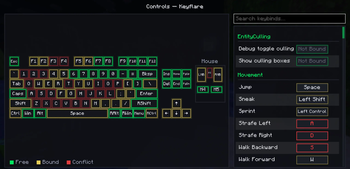
Creates a new Minecraft controls screen with a color-coded visual keyboard to show if keys have conflicting functions.
Screenshots
About this Mod
If you have ever loaded up a massive modpack only to open the controls menu and get blinded by a sea of red, conflicting keybinds, you know how much of a headache it is. Trying to figure out which keys are actually free on your keyboard shouldn't feel like a puzzle game.
This mod completely overhauls Minecraft's clunky, endless scrolling controls screen and replaces it with a nice, interactive dual-pane dashboard. On the left side of your screen, you get a beautiful visual layout of your keyboard and mouse. On the right, you get a cleaned-up, modern dark-themed version of the classic keybind list that actually matches the vibe.
Key Features
- Color-Coding: You can see your entire setup at a glance. Completely free keys glow a clean green, keys with a single function have a soft yellow glow, and conflicting keys pulse a bright neon red so you can spot trouble instantly.
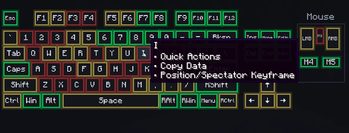
- Hover Tooltips: Hovering your mouse over any key on the visual layout pops up a native tooltip showing you every single action currently bound to it.
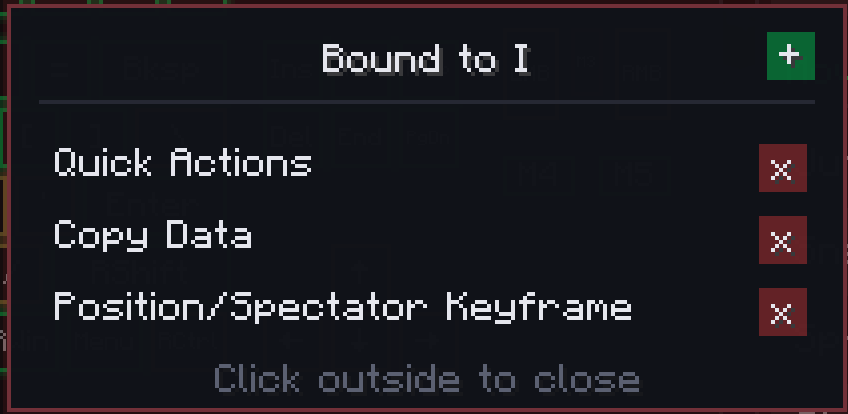
- Easy Key Management: Left-clicking any key opens a quick management popup where you can see its assigned functions and clip them off individually with a little 'X' button. Need a total reset? Just right-click any key on the board to instantly wipe all of its bindings clean.
Available Versions
How to Install Key Flare on Your Server
Order Server
Order a Minecraft Java server with at least 3 GB RAM (4 GB recommended).
Set fabric Loader
In the panel under "Egg", select the fabric loader and matching Minecraft version (26.1.2).
Install Mod
Open the mod browser in the dashboard and search for "Key Flare". Click "Install" – done! Alternatively, upload the .jar via SFTP to the /mods folder.
Compatibility
Mod Loaders
Minecraft Versions
26.1.2, 26.1.1, 26.1 (+1 more)
Server-side
✗ UnsupportedRecommended RAM
4 GB(min. 3 GB)Frequently Asked Questions
Key Flare server crashes on startup – what to do?
Most common cause: wrong fabric version or insufficient RAM. Check the server log (latest.log) for "OutOfMemoryError" or "Mixin" errors. With Mado Hosting: ensure at least 3 GB RAM is allocated and the loader matches the mod version (26.1.2). You can switch loaders with one click in the panel.
Is Key Flare compatible with fabric?
Key Flare officially supports fabric for Minecraft 26.1.2, 26.1.1, 26.1. The Mado dashboard automatically detects incompatible loader combinations.
Server lagging with Key Flare – how to optimize performance?
Recommended RAM: 4 GB (per 8 players). Use /spark profiler to check if Key Flare consumes the most tick time. Common fixes: reduce server view-distance to 8-10, install "performant" or "starlight" as supplementary mods on Forge. With Mado Hosting, your server runs on NVMe SSDs with dedicated CPU cores for minimal latency.
Similar Mods




![[ETF] Entity Texture Features](https://cdn.modrinth.com/data/BVzZfTc1/af683d206d50b05258d865b0d6e4aa2f2cee12f2_96.webp)
![[EMF] Entity Model Features](https://cdn.modrinth.com/data/4I1XuqiY/6e5bbd0d06b1741bfdab6c0cfab6de8fdaf0064c_96.webp)
Rent Modded Server
Install Key Flare with just one click on your server.