
Keybind Atlas
Keybind overlay for modpacks that shows what every key does at a glance.
Screenshots
About this Mod
Keybind Atlas
Keybind Atlas is a client-side visual keybinding overlay that shows players what every key does, across vanilla and modded content.
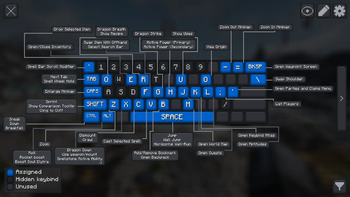
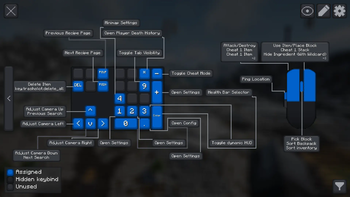


How? When players open the atlas(default key K), it reads their current keybinding state and renders a live visual map of their keyboard and mouse. Each key is color-coded based on whether it's assigned, unused, or hidden, and hovering over a key shows an info box with the action name and source mod. Players can also enter edit mode to manage bindings directly from the overlay.
Why? Modpack controls get crowded fast. Instead of digging through long controls menus, players can open a readable map and understand where bindings come from at a glance, and easily edit them.
Features
Live Visual Overview
Keybind Atlas reads the current keybinding state from vanilla Minecraft and installed mods, then renders a live map of the player's keyboard and mouse. If a player changes a binding or adds a mod, the atlas updates dynamically.
Keys are visually separated by state:
- Assigned for keys with active bindings
- Unused for free keys
- Hidden for bindings the player chooses to keep out of the overview
Hovering a key shows the action name and source mod.
In-Overlay Editing
Players can manage bindings directly from the overlay:
- Remove or rebind an assigned key
- Browse unassigned bindings grouped by mod
- Assign actions to new keys
- Undo changes, discard them, or apply them when ready
Filtering and Customization
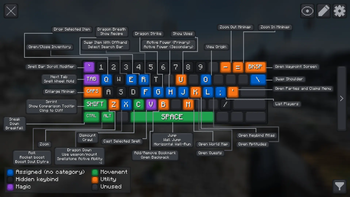
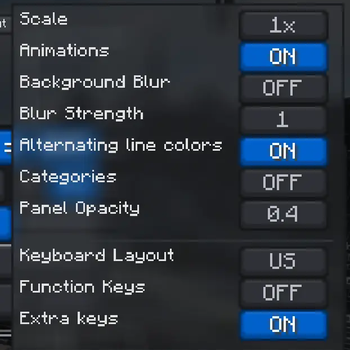
Players can filter visible bindings by mod or by specific actions to reduce noise and focus on the controls that matter. The atlas also supports custom color-coded categories for organizing assigned bindings, including creating, editing, and deleting categories directly in the overlay. Keyboard layout selection, function and extra key toggles, animation controls, hidden-binding controls, scale adjustments, persisted mod and binding filters, and panel styling options are also available.
Why should I add this to my modpack?
If your pack depends on many key-driven features, vehicles, abilities, gadgets, magic systems, or utility menus, this mod gives players a much better first impression of the control setup and helps new players learn the controls faster. Players can reassign controls as they see fit in the same screen.
I recommend using this mod along with Default Options mod to ship a custom keybinding setup with your modpack.
Other Info
- Side: Client-side only, no server installation is required.
- Default open key:
K - Supported keyboard layouts: US QWERTY, UK QWERTY, Brazilian ABNT2, French AZERTY, Belgian AZERTY, German QWERTZ, Swiss QWERTZ, Spanish QWERTY, Italian QWERTY, and Nordic QWERTY
- Mouse support: Integrated mouse visualization is included alongside the keyboard overlay.
- Supported localizations: English (US), English (UK), Portuguese (Brazil), French, German, Spanish, Italian, Dutch (Belgium), Danish, Swedish, Norwegian Bokmal, Finnish, Russian, and Simplified Chinese
Showcase Videos
Thank you to all the content creators who have showcased the mod! If you have a video featuring Keybind Atlas that you'd like to share, please let me know.
Kreksu
EnderVerse
Available Versions
How to Install Keybind Atlas on Your Server
Order Server
Order a Minecraft Java server with at least 3 GB RAM (4 GB recommended).
Set forge Loader
In the panel under "Egg", select the forge loader and matching Minecraft version (1.21.1).
Install Mod
Open the mod browser in the dashboard and search for "Keybind Atlas". Click "Install" – done! Alternatively, upload the .jar via SFTP to the /mods folder.
Compatibility
Mod Loaders
Minecraft Versions
1.21.1, 1.20.1
Server-side
✗ UnsupportedRecommended RAM
4 GB(min. 3 GB)Frequently Asked Questions
Keybind Atlas server crashes on startup – what to do?
Most common cause: wrong forge version or insufficient RAM. Check the server log (latest.log) for "OutOfMemoryError" or "Mixin" errors. With Mado Hosting: ensure at least 3 GB RAM is allocated and the loader matches the mod version (1.21.1). You can switch loaders with one click in the panel.
Is Keybind Atlas compatible with forge and neoforge?
Keybind Atlas officially supports forge, neoforge for Minecraft 1.21.1, 1.20.1. The Mado dashboard automatically detects incompatible loader combinations.
Server lagging with Keybind Atlas – how to optimize performance?
Recommended RAM: 4 GB (per 8 players). Use /spark profiler to check if Keybind Atlas consumes the most tick time. Common fixes: reduce server view-distance to 8-10, install "performant" or "starlight" as supplementary mods on Forge. With Mado Hosting, your server runs on NVMe SSDs with dedicated CPU cores for minimal latency.
Similar Mods




![[ETF] Entity Texture Features](https://cdn.modrinth.com/data/BVzZfTc1/af683d206d50b05258d865b0d6e4aa2f2cee12f2_96.webp)
![[EMF] Entity Model Features](https://cdn.modrinth.com/data/4I1XuqiY/6e5bbd0d06b1741bfdab6c0cfab6de8fdaf0064c_96.webp)
Rent Modded Server
Install Keybind Atlas with just one click on your server.