Keychain
Switch between Microsoft and offline Minecraft accounts in-game with the real Microsoft login. No codes, no restart, encrypted at rest.
Screenshots
About this Mod
Keychain
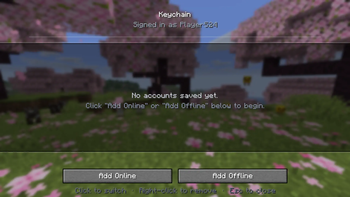
Switch Minecraft accounts in-game without restarting. A Keychain button is added to your title screen and pause menu. Click it, pick Add Online, and the real Microsoft sign-in page opens in your browser. Sign in normally — email, password, 2FA — and your account appears in the list. Click any saved account to switch to it instantly.
Features
- 🔑 One-click account switching — click any saved account in the list, you're switched. No restart.
- 🌐 Real Microsoft login — opens
login.microsoftonline.comin your browser. Same form Microsoft uses everywhere. Email, password, 2FA, all official. - 👤 Offline accounts — pick a username, switch immediately. Same
OfflinePlayer:UUID derivation vanilla uses. - 🔒 Encrypted at rest — your saved tokens are AES-GCM-encrypted with a key tied to your machine. Anyone who copies your
.minecraftfolder gets unreadable data. - 🚫 Zero telemetry — only talks to Microsoft and Mojang's official endpoints. No phoning home, no analytics.
- ⚡ Tiny — ~50 KB jar. No bundled browser, no native libs.
- 🧹 Clean UI — top-left button, two big actions, click-to-switch, right-click-to-remove.
How it works
Keychain uses the OAuth 2.0 Authorization Code flow with PKCE — the same flow MultiMC, Prism Launcher, and Auth Me use. When you click Add Online:
- Keychain starts a tiny local HTTP server bound to
127.0.0.1on a random free port. - Your default browser opens to the official Microsoft sign-in page.
- You sign in with your real credentials. 2FA and security keys work normally.
- Microsoft redirects back to
http://localhost:<port>/callback. - Keychain captures the auth code, exchanges it through the standard Microsoft → Xbox Live → XSTS → Minecraft Services chain.
- Your account appears in the list, encrypted to disk.
The local server only exists during the ~5-minute sign-in window and shuts down immediately afterwards.
Privacy
- 🔐 AES-GCM encryption of
<gamedir>/config/account-switcher.jsonusing a key derived from your OS user + machine name. Tokens are unreadable on any other machine. - 🚷 No tokens in logs.
latest.logand crash reports never contain access tokens, refresh tokens, or auth codes. - 🛡️ PKCE + state parameter — protects against code interception and CSRF.
- 🌐 HTTPS-only outbound traffic to:
login.microsoftonline.com,user.auth.xboxlive.com,xsts.auth.xboxlive.com,api.minecraftservices.com. Nothing else. - 🔒 Loopback-only local callback server (
127.0.0.1, never reachable over your network).
Installation
- Install Fabric Loader for Minecraft 26.1.x.
- Download Fabric API and drop it into
%APPDATA%\.minecraft\mods(Windows) /~/Library/Application Support/minecraft/mods(macOS) /~/.minecraft/mods(Linux). - Drop the Keychain jar into the same folder.
- Launch Minecraft. Keychain button is at the top-left of the title screen and pause menu.
Compatibility
- ✅ Minecraft 26.1, 26.1.1, 26.1.2 (Fabric)
- ✅ Java 25
- ✅ Client-side only (don't put it on your server)
- ⚠️ Mid-server account switching may kick you — switch from the title screen for cleanest behaviour.
- ⚠️ Skin doesn't refresh on a server you're already connected to. Disconnect and reconnect after switching.
FAQ
Why does the Microsoft consent screen say "Auth Me for Minecraft"?
Keychain ships with a public Azure App ID registered by Auth Me (axieum), used by ~9.6 million players. If that ever gets revoked, Keychain has a built-in Use custom Azure ID fallback to paste your own.
Is this safe for my Microsoft account?
Yes. The mod opens the real login.microsoftonline.com — you're signing in to Microsoft directly, not to me. Verify the URL bar. Same flow as the official Minecraft launcher and every major third-party launcher.
Will my token file leak if I share my .minecraft folder?
No. The file is AES-GCM-encrypted with a per-machine key. Unreadable elsewhere.
Can I sign in to multiple accounts and switch?
Yes — that's the entire point. Add as many as you want, click any one to switch.
Does it work on servers?
Yes for switching from the title screen / pause menu before joining. Switching mid-game on a server will likely get you kicked because the protocol session changes.
Source & support
Made by Domsimus.
Available Versions
How to Install Keychain on Your Server
Order Server
Order a Minecraft Java server with at least 3 GB RAM (4 GB recommended).
Set fabric Loader
In the panel under "Egg", select the fabric loader and matching Minecraft version (26.1.2).
Install Mod
Open the mod browser in the dashboard and search for "Keychain". Click "Install" – done! Alternatively, upload the .jar via SFTP to the /mods folder.
Compatibility
Mod Loaders
Minecraft Versions
26.1.2, 26.1.1, 26.1
Server-side
✗ UnsupportedRecommended RAM
4 GB(min. 3 GB)Frequently Asked Questions
Keychain server crashes on startup – what to do?
Most common cause: wrong fabric version or insufficient RAM. Check the server log (latest.log) for "OutOfMemoryError" or "Mixin" errors. With Mado Hosting: ensure at least 3 GB RAM is allocated and the loader matches the mod version (26.1.2). You can switch loaders with one click in the panel.
Is Keychain compatible with fabric?
Keychain officially supports fabric for Minecraft 26.1.2, 26.1.1, 26.1. The Mado dashboard automatically detects incompatible loader combinations.
Server lagging with Keychain – how to optimize performance?
Recommended RAM: 4 GB (per 8 players). Use /spark profiler to check if Keychain consumes the most tick time. Common fixes: reduce server view-distance to 8-10, install "performant" or "starlight" as supplementary mods on Forge. With Mado Hosting, your server runs on NVMe SSDs with dedicated CPU cores for minimal latency.
Similar Mods




![[ETF] Entity Texture Features](https://cdn.modrinth.com/data/BVzZfTc1/af683d206d50b05258d865b0d6e4aa2f2cee12f2_96.webp)

Rent Modded Server
Install Keychain with just one click on your server.