
KeyStrokes Overlay With Lua
A highly customizable keystrokes overlay for Fabric that uses Lua scripts for dynamic visual themes and real-time design editing
Screenshots
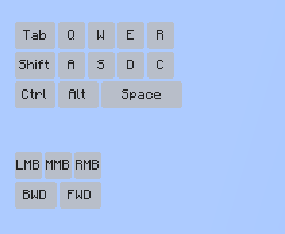
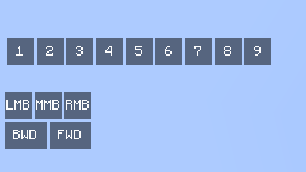
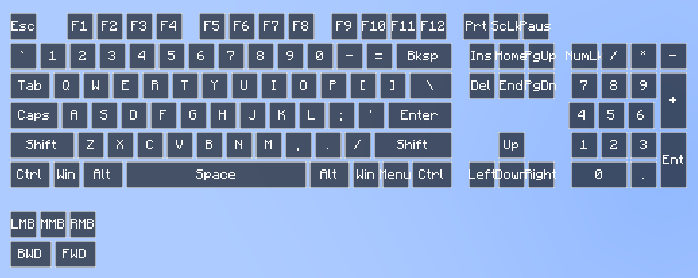
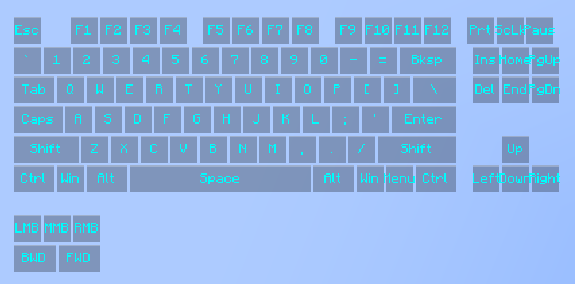
About this Mod
⌨️ KeyStrokes Overlay With Lua
A powerful and flexible keystrokes display mod for Minecraft Fabric, featuring a unique Lua-based engine for deep visual customization.
✨ Key Features:
- Lua-Powered Themes: All visual styles (Classic, Modern, Apple, and Lunar) are handled via external Lua scripts. Create your own unique look by adding
.luafiles toconfig/keystrokes/ThemeManager/. - Live Hot-Reloading: Modify your theme scripts while the game is running and see the changes instantly using the "Reload Lua" button in the settings menu.
- Intuitive In-Game Menu: Press the 'K' key to open the settings interface.
- Full RGB Customization: Real-time color sliders that sync directly with your Lua scripts for ultimate control.
- Flexible UI: Independently drag and reposition the keyboard and mouse overlays. Support for custom scaling (Auto, Fixed, or Slider-based).
🚀 Installation:
- Ensure you have Fabric Loader installed for Minecraft 1.20 or higher.
- Download the mod and place the
.jarfile into yourmodsfolder. - Launch Minecraft and press 'K' to open the settings.
- Explore the
config/keystrokes/ThemeManager/folder to tweak the default scripts or add new ones.
📜 Scripting Guide: Create Your Own Theme
Creating a theme is easy. Just create a .lua file in the config/keystrokes/ThemeManager/ folder. Here is a starter template:
-- Save this as "my_custom_theme.lua" in config/keystrokes/ThemeManager/

-- Optional: This runs once when the theme is loaded or selected
function onThemeLoad()
    -- Sets the default color of the menu sliders (R, G, B, A)
    setMenuColor(255, 165, 0, 255) -- Default to Orange
end

-- This runs every frame for every key and mouse button
-- Parameters: label (String), isPressed (Boolean), x, y, w, h (Position/Size), r, g, b, a (Menu Colors)
function renderKey(label, isPressed, x, y, w, h, r, g, b, a)
    -- Combine the R, G, B, A values from the menu into a single color
    local menuColor = bit.bor(bit.lshift(a, 24), bit.lshift(r, 16), bit.lshift(g, 8), b)

    if isPressed then
        -- Draw a solid background using the menu color
        fill(x, y, w, h, menuColor)
        -- Tell the mod to draw the text in Black
        setTextColor(0xFF000000)
    else
        -- Draw a semi-transparent black background when not pressed
        fill(x, y, w, h, 0x80000000)
        -- Tell the mod to draw the text in White
        setTextColor(0xFFFFFFFF)
    end
end
Available Versions
How to Install KeyStrokes Overlay With Lua on Your Server
Order Server
Order a Minecraft Java server with at least 3 GB RAM (4 GB recommended).
Set fabric Loader
In the panel under "Egg", select the fabric loader and matching Minecraft version (1.21.11).
Install Mod
Open the mod browser in the dashboard and search for "KeyStrokes Overlay With Lua". Click "Install" – done! Alternatively, upload the .jar via SFTP to the /mods folder.
Compatibility
Mod Loaders
Minecraft Versions
1.21.11, 1.21.10, 1.21.9 (+16 more)
Server-side
✗ UnsupportedRecommended RAM
4 GB(min. 3 GB)Frequently Asked Questions
KeyStrokes Overlay With Lua server crashes on startup – what to do?
Most common cause: wrong fabric version or insufficient RAM. Check the server log (latest.log) for "OutOfMemoryError" or "Mixin" errors. With Mado Hosting: ensure at least 3 GB RAM is allocated and the loader matches the mod version (1.21.11). You can switch loaders with one click in the panel.
Is KeyStrokes Overlay With Lua compatible with fabric?
KeyStrokes Overlay With Lua officially supports fabric for Minecraft 1.21.11, 1.21.10, 1.21.9. The Mado dashboard automatically detects incompatible loader combinations.
Server lagging with KeyStrokes Overlay With Lua – how to optimize performance?
Recommended RAM: 4 GB (per 8 players). Use /spark profiler to check if KeyStrokes Overlay With Lua consumes the most tick time. Common fixes: reduce server view-distance to 8-10, install "performant" or "starlight" as supplementary mods on Forge. With Mado Hosting, your server runs on NVMe SSDs with dedicated CPU cores for minimal latency.
Similar Mods




![[ETF] Entity Texture Features](https://cdn.modrinth.com/data/BVzZfTc1/af683d206d50b05258d865b0d6e4aa2f2cee12f2_96.webp)
![[EMF] Entity Model Features](https://cdn.modrinth.com/data/4I1XuqiY/6e5bbd0d06b1741bfdab6c0cfab6de8fdaf0064c_96.webp)
Rent Modded Server
Install KeyStrokes Overlay With Lua with just one click on your server.