
KillStats
Tracks your entity kills during gameplay sessions and displays live statistics via a configurable in-game HUD overlay.
Screenshots
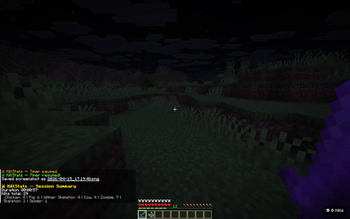
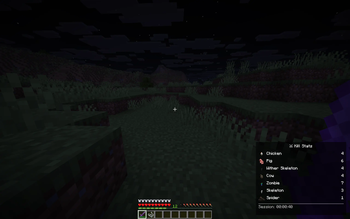
About this Mod
KillStats
Track every kill, estimate your loot, and dominate the battlefield!
This lightweight client-side Fabric mod tracks your entity kills during gameplay sessions and displays live statistics via a configurable in-game HUD overlay.
Features
Kill Tracking
- Per-mob breakdown - See exactly how many of each mob type you've killed
- Multiple kill methods - Tracks melee, projectile, and splash potion kills
- 40+ mob types - Covers hostile, passive, nether, end mobs, and bosses
HUD Display
- Full mode - Detailed per-mob breakdown with drop icons and kill counts
- Compact mode - Minimal single-line display for less screen clutter
- Configurable position - Place the HUD in any corner of the screen
- Adjustable opacity and scale - Fine-tune the look to your preference
- Smart visibility - Show only when holding weapons, or keep always visible
Session Management
- Session timer - Track how long you've been hunting with start/pause/resume
- Auto-pause - Timer pauses automatically when opening menus
- Session summary - Detailed breakdown in chat when leaving a world or resetting
- Persistent sessions - Optionally save session data across world exits
Milestones & Alerts
- Kill milestones - Chat notifications every X total kills (configurable)
- Per-mob milestones - Notifications every 50 kills of the same mob type
- Boss kill effects - Gold flash and sound when defeating bosses
- Sound alerts - Optional audio feedback on milestones
Customization
Configure everything in-game via ModMenu:
HUD Settings
- HUD position (top-left, top-right, bottom-left, bottom-right)
- Always visible toggle
- Background opacity (0-100%)
- HUD scale (0.5x-2.0x)
Keybinds (Controls > KillStats)
K- Start/Pause/Resume timerL- Reset sessionJ- Toggle compact mode
Session Settings
- Show session summary on exit
- Auto-pause timer in menus
- Persistent session storage
Milestones
- Milestone sound toggle
- Milestone interval (0 = disabled)
Requirements
- Minecraft: 26.1+
- Fabric Loader: 0.18.4 or higher
- Fabric API: Required
- Java: 25 or higher
- ModMenu + YACL: Optional (for in-game config screen)
Perfect For
- Grinders - Track your mob farm efficiency with kill counts and drop value estimates
- Speedrunners - Monitor kills and session time in a clean overlay
- Adventurers - See your combat stats at a glance while exploring
- Everyone - Anyone who wants to know their kill stats in Minecraft!
Links
- Issues & Bugs: GitHub Issues
- Source Code: GitHub Repository
License
This mod is open-source and licensed under the MIT License.
Made with love by DennisTheGamer
Available Versions
How to Install KillStats on Your Server
Order Server
Order a Minecraft Java server with at least 3 GB RAM (4 GB recommended).
Set fabric Loader
In the panel under "Egg", select the fabric loader and matching Minecraft version (26.1.2).
Install Mod
Open the mod browser in the dashboard and search for "KillStats". Click "Install" – done! Alternatively, upload the .jar via SFTP to the /mods folder.
Compatibility
Mod Loaders
Minecraft Versions
26.1.2, 26.1.1, 26.1
Server-side
✗ UnsupportedRecommended RAM
4 GB(min. 3 GB)Frequently Asked Questions
KillStats server crashes on startup – what to do?
Most common cause: wrong fabric version or insufficient RAM. Check the server log (latest.log) for "OutOfMemoryError" or "Mixin" errors. With Mado Hosting: ensure at least 3 GB RAM is allocated and the loader matches the mod version (26.1.2). You can switch loaders with one click in the panel.
Is KillStats compatible with fabric?
KillStats officially supports fabric for Minecraft 26.1.2, 26.1.1, 26.1. The Mado dashboard automatically detects incompatible loader combinations.
Server lagging with KillStats – how to optimize performance?
Recommended RAM: 4 GB (per 8 players). Use /spark profiler to check if KillStats consumes the most tick time. Common fixes: reduce server view-distance to 8-10, install "performant" or "starlight" as supplementary mods on Forge. With Mado Hosting, your server runs on NVMe SSDs with dedicated CPU cores for minimal latency.
Similar Mods
![[EMF] Entity Model Features](https://cdn.modrinth.com/data/4I1XuqiY/6e5bbd0d06b1741bfdab6c0cfab6de8fdaf0064c_96.webp)


Rent Modded Server
Install KillStats with just one click on your server.