
Kill Switch
The first ever kill (public?) switch in Minecraft. Default Bind is K. Be careful since its instant exit.
Screenshots
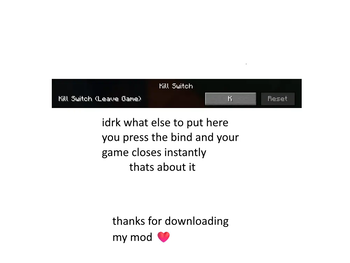
About this Mod
🚨 Minecraft Kill Switch 🚨
🧨 Overview
The Minecraft Kill Switch is a simple yet powerful mod that lets you instantly kill the game with a single keystroke. Whether you're stuck in a tight spot, want to quit without waiting for the game to close normally, or just need a quick "emergency exit," this mod does the job. The default keybinding for this action is the K key.
⚡ Instant Shutdown: Press the K key to instantly close your Minecraft game, no questions asked.
🛠️ Features
- One-Press Shutdown: Simply press the K key to terminate Minecraft immediately.
- No Confirmation Required: This is an emergency switch; there's no "Are you sure?" prompt—just a quick exit.
🎮 How It Works
The Minecraft Kill Switch works by intercepting the game's input and detecting the press of the K key. When the key is pressed, the game is forcibly closed without any delay.
Default Keybind
- Key:
K(Can be customized in Minecraft's control settings)
⚙️ Installation Guide
Follow these steps to install the Minecraft Kill Switch Mod:
Download the Mod:
Install Fabric (or Forge):
- You’ll need either Fabric or Forge installed to run this mod. You can get Fabric from here.
- Follow the installation instructions on their website for your version of Minecraft.
Add the Mod:
- Move the downloaded mod
.jarfile into your Minecraft mods folder:- On Windows:
AppData > Roaming > .minecraft > mods - On macOS:
~/Library/Application Support/minecraft/mods
- On Windows:
- Move the downloaded mod
Launch Minecraft:
- Open your Minecraft Launcher, select the correct profile (Fabric/Forge), and click Play.
🖱️ Customizing the Keybind
If you want to change the default K key to something else:
- Open Minecraft and go to Options > Controls.
- Look for the section labeled Kill Switch Mod.
- Change the key to your preferred button.
- Hit Done and you're set!
🧳 Troubleshooting
- The mod isn't working: Ensure you're using the correct version of Fabric/Forge. Double-check that the mod file is in the correct mods folder.
- The key doesn't work: Make sure no other mods are conflicting with the keybind. Try resetting your controls.
- Accidentally pressing K: Change the key to something less accessible.
🔐 Safety Warning
This mod is designed to terminate the game instantly when the key is pressed. While useful, please use responsibly—accidentally pressing the key could cause you to lose unsaved progress.
⚙️ Requirements
- Loader: Fabric 0.16.10
- Fabric API: Recommended
Available Versions
How to Install Kill Switch on Your Server
Order Server
Order a Minecraft Java server with at least 3 GB RAM (4 GB recommended).
Set fabric Loader
In the panel under "Egg", select the fabric loader and matching Minecraft version (1.21.3).
Install Mod
Open the mod browser in the dashboard and search for "Kill Switch". Click "Install" – done! Alternatively, upload the .jar via SFTP to the /mods folder.
Compatibility
Mod Loaders
Minecraft Versions
1.21.3
Server-side
✗ UnsupportedRecommended RAM
4 GB(min. 3 GB)Frequently Asked Questions
Kill Switch server crashes on startup – what to do?
Most common cause: wrong fabric version or insufficient RAM. Check the server log (latest.log) for "OutOfMemoryError" or "Mixin" errors. With Mado Hosting: ensure at least 3 GB RAM is allocated and the loader matches the mod version (1.21.3). You can switch loaders with one click in the panel.
Is Kill Switch compatible with fabric?
Kill Switch officially supports fabric for Minecraft 1.21.3. The Mado dashboard automatically detects incompatible loader combinations.
Server lagging with Kill Switch – how to optimize performance?
Recommended RAM: 4 GB (per 8 players). Use /spark profiler to check if Kill Switch consumes the most tick time. Common fixes: reduce server view-distance to 8-10, install "performant" or "starlight" as supplementary mods on Forge. With Mado Hosting, your server runs on NVMe SSDs with dedicated CPU cores for minimal latency.
Similar Mods




Rent Modded Server
Install Kill Switch with just one click on your server.