
Krave Client
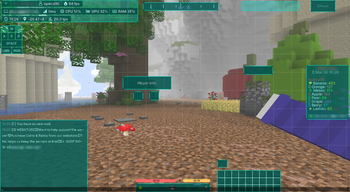
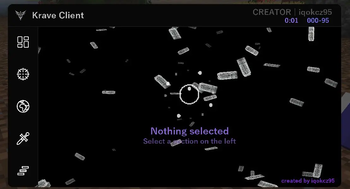
Krave Client - is a Minecraft client with a large number of features developed from scratch.
Screenshots
About this Mod
Русский (Russian)
Krave Client
Krave Client — это клиент-мод, созданный с нуля с упором на красивый визуал и удобство игры. Никаких читов — только инструменты, которые делают игровой опыт лучше.
Функции в клиенте могут немного отличаться, потому что библиотеки на версиях майнкрафта разные!!!
Клиент весит много, потому что шрифты находяться прямо в файле, они не получаются через интернет!!!
Открыть гуи - Right Shift
⚙️ Требования
- Загрузчик | Fabric
- Minecraft | 1.21.11 ; 1.21.8 ; 1.21.1 ; 1.21.4 (В будущем будут и новые версии)
- Fabric API | Требуется
- Java | 21+
🖥️ HUD
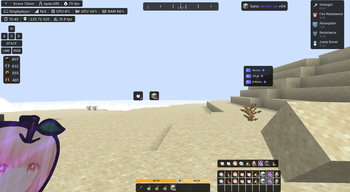
- Stats HUD — панель с FPS, пингом, CPU, GPU, RAM, TPS, координатами, айпи сервера, ником игрока, временем
- Armor HUD — отображение прочности брони
- Player Info — панель, которая показывает ник и хп других игроков
- Inventory HUD — отображение инвентаря на экране во время игры
- Chat HUD — собственный чат с временными метками, окраской ников других игроков и вашего ника в настраиваемые цвета, поддержкой прокрутки и shimmer-эффектом
- Effect HUD — панель, в которой показывает все эффекты, которые в данный момент есть на игроке
- PvP Resources — панель, в которой показывает предметы, которые связаны с пвп
- Hand Item — панель, в которой показывает предмет в активной руке
- Offhand Item — панель, в которой показывает предмет в левой руке
- Server HUD — заменяет сервер худ с информацией на кастомный с клиента
- Hotbar HUD — заменяет ванильный хотбар на кастомный
- Coordinate Bar — компасная шкала с названиями сторон света, азимутом и центральным указателем
- и другие...
Перемещать худы можно через открытый чат
⚔️ Combat
- Hitboxes — кастомные хитбоксы с настройкой цвета
- Hit Color — перекраска модели существа при получении урона
- Hit Sound — возможность заменить звук крит удара прямо в игре на свой любой .ogg .wav звуки
- Fire Immunity — отключение анимации огня на экране
- Custom FOV — настройка поля зрения
- HP/Armor/Damage Billboard — отображение информации над сущностями прямо в мире
- Armor Alerts — показывает уведомления, когда любой элемент брони на грани поломки
- Screen Vignette — когда у игрока меньше 4 сердец, на экране увеличивается эффект туманности
- Auto Leave — автоматически выходит с сервера/мира, когда уровень здоровья падает ниже выбранного.
- Quick Disconnect Hotkey — назначаемая клавиша для мгновенного выхода из игры или сервера.
🧩 Other
- Block Highlight — окрашает блок в цвета, на который наведена камера игрока
- Aspect Ratio — возможность поменять разрешение майнкрафта (Вариантов очень много)
- Hand View — возможность поменять расположение рук правой и левой
- GPS — через команду
.gps * * *можно поставить метку, как на любых миникартах - Item Bean/Item Highlight 2 — на выброшенных предметах появляется столбец или квадрат, обводящий выброшенные предметы
- Elytra Trails — во время полета будут красивые следы
- Armor Transparency — можно менять прозрачность брони на игроках + элитры + плащи
- Proximity Tint — тонировка вдаль в виде тумана, который закрывает полностью все
- Strafe Tilt — плавный наклон камеры во время ходьбы влево или вправо
- Hotbar Lock — позволяет заблокировать выбрасывание любых предметов с определенных слотов
- Loot Timer — над выброшенными предметами появляется таймер исчезновения
- Safe Walk — предотвращает падение с краев блоков
- Container Search — позволяет искать предметы внутри сундуков
- Streamer Mode — скрывает никнейм и айпи сервера на экране
- Smart Middle-Click — нажатие колесиком мыши для быстрого выбора предмета(как в креативе), если он есть в инвентаре
- Visible Ore Highlight — подсвечивает видимые руды сквозь прозрачные блоки или в темноте. (НЕ XRAY)
- Toggle Sprint/Sneak — переключение бега и приседания по нажатию, вместо удержания клавиши
- In-Game NotePad — встроенный блокнот для быстрых заметок прямо во время игры.
- и другие...
🌍 World
- Weather — кастомная смена погоды
- Fog — кастомная смена тумана
- Clouds — кастомная смена облаков
- Rendering — кастомная настройка прогрузки чанков
- и другие...
💻 Other Categories
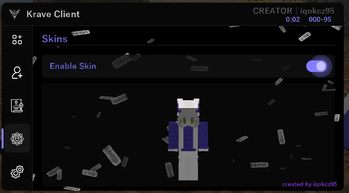
- Skins — 3д рендер скинов, можно ставить кастомные скины
- Crosshair — кастомные прицелы, кулдаун прицела + динамический вариант
- Death — список смертей с захода на сервер/мир
- Friends — возможность добавления друзей в клиенте (Ник игрока изменяет цвет)
🪜 Extra
- AltCamera — полная копия функции Freelock, но с дополнительной возможностью крутить камерой в первом лице
- Fullbright — убирает все тени и все осветляет
- Zoom — возможность плавно приближать камеру, по типу как в Optifine
- и другие...
⚙️ Settings
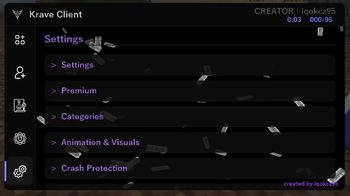
- Полностью кастомный ClickGui с категориями, большим количеством элементов для категорий, анимациями и shimmer-эффектами
- Цветовые пикеры, слайдеры, несколько разных дропдаунов
- Выбор нескольких языков для гуи
- 25+ встроенных шрифтов
- Конфиги
- другие...
⭐ Premium-версия
Premium-версия Krave Client создана исключительно для друзей автора и не распространяется среди других игроков. Она не открывает никаких новых игровых функций — единственное отличие заключается в анимированном интерфейсе клиента. Если вы не являетесь другом автора, вы автоматически используете стандартную версию со всем тем же функционалом.
🎩 Айди система
- Айди система — это система, которая создает под каждый ник игрока кастомный айди по такому примеру
###-##до лимита. Если лимит в 99999 ников был преодолен, то появляется новый вид айди###-###. ВСЕ ДАННЫЕ О НИКАХ ИГРОКОВ И ИХ АЙДИ ХРАНЯТСЯ НА GitHub Gists. Сохраняется ИСКЛЮЧИТЕЛЬНО ник игрока и созданный под этот ник кастомный айди, больше ничего в Gists НЕ СОХРАНЯЕТСЯ. Я всегда хотел, чтобы в каком-то из моих модов была такая система. Она ничего другого не делает, лишь под ники игроков добавляет кастомные айди, поэтому определенной сути для этой системы просто нету. Также, когда под новый ник генерируется новый айди, в Дискорд-сервере создателя мода появляется уведомление по вебхуку с ником и айди игрока.
English (English)
Krave Client
Krave Client is a client mod created from scratch with a focus on beautiful visuals and ease of play. No cheats—only tools that enhance the gaming experience.
Client features may vary slightly because the libraries used in each Minecraft version are different!
The client is large because the fonts are located directly in the file and cannot be retrieved via the internet!!!
Open GUI - Right Shift
⚙️ Requirements
- Loader | Fabric
- Minecraft | 1.21.11 ; 1.21.8 ; 1.21.1 ; 1.21.4 (There will be new versions in the future)
- Fabric API | Required
- Java | 21+
🖥️ HUD
- Stats HUD — a panel with FPS, ping, CPU, GPU, RAM, TPS, coordinates, server IP, player nickname, and time
- Armor HUD — displays armor durability
- Player Info — a panel that shows the nicknames and HP of other players
- Inventory HUD — displays your inventory on the screen during the game
- Chat HUD — a custom chat with timestamps, customizable colors for other players' nicknames and your nickname, scrolling support, and a shimmer effect
- Effect HUD — a panel that displays all effects currently on the player
- PvP Resources — a panel that displays PvP-related items
- Hand Item — a panel that displays the item in your active hand
- Offhand Item — a panel that displays the item in your left hand
- Server HUD — replaces the server-side HUD with information from the client
- Hotbar HUD — replaces the vanilla hotbar with a custom one
- Coordinate Bar — compass scale with cardinal directions, azimuth, and a center pointer
- etc...
You can move the HUDs through the open chat
⚔️ Combat
- Hitboxes — custom hitboxes with color customization
- Hit Color — recolor the creature model when taking damage
- Hit Sound — change the critical hit sound directly in-game to your own .ogg or .wav sounds
- Fire Immunity — disables the on-screen fire animation
- Custom FOV — adjusts the field of view
- HP/Armor/Damage Billboard — displays information above entities directly in the world
- Armor Alerts — displays notifications when any armor element is about to break
- Screen Vignette — when the player has fewer than 4 hearts, the fog effect on the screen
- Quick Disconnect Hotkey — a bindable hotkey for instantly disconnecting from the game or server.
- Auto Leave — automatically leaves the server/world when health drops below the selected one.
increases.
🧩 Other
- Block Highlight — colors the block the same color as the player's camera focus.
- Aspect Ratio — changes Minecraft's resolution (many options available).
- Hand View — changes the position of your left and right hands.
- GPS — use the
.gps * * *command to place a marker, just like on any minimap. - Item Bean/Item Highlight 2 — a column or square appears on dropped items, outlining them.
- Elytra Trails — leaves beautiful trails during flight.
- Armor Transparency — changes the transparency of armor on players, elytra, and cloaks.
- Proximity Tint — a distant fog-like tint that completely obscures everything.
- Strafe Tilt — smooth camera tilt while walking left or right
- Hotbar Lock — prevents dropping any items from specific slots
- Loot Timer — a despawn timer appears over dropped items
- Safe Walk — prevents falling off the edges of blocks.
- Container Search — allows you to search for items inside chests.
- Streamer Mode — hides nickname and ipserver on the screen.
- Smart Middle-Click — clicking the mouse wheel to quickly select an item (as in creative), if it is in the inventory
- Visible Ore Highlight — highlights visible ores through transparent blocks or in the dark. (NOT XRAY)
- Toggle Sprint/Sneak — toggles sprinting and sneaking on press instead of holding the key
- In-Game NotePad — a built-in notepad for quick notes right during the game
- etc...
🌍 World
- Weather — custom weather changes
- Fog — custom fog changes
- Clouds — custom cloud changes
- Rendering — custom chunk loading settings
- etc...
💻 Other Categories
- Skins — 3D skin renders, allows you to install custom skins
- Crosshair — custom crosshairs, crosshair cooldown + dynamic option
- Death — death list since joining a server/world
- Friends — add friends in the client (player nickname changes color)
🪜 Extra
- AltCamera — a complete copy of the Freelock feature, but with the added ability to rotate the camera in first person
- Fullbright — removes all shadows and brightens everything
- Zoom — the ability to smoothly zoom in on the camera, similar to Optifine
- etc...
⚙️ Settings
- Fully custom ClickGui with categories, a large number of category elements, animations, and shimmer effects
- Color pickers, sliders, several different dropdowns
- Multiple language options for the GUI
- 25+ built-in fonts
- Configs
- etc...
⭐ Premium Version
The Premium version of Krave Client is made exclusively for the author's personal friends and will not be distributed to other players under any circumstances. It does not unlock any additional gameplay features — the only difference is an animated client GUI. If you are not a personal friend of the author, you are already using the standard version with the exact same feature set.
🎩 ID System
- The ID System is a system that creates a custom ID for each player's nickname, like this
###-##, up to a limit. If the 99,999 nickname limit is reached, a new type of ID is created###-###. ALL DATA ABOUT PLAYER NICKS AND THEIR IDS IS STORED ON GitHub Gists. It stores EXCLUSIVELY the player's nickname and the custom ID created for that nickname; Gists does NOT store anything else. I've always wanted a system like this in one of my mods. It doesn't do anything else except add custom IDs for players' nicknames, so there's no real purpose to this system. Also, when a new ID is generated for a new nickname, a webhook notification appears on the mod creator's Discord server with the player's nickname and ID.
Available Versions
How to Install Krave Client on Your Server
Order Server
Order a Minecraft Java server with at least 3 GB RAM (4 GB recommended).
Set fabric Loader
In the panel under "Egg", select the fabric loader and matching Minecraft version (1.21.11).
Install Mod
Open the mod browser in the dashboard and search for "Krave Client". Click "Install" – done! Alternatively, upload the .jar via SFTP to the /mods folder.
Compatibility
Mod Loaders
Minecraft Versions
1.21.11, 1.21.8, 1.21.4 (+1 more)
Server-side
✗ UnsupportedRecommended RAM
4 GB(min. 3 GB)Frequently Asked Questions
Krave Client server crashes on startup – what to do?
Most common cause: wrong fabric version or insufficient RAM. Check the server log (latest.log) for "OutOfMemoryError" or "Mixin" errors. With Mado Hosting: ensure at least 3 GB RAM is allocated and the loader matches the mod version (1.21.11). You can switch loaders with one click in the panel.
Is Krave Client compatible with fabric?
Krave Client officially supports fabric for Minecraft 1.21.11, 1.21.8, 1.21.4. The Mado dashboard automatically detects incompatible loader combinations.
Server lagging with Krave Client – how to optimize performance?
Recommended RAM: 4 GB (per 8 players). Use /spark profiler to check if Krave Client consumes the most tick time. Common fixes: reduce server view-distance to 8-10, install "performant" or "starlight" as supplementary mods on Forge. With Mado Hosting, your server runs on NVMe SSDs with dedicated CPU cores for minimal latency.
Similar Mods




Rent Modded Server
Install Krave Client with just one click on your server.